
Understanding DuckLake's Sorted Tables
Faster read queries and nice looking data


This is part of a series about DuckLake where I explain its features and different implementations. My previous article was on DuckLake’s inlining feature that explained how it solves the “small file problem” that nags modern lakehouses. I’m excited to dig deep into what DuckLake is and why I feel like it redefines lakehouse design.
This article is made in partnership with MotherDuck. The cloud data warehouse built for answers, in SQL or natural language. Fast, serverless analytics powered by DuckDB–from production apps to internal insights.

Note: This article assumes you know the basics of a terminal, curl commands and how databases work for the most part. If you aren’t familiar with DuckLake you should read my article on getting started with DuckLake.
What is DuckLake’s Sorted Tables Feature?
Sorted tables are a recent feature that came out of the latest DuckLake v1.0 release. If you run queries regularly against high-cardinality columns, like an ID or a timestamp, sorting is a great way to improve read-query performance1. It allows you to set a sort-order configuration for a table based on its columns. This is similar to what a data warehouse like BigQuery does with its clustering configuration option. You can sort by column names themselves, or by expressions where you can EXTRACT from a timestamp or even select an attribute in a JSON object.
The sort configuration is applied by default to inserts, flushing, and compaction operations. This means that when you set the sort order for a table, it will ensure the data inserted is ordered accordingly. You can turn off the insert sort config to improve write performance. The flushing and compaction sort config will stay, however, and data will still be sorted when written to Parquet. If you need an explainer on flushing, see my inlining article.
What Problem Does Sorted Tables Solve?
For certain types of work, you datasets may require a particular type of sorting to be properly queried. For example, large amounts of event data may need to be sorted in a particular way, usually by something like a UUID and then by timestamp for each event associated with that UUID. You would do this to get the sequential events for a particular user’s behavior in an app or tool.
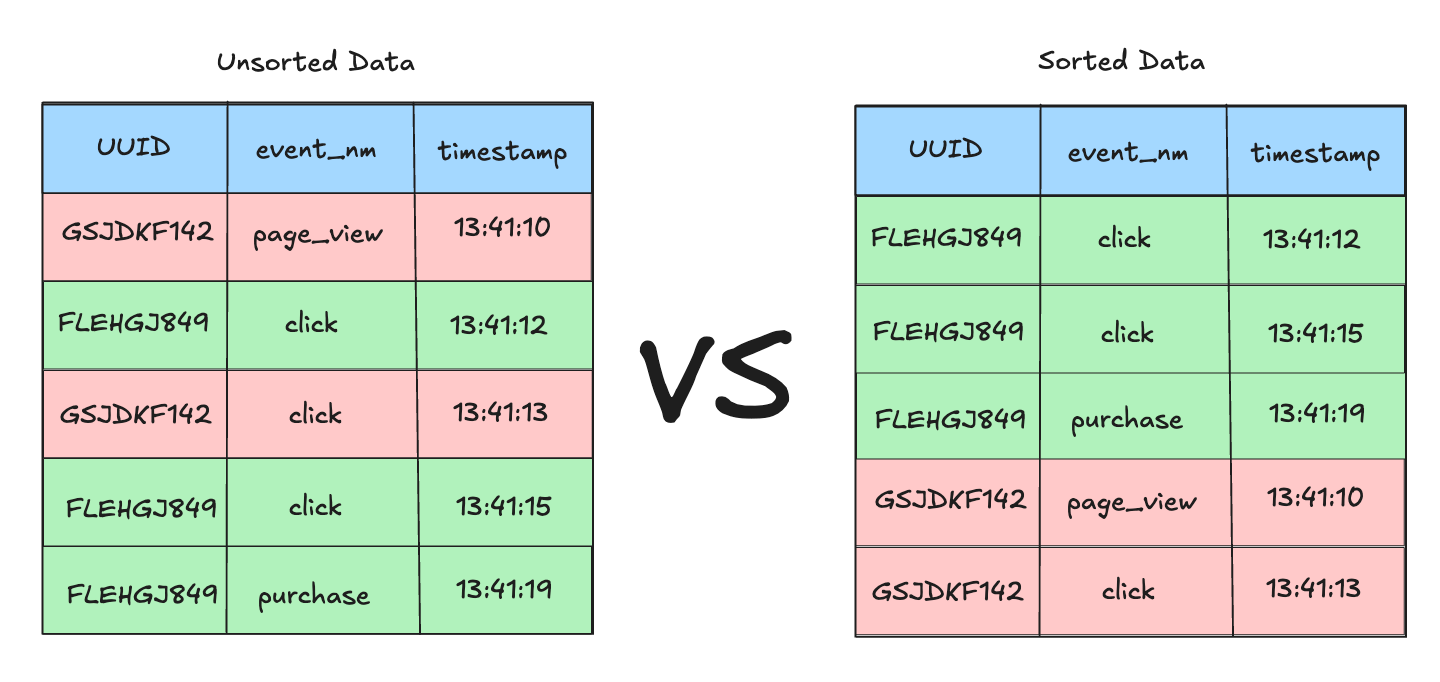
Many times, events come into a queue as they are created and are then appended incrementally to a single table. So, for example, if ten users are all clicking on different things at different times in an application, the appended rows will not be ordered by user but instead by timestamp. This means the data in the table will be unsorted from a UUID perspective. If you are appending tens of thousands of unsorted events every day, you will find that this can really slow down your queries or even return memory limit errors. That happens because the query planner needs to sort all the event data by UUID and then by timestamp before it can compute an answer to the query. I would get this type of memory limit error regularly in data warehouses that weren’t sorted correctly.
Lakehouse Specific Issues With Unsorted Data
This problem is magnified in a lakehouse design because the architecture is a catalog sitting on top of Parquet files in a folder. When you write data to Parquet that’s not sorted in an optimal way for your queries, you create inefficiency. That’s because lakehouse designs leverage the min/max statistics in Parquet footers. Those statistics allow it to skip reading the data in a Parquet file if the requested data is not within those statistics. If values like UUIDs are spread across different Parquet files, then the lakehouse has to decompress and read all those files to get the data. This can become a bottleneck at scale. Consider the following image.
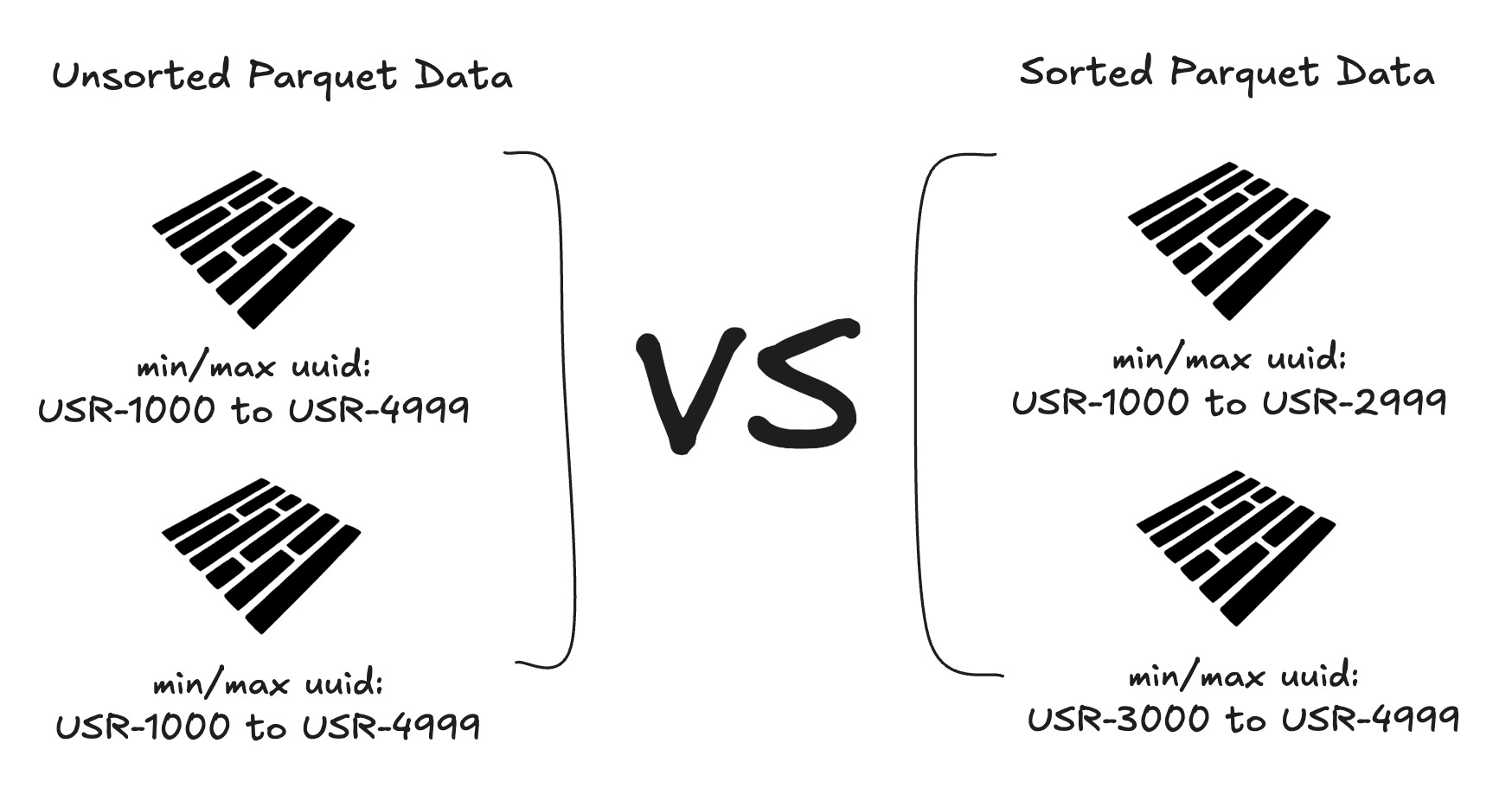
The Parquets on the left all have the same range of UUIDs in each file. Therefore, the lakehouse would need to open all the Parquets to find the event data needed to answer a query about a single user. On the right, the Parquets have clear distinctions in their statistics, and ones that do not have the UUID in them will be skipped. This file skipping is a major performance benefit of lakehouses.
How Do Sorted Tables Fix This Problem?
The file skipping noted above is a big efficiency gain that sorted tables enable. But file skipping is not the only filter optimization (also known as predicate pushdown) that happens with sorted data. Within Parquet, there is also a thing called row groups. So when you get the initial file skip and open the Parquet file that contains the UUID, you can then quickly skip the rows that do not have what you are looking for.
Looking at the image below, we see a SQL query filtering for a specific UUID. Since the Parquet files are physically sorted by UUID, the query planner can skip the other file altogether because it knows that the requested ID isn’t in that file.
Then, once the Parquet file is opened, the table is also sorted by UUID, which allows the query planner to ignore all the other row groups in the Parquet that don’t have that ID.
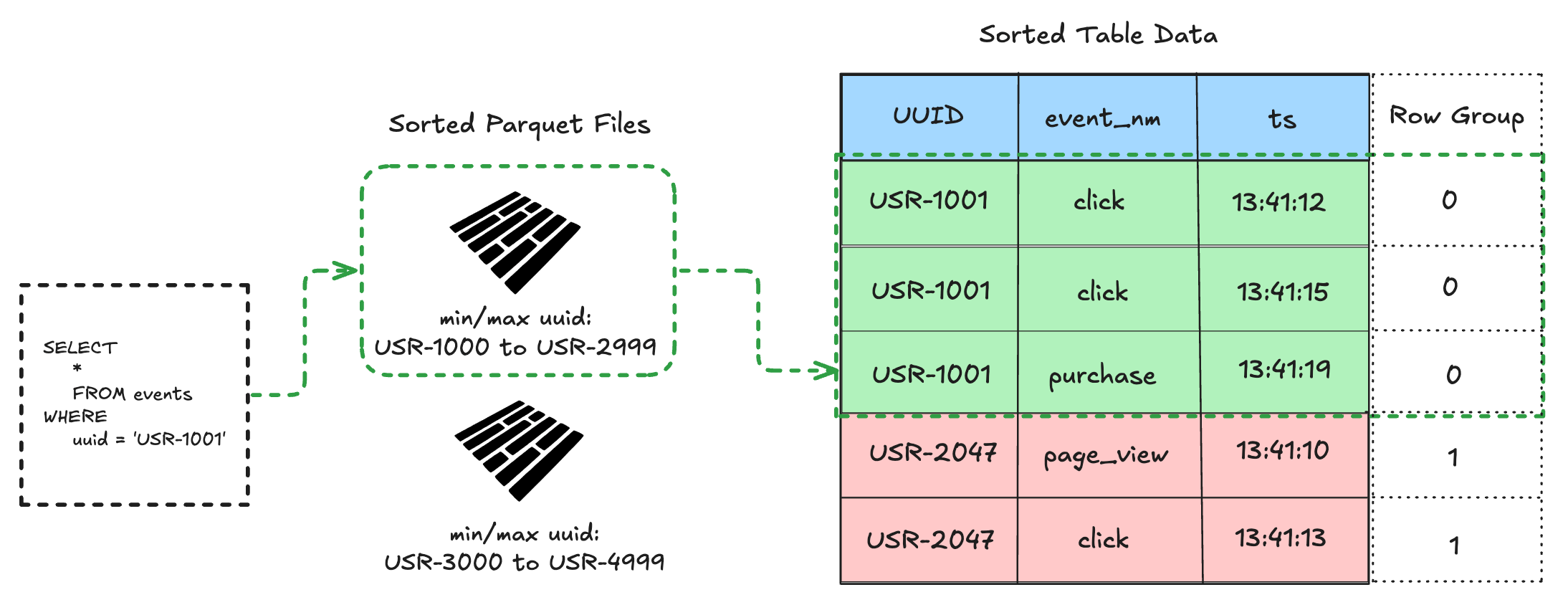
This is a very high level explanation of predicate pushdown meant to give you a simple mental model.
Let’s set up an example to explain this optimization in more detail. We will first start a new DuckLake instance using the CLI, create a new table, and then insert data without a sort configuration.
Create an Unsorted DuckLake Table
Note: Before running DuckLake commands always start a DuckDB session first by typing ‘duckdb’ into your terminal.
duckdb

-- install and load the DuckLake extension
INSTALL ducklake;
LOAD ducklake;

-- attach a new DuckLake catalog
ATTACH 'ducklake:sorted.duckdb' AS my_ducklake (DATA_PATH 'data/');

-- use that catalog
USE my_ducklake;

-- create a new table in the DuckLake
CREATE TABLE events (uuid VARCHAR, event_nm VARCHAR, ts TIME);

-- insert unsorted rows of data to the new table
INSERT INTO events (uuid, event_nm, ts) VALUES
      ('USR-1001', 'page_view', '13:41:10'),
      ('USR-2047', 'click',     '13:41:12'),
      ('USR-1001', 'click',     '13:41:13'),
      ('USR-3892', 'page_view', '13:41:14'),
      ('USR-2047', 'click',     '13:41:15'),
      ('USR-4731', 'page_view', '13:41:16'),
      ('USR-3892', 'click',     '13:41:17'),
      ('USR-1001', 'purchase',  '13:41:18'),
      ('USR-4731', 'click',     '13:41:19'),
      ('USR-2047', 'purchase',  '13:41:20');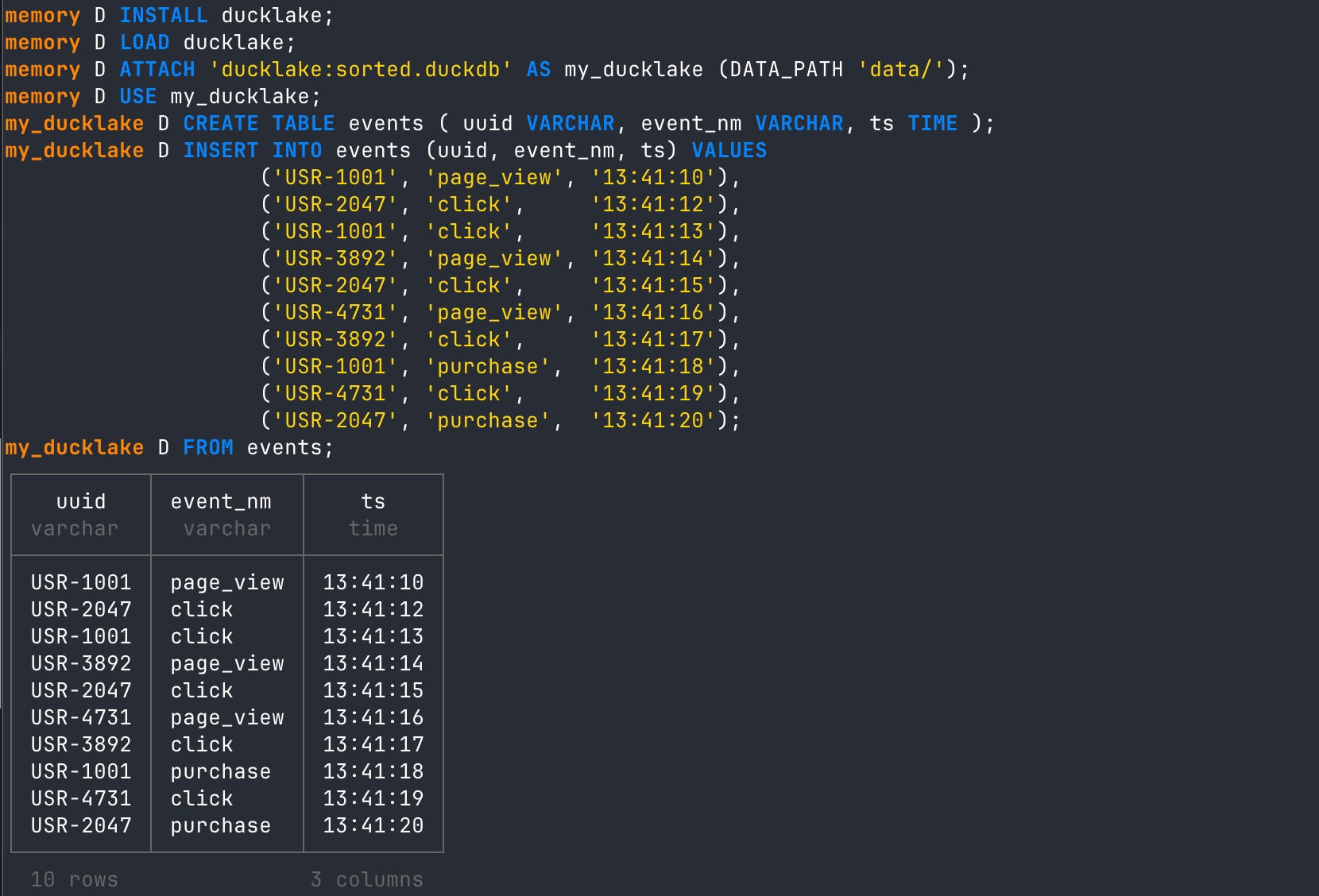
You can see above that when we create a new table in DuckLake and INSERT unsorted rows of data into it, no sort configuration is applied. It’s also important to note that since we inserted only 10 rows into the table, all of these rows were inlined. That is, they were not written to Parquet yet, only stored in the metadata catalog. If you need an explainer on inlining, see my DuckLake inlining article. Even if we did flush these inlined rows to Parquet, no sort would be applied.
To get the data in the order you need for analytics, you would need to ORDER BY UUID and then timestamp.
-- order by user id then timestamp
FROM events ORDER BY uuid, ts;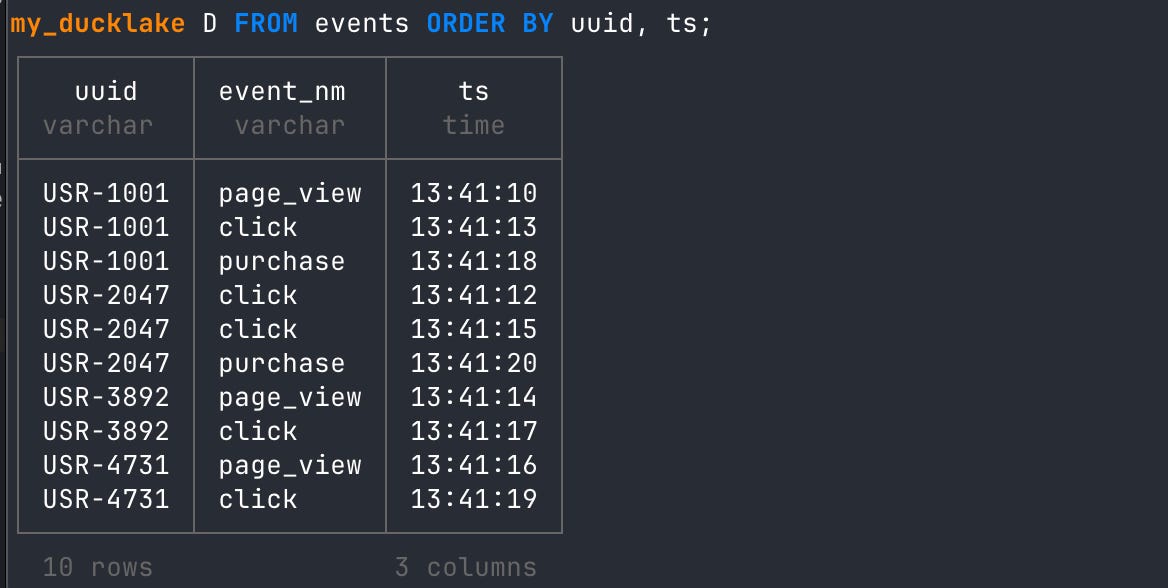
You could leverage a window function to deal with the sort order, but that misses the optimization opportunity. Remember, we are talking about a lakehouse, which is a catalog on top of Parquet files. When we store unsorted data in Parquet files, it means a single UUID could show up in multiple Parquets or in multiple row groups within a single file. Ideally, what we want is for each UUID to be in a single Parquet file so that files can be skipped at query time, depending on the query. This improves query performance.
Alter the Table to Add a Sort Order
To really drive home what is happening with a sorted table, let’s go ahead and add a sort config to this table.
ALTER TABLE events SET SORTED BY (uuid, ts ASC);Now INSERT 5 more new rows with later timestamp values and view the table.
-- insert 5 new rows with later timestamps
INSERT INTO events (uuid, event_nm, ts) VALUES
      ('USR-3892', 'purchase',  '13:41:22'),
      ('USR-1001', 'page_view', '13:41:25'),
      ('USR-4731', 'purchase',  '13:41:27'),
      ('USR-5618', 'page_view', '13:41:29'),
      ('USR-5618', 'click',     '13:41:31');

-- view the table
FROM events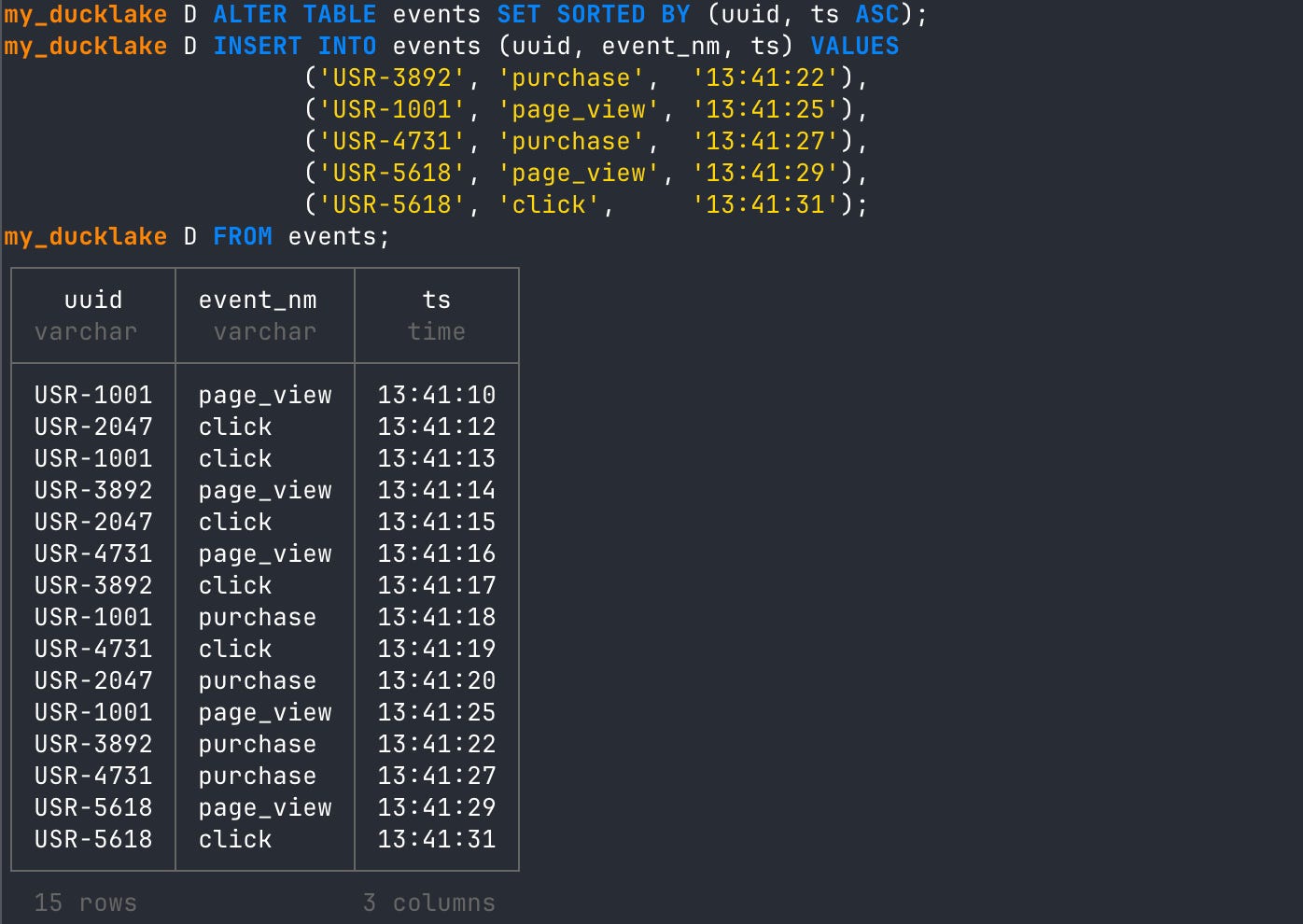
If you look closely at the terminal output above, you will see that the first ten rows we inserted were not sorted. However, after we set up the ALTER TABLE sort order and then INSERTed five new rows, those were sorted according to the sort config. Specifically, UUID is ordered first, then by timestamp ascending.
Note: In the event you add a sort order to a table you didn’t want to you can easily reset it with
-- reset sort order
ALTER TABLE events RESET SORTED BY;
The takeaway here is that the sort order is not retroactive. If you inline or write Parquet data before you set the sort order, it won’t go back and sort your previous data. For this reason, it’s a good idea to think through your query needs for a table and set the sort config before you start to INSERT data.
Create a Sorted DuckLake Table
Let’s go ahead and drop that table, then recreate it. But this time, we will add the ALTER TABLE sort order before we INSERT any data.
-- drop current table
DROP TABLE events;

-- create same table
CREATE TABLE events (uuid VARCHAR, event_nm VARCHAR, ts TIME);

-- add sort order
ALTER TABLE events SET SORTED BY (uuid, ts ASC);

-- insert sorted rows of data to the new table
INSERT INTO events (uuid, event_nm, ts) VALUES
      ('USR-1001', 'page_view', '13:41:10'),
      ('USR-2047', 'click',     '13:41:12'),
      ('USR-1001', 'click',     '13:41:13'),
      ('USR-3892', 'page_view', '13:41:14'),
      ('USR-2047', 'click',     '13:41:15'),
      ('USR-4731', 'page_view', '13:41:16'),
      ('USR-3892', 'click',     '13:41:17'),
      ('USR-1001', 'purchase',  '13:41:18'),
      ('USR-4731', 'click',     '13:41:19'),
      ('USR-2047', 'purchase',  '13:41:20');

-- read from new table
FROM events;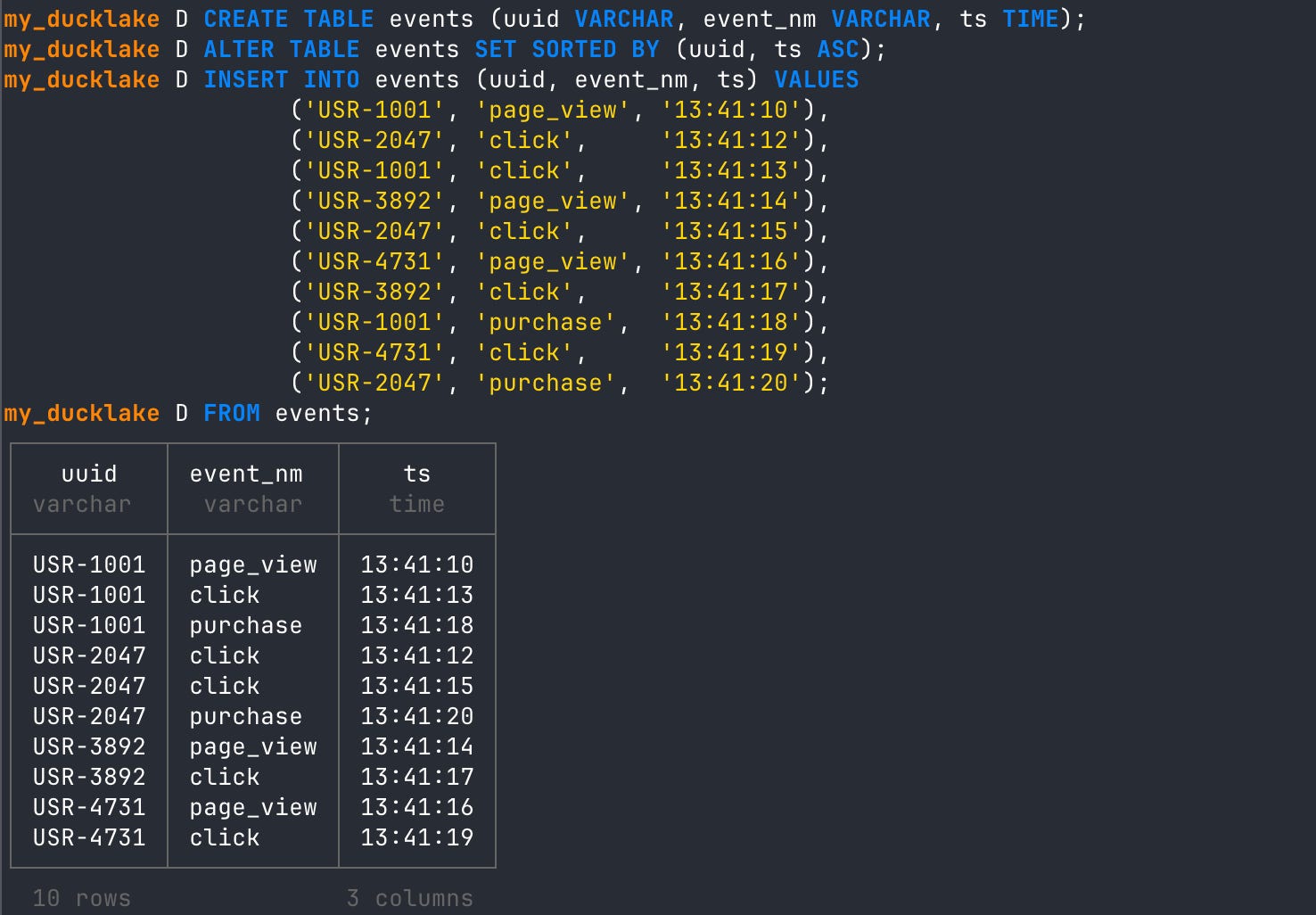
As you can see, now that we have initiated the sort order after creating the table but before the first INSERT, we get sorted data from the beginning. Again, since the INSERT I did was only 10 rows (less than or equal to the threshold), this data is currently inlined in the metadata catalog. We can verify this by looking at the data files metadata table for this DuckLake.
-- check if any data files have been created yet
FROM ducklake_list_files('my_ducklake', 'events');
View Sort Order Metadata
DuckLake’s metadata tables are very detailed and a treasure trove of information about all the updates you do to your lakehouse. For instance, there is a metadata table that will give you data about the sort expressions you set up, like ours above.
-- get sort expression info
FROM __ducklake_metadata_my_ducklake.ducklake_sort_expression
We can join ‘table name’ from another metadata table to see sort info with enriched table data.
SELECT
dse.sort_id,
dse.table_id,
dt.table_name,
dse.sort_key_index,
dse.expression,
dse.dialect,
dse.sort_direction,
null_order
FROM __ducklake_metadata_my_ducklake.ducklake_sort_expression dse
LEFT JOIN __ducklake_metadata_my_ducklake.ducklake_table dt
ON dse.table_id = dt.table_id;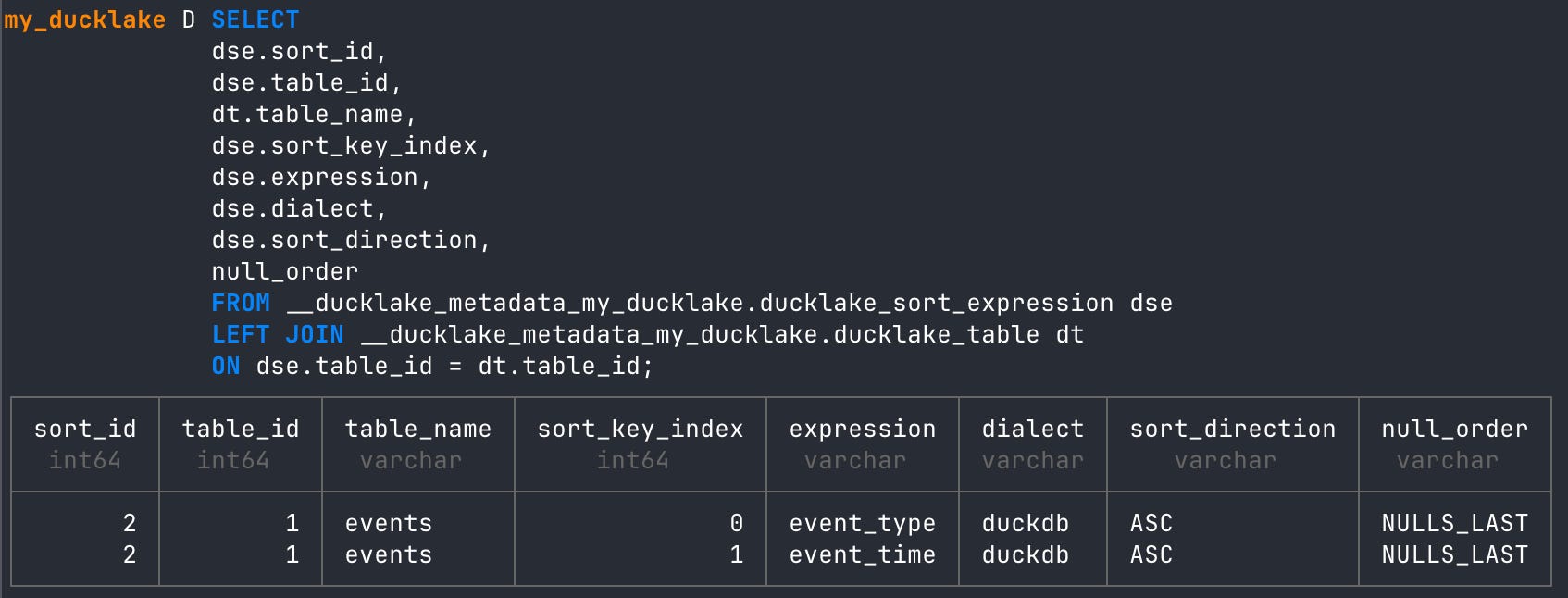
Flushing Inlined Sorted Data
As inlined data builds up, it may get to a point where you’d like to move it to Parquet. DuckLake allows you to do this very easily with the ducklake_flush_inlined_data function.
Let’s flush these inlined rows to Parquet, then check the data files folder again.
-- flush inlined rows to parquet
CALL ducklake_flush_inlined_data('my_ducklake', table_name => 'events'); 
We flushed those ten inlined rows to Parquet. We can verify using the ducklake_list_files function.
-- read all data files for the tables
FROM ducklake_list_files('my_ducklake', 'events');
There is now a single Parquet file in our data folder. Great!
View Parquet Statistics
We can look at the statistics for this Parquet file using DuckDB. This gives us a view into how data is physically sorted into Parquet files and how that relates to the image we saw at the top of the article.
-- look at min max stats parquet files
SELECT file_name, column_id,
           row_group_id,
           stats_min,
           stats_max
         FROM parquet_metadata('data/**/*.parquet');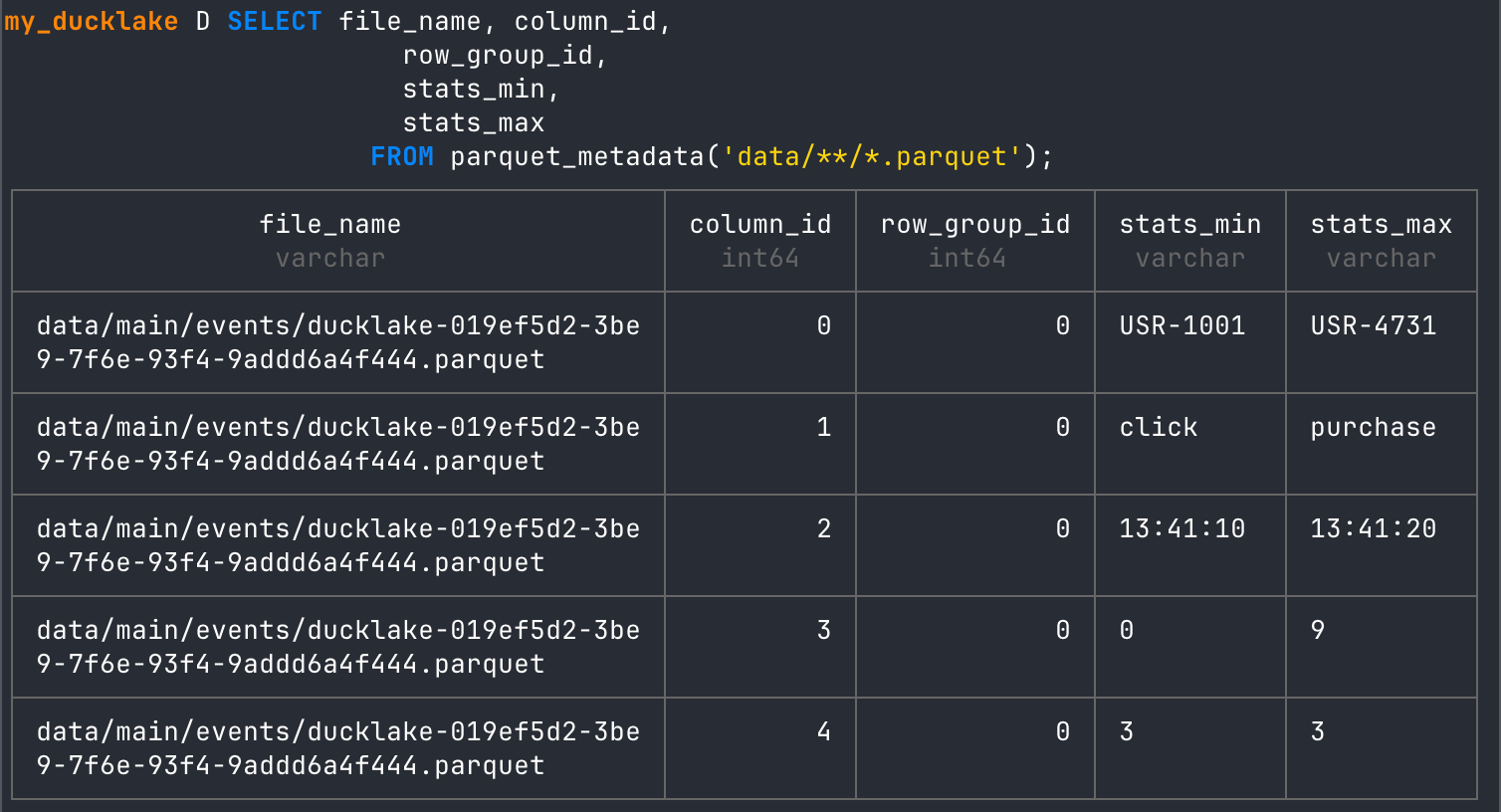
As you can see, this current Parquet file is a min/max UUID range of USR-1001 to USR-4731. It also clearly shows the row groups that exist in the Parquet metadata.
Flushing Inlined Unsorted Data
Adding a sort order to a table will, by default, affect inserted data so that it sorts automatically. However, this can slow writes down with really high throughput. DuckLake allows you to turn this off.
CALL my_ducklake.set_option('sort_on_insert', false, table_name => 'events');Now let’s add the second round of rows like before.
-- insert 5 new rows with later timestamps
INSERT INTO events (uuid, event_nm, ts) VALUES
      ('USR-3892', 'purchase',  '13:41:22'),
      ('USR-1001', 'page_view', '13:41:25'),
      ('USR-4731', 'purchase',  '13:41:27'),
      ('USR-5618', 'page_view', '13:41:29'),
      ('USR-5618', 'click',     '13:41:31');

-- read from the table
FROM events;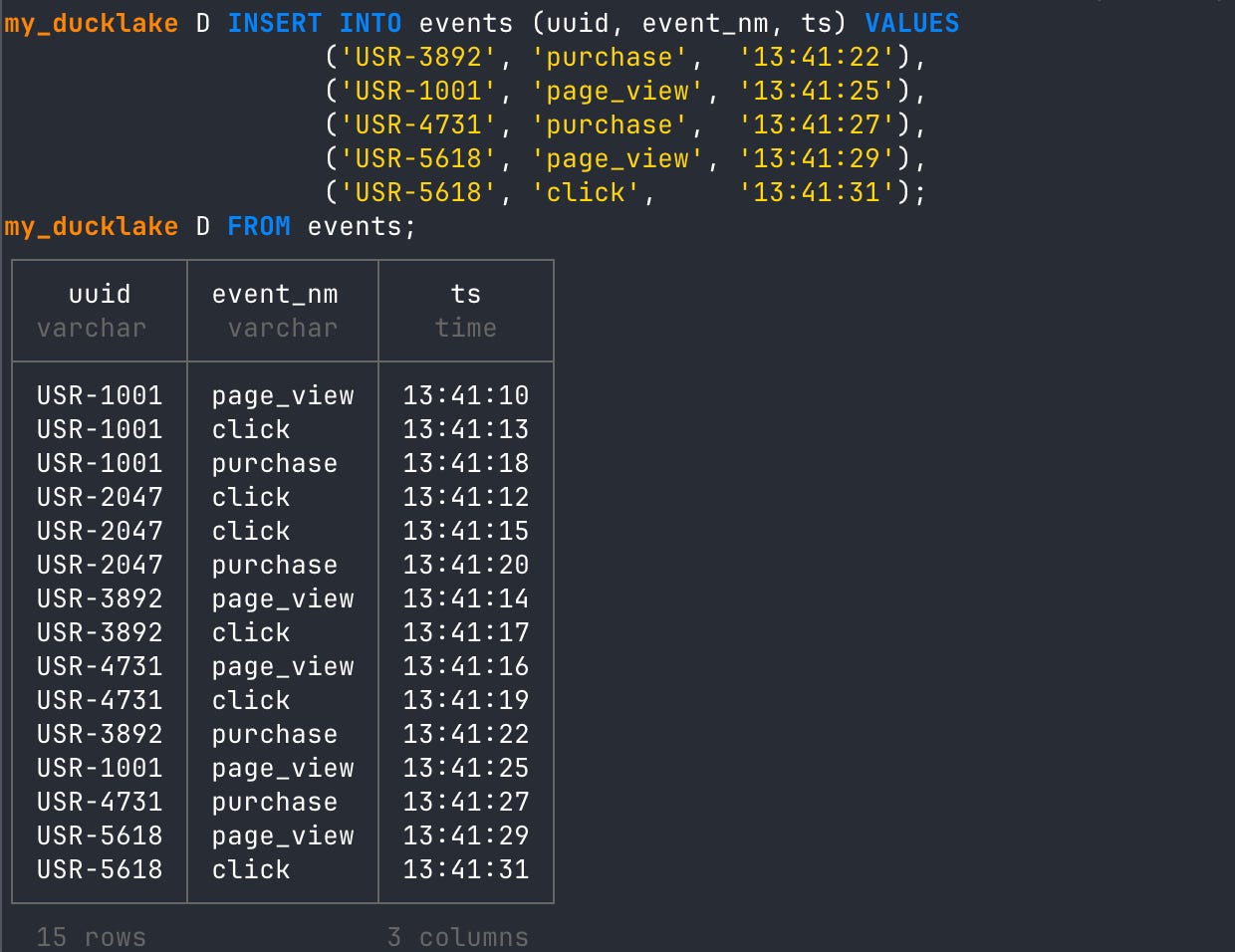
Double checking the data files folder still have one file.
FROM ducklake_list_files('my_ducklake', 'events');
So we have both inlined rows of data in the metadata catalog as well as rows written to Parquet. When we read from that table now, it will read using both the inlined rows and the Parquet file. You can also see the Parquet data is sorted, and the second round of inlined rows is not. This is all expected based on what we just changed in the table sort config.
So we might want to get those new unsorted inlined rows into a sorted Parquet file. We can flush them again to create another Parquet file.
-- flush the second round of rows
CALL ducklake_flush_inlined_data('my_ducklake', table_name => 'events');
Five lines have been flushed. Now let’s check the data files.
Note: Even though we turned off sorting for INSERTs, it will still sort by default when we use the flush function. This allows you to have high-throughput writes and then sort the data later when it’s flushed to Parquet.
-- read the data files metadata table
FROM ducklake_list_files(’my_ducklake’, ‘events’);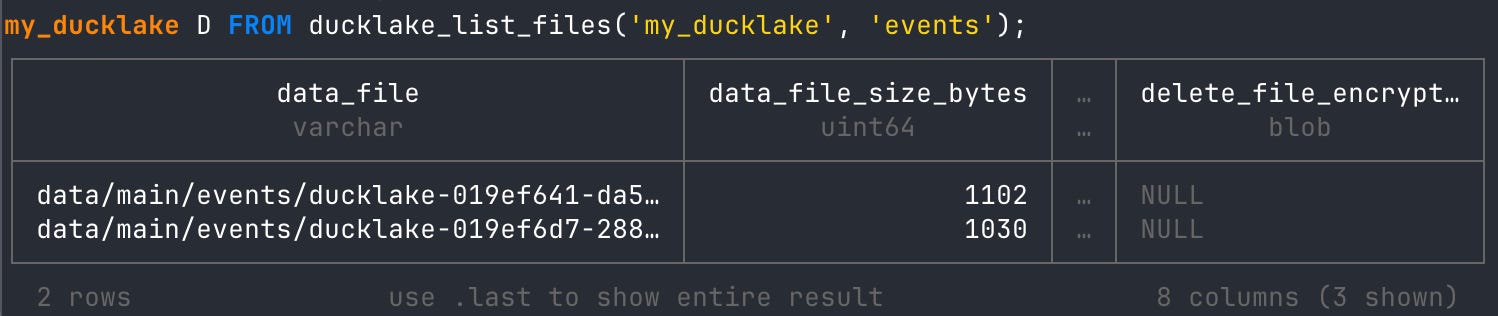
Great! You now can see that there are two files that have been created. Let’s look at the min/max statistics again.
-- look at min max stats parquet files
SELECT file_name, column_id,
           row_group_id,
           stats_min,
           stats_max
         FROM parquet_metadata('data/**/*.parquet');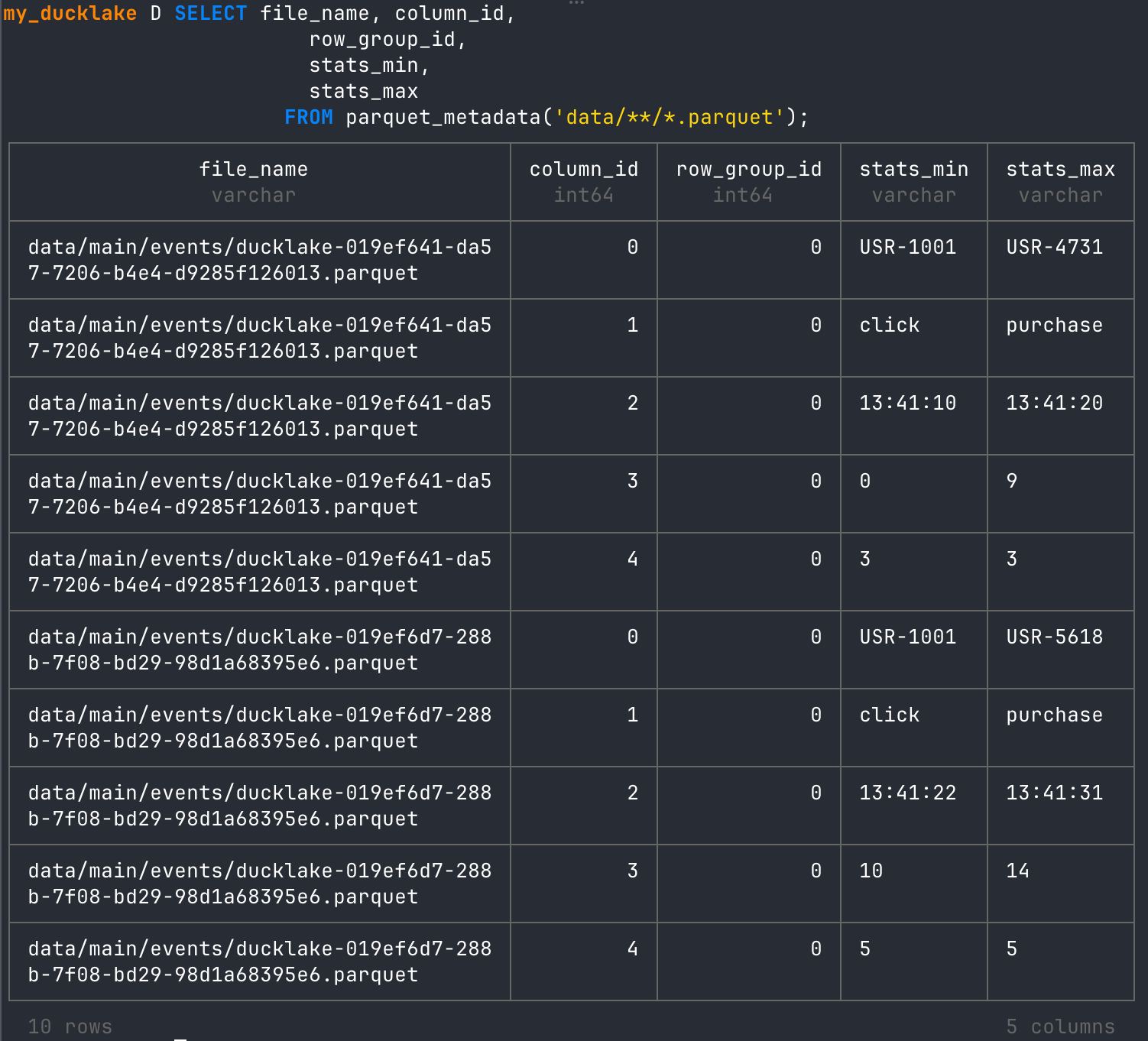
With this new Parquet created, we now have two rounds of column IDs in the table. Notice that there are two different rounds of UUID min/max stats, and all row groups are 0. The 0 means that this represents two different files.
When we read the table, the query reads both Parquet files and sorts them together in the output.
-- read events table
FROM events;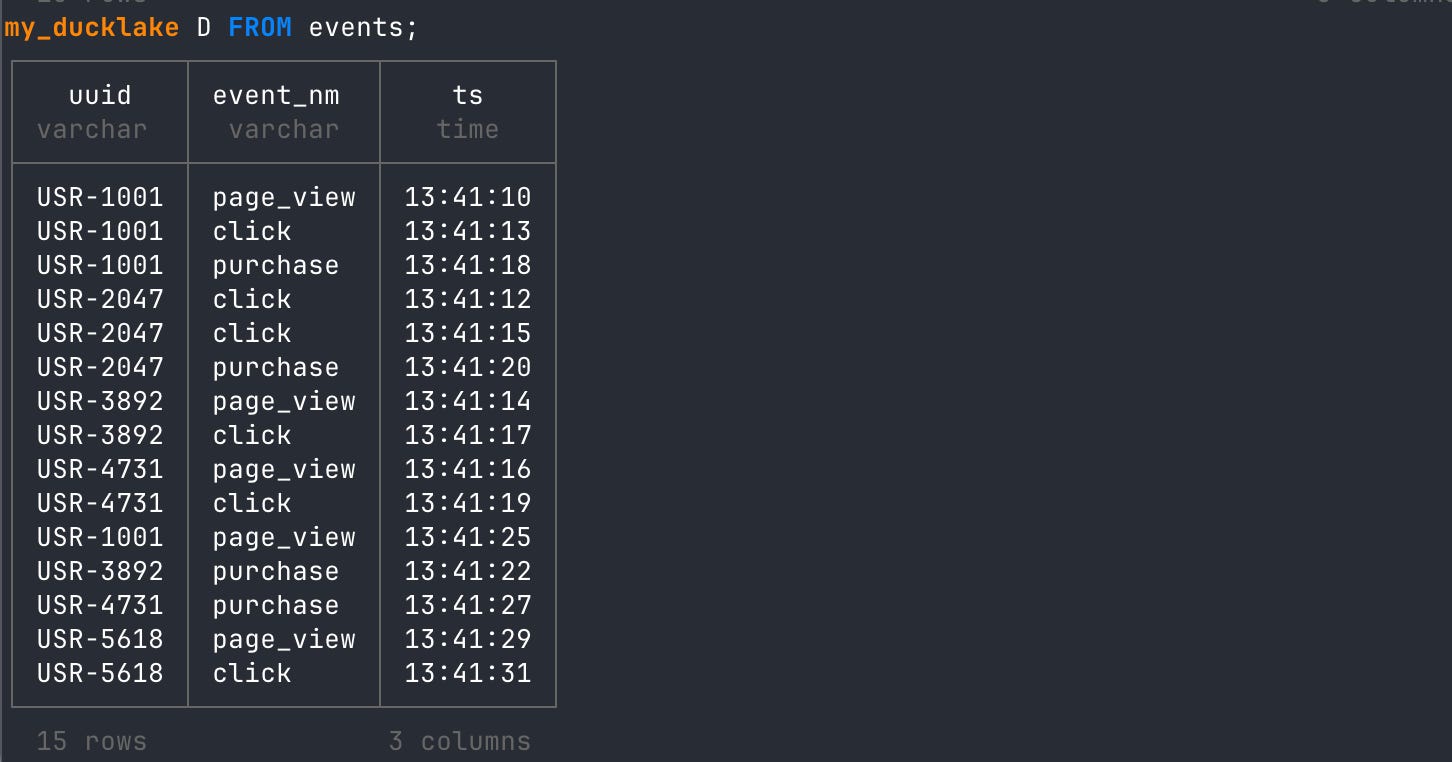
Using Compaction on Parquet Data
The flushing function offers short-term help when inline data gets too big and you want to move it to Parquet. However, you will still end up with multiple Parquet files containing values that should probably be written into a single Parquet file. The way we merge these Parquet tables into one, and thus sort the full table altogether, is with the CHECKPOINT statement DuckLake offers. This will do a number of things, including compaction of the current data files.
-- run the checkpoint statement
CHECKPOINT;
CHECKPOINT will run compaction on the data files. That means it will take the multiple files and rewrite the data into fewer files. Since we had two files that represented timestamps that were very close to each other, you’ll see that when we ran the CHECKPOINT statement, it turned the two files into one.

Nothing has changed when we read from the table:
-- read the events table
FROM events;
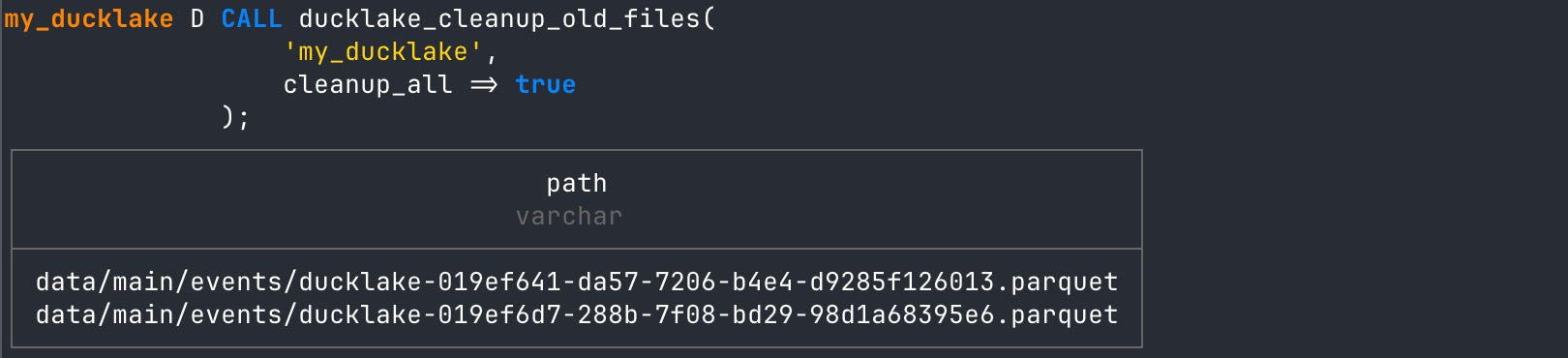
If we look at the Parquet statistics again, we’d actually see three Parquet files in the data folder. However, DuckLake will only be looking at one of them: the one created from the compaction operation. You can delete old Parquet files with the ducklake_cleanup_old_files function!
-- cleanup old parquet files
CALL ducklake_cleanup_old_files(
                  'my_ducklake',
                  cleanup_all => true
              );
And if we read the metadata statistics again we have just our latest Parquet file with all the data we imported. It represents all UUID’s and all timestamp ranges. Amazing!
-- check metadata statistics
SELECT file_name, column_id,
                         row_group_id,
                         stats_min,
                         stats_max
                       FROM parquet_metadata('data/**/*.parquet');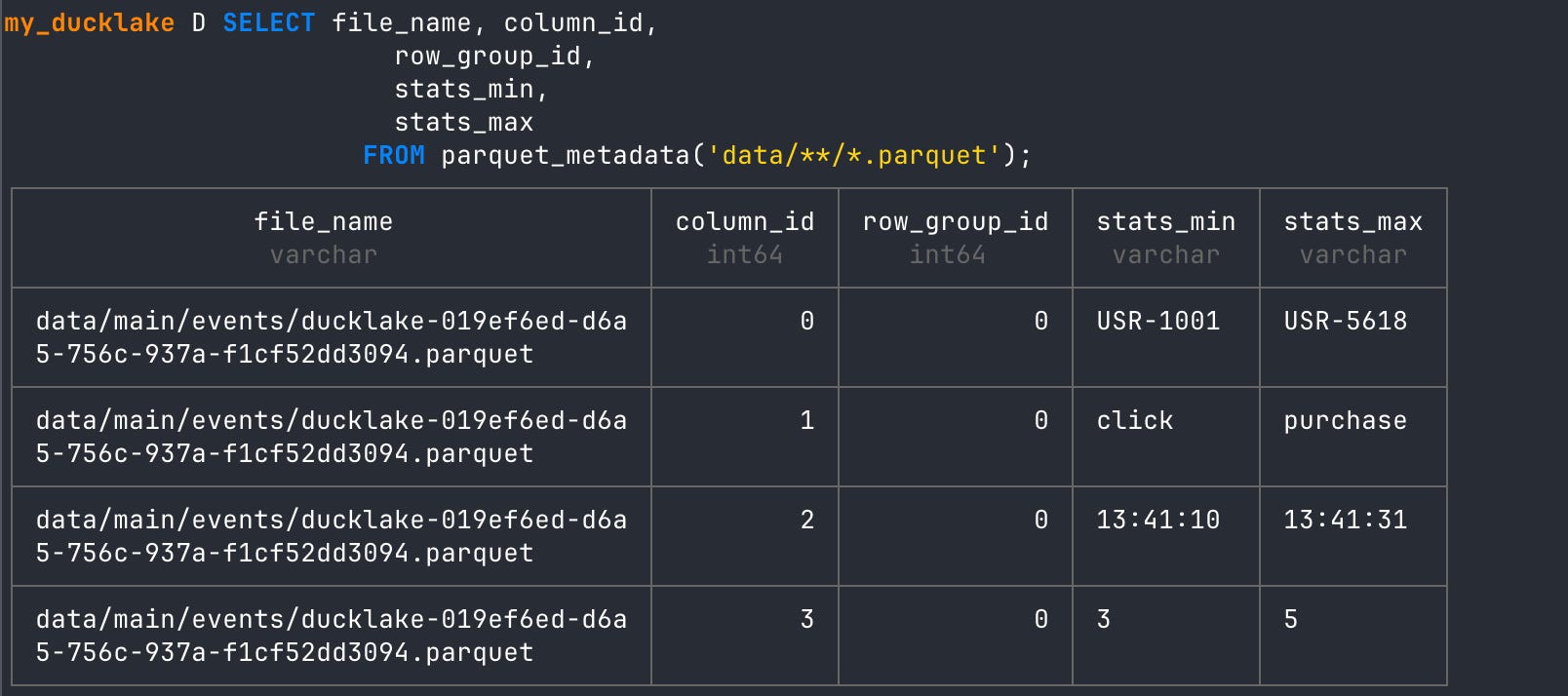
Conclusion
DuckLake’s sorted tables feature is a practical, lakehouse-native way to make high-cardinality analytics faster and more reliable. By defining a sort order up front, you shape how data lands in Parquet so the engine can take full advantage of min and max statistics and row groups to skip work instead of sorting huge datasets at query time. The result is fewer memory-heavy query plans, better predicate pushdown, and more predictable performance as your tables grows!
This was Really Cool, So What’s Next?
This is the second installment of my series on DuckLake and there’s only more to come! I want to get out of the CLI and into some Python code to start really showing how DuckLake can be you go to data platform for streaming and batch. I’ll also be showing what a production setup will look like using Postgres!

Hi, my name is Hoyt. I’ve spent different lives in Marketing, Data Science and Data Product Management. Other than this Substack, I am the founder of Early Signal. I help data tech startups build authentic connections with technical audiences through bespoke technical content and intentional distribution. Are you an early stage start up or solopreneur wanting to get creative with your technical content and distribution strategy? Let’s talk!
Great write up. I like to think of the predicate push down in 3 layers:
1. Explicit partition filtering
2. File pruning
3. Row group pruning
The sorting in Ducklake really is powerful at the row groups. And sorting in combination of partitions can really amplify the performance.