
Understanding DuckLake's Inlining Feature
An elegant and novel way to handle streaming to a lakehouse


If you have been with me on my Substack or YouTube over the course of the last year, then you’ve seen me write in depth about DuckLake. At first, I did a simple review of it’s basic CLI features. Then I went into detail on how you can deploy a production DuckLake, before going very deep into DuckLake’s most important metadata tables.
I consider myself a DuckLake early adopter and a DuckDB late adopter. It was DuckLake that finally helped me understand the DuckDB use case. I owe a debt to DuckLake for helping me find my technical niche.
I’ve tried other lakehouse architectures, but DuckLake is the first that really made things click. With the release of DuckLake 1.0, I’m excited to keep learning and writing about it.
This article is made in partnership with MotherDuck. The cloud data warehouse built for answers, in SQL or natural language. Fast, serverless analytics powered by DuckDB–from production apps to internal insights.

A Quick Refresher on What Ducklake Is
Let me start by explaining what DuckLake is. I’d like to use some excerpts from the upcoming book “DuckLake: The Definitive Guide”:
DuckLake is an open source specification, with its primary implementation in DuckDB and a secondary implementation in Apache Spark. It is both a lakehouse format and a lakehouse catalog in one. The DuckLake architecture has three main components: storage, the metadata catalog, and compute.
Ducklake’s architectural north star is that metadata deserves a real database; the metadata is managed in a DuckDB, SQLite, or Postgres database. That provides dramatically lower latency for reads and writes. However, your data files can still be stored on object storage in standard Parquet format just like other lakehouses - retaining their low cost, high scalability, and openness1.
OK, now in my own words.
DuckLake is a lakehouse architecture that simplifies how you stand up and work with a lakehouse. It defines a clear structure across storage, metadata, and compute, but makes a different design decision compared to traditional lakehouses.
Instead of storing metadata as a collection of files like manifests and logs, DuckLake stores it in a database. The data itself still lives in Parquet files in object storage, but the control plane moves into a database system.
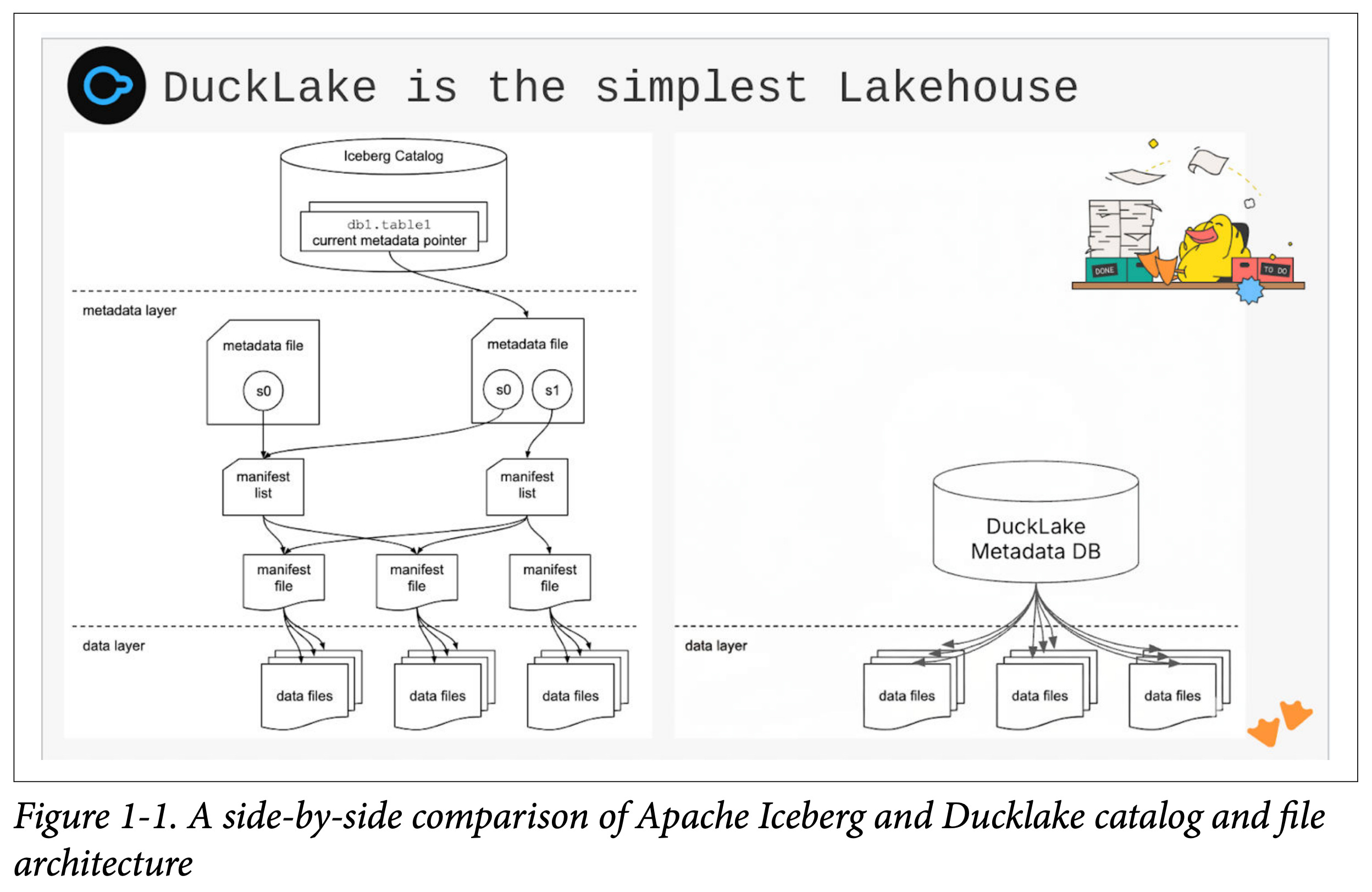
You can use SQL to query the lakehouse, but you already had that with other systems. The difference is that you no longer need to crawl and interpret a large number of metadata files just to understand the state of the lakehouse or plan a query.
With DuckLake, the metadata is directly queryable, which reduces planning overhead and makes the system easier to reason about and debug.
I highly suggest you go get the early access to “DuckLake: The Definitive Guide” to have a front row seat in our journey learning about DuckLake.
What Problem Does Inlining Solve?
Before getting into the details of DuckLake’s inlining feature, it makes sense to take a step back and talk about a nagging issue with traditional lakehouse architecture.
A lakehouse, in simple terms, is a group of data files (normally Parquet) in a storage folder/bucket that has an attached “catalog” that keeps track of statistics about the files. This includes min/max values, row counts, and other metadata that allows query engines to quickly determine which files need to be read. Changes to the data are tracked and recorded in the catalog so that a user not only knows what the most up to date data looks like but can also go back to previous versions of the data’s state (time travel).
New lakehouse data is written as new immutable files whenever data is inserted or updated. Rather than modifying data in place, changes create new files and a new snapshot in the catalog.
This works well at scale when the inserted data is a large batch that is appended within longer time frames, like every hour. Large batches can be compressed efficiently into columnar formats like Parquet, which are optimized for analytical reads through techniques like column pruning and predicate pushdown.
The Small File Problem
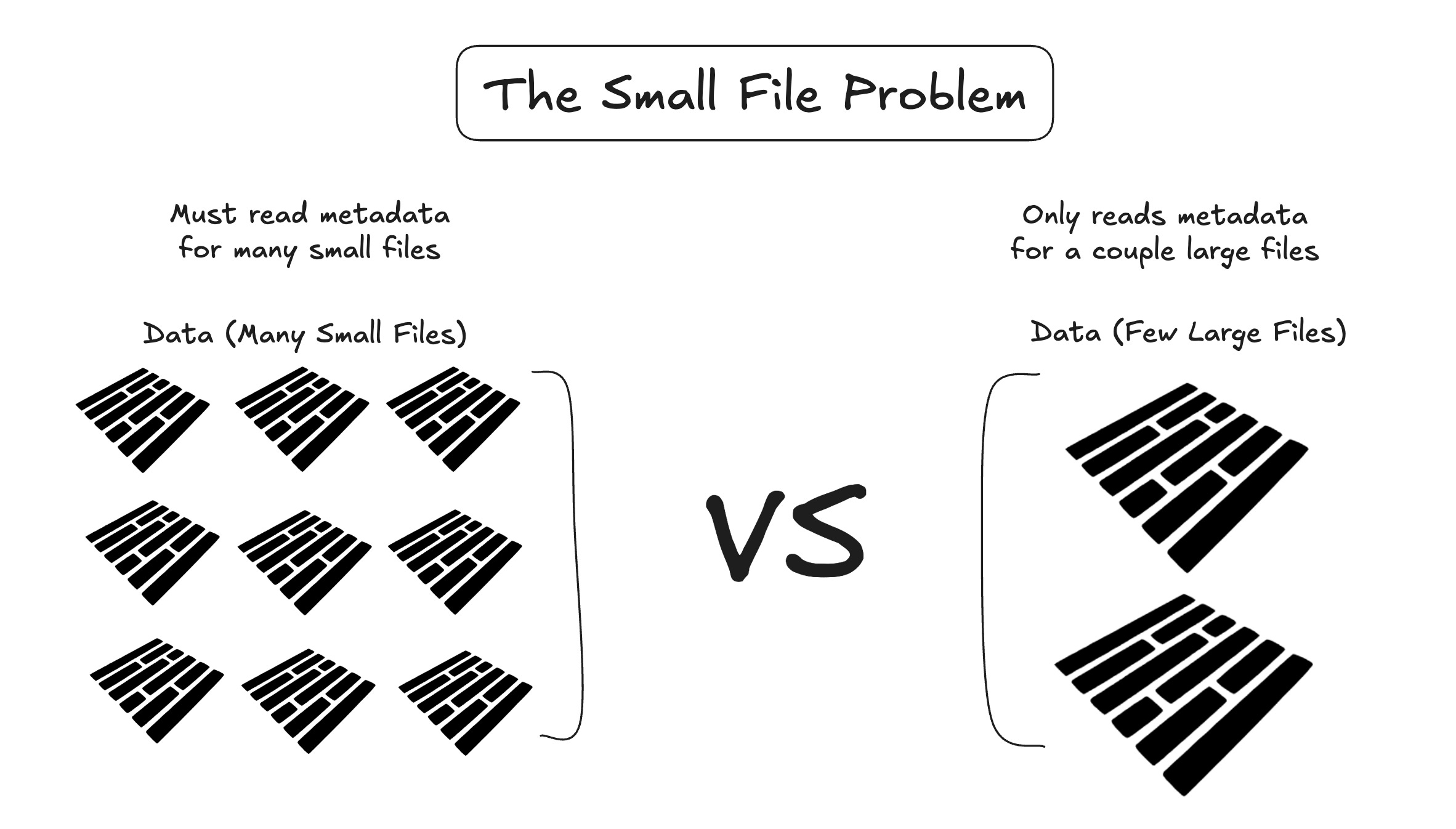
Where the lakehouse architecture starts to crack is when you want to stream data at high frequency. Traditional lakehouses write data as immutable files and make it visible through commits. While writes can be batched, pushing for low latency commits leads to many small files being created over time. If you're streaming events every second, you can easily end up with 86,400+ tiny Parquet files per day. At that point, performance starts to break down.
This is referred to as the “small file problem”, an issue first recognized during the early days of Hadoop and “big data”2. What it essentially means is that while Parquet files are designed for fast reads, when you have a very large number of them representing relatively little data, the lakehouse system still has to scan and evaluate metadata for each file to determine whether it should be included in a query. This is because lakehouses rely on file-level metadata, such as min/max statistics and row group summaries, to prune files before reading them. An ideal state of a lakehouse is one where files are large, well-packed, and few enough that metadata overhead is negligible compared to the actual data scanned.
How Does Inlining Solve This Problem?
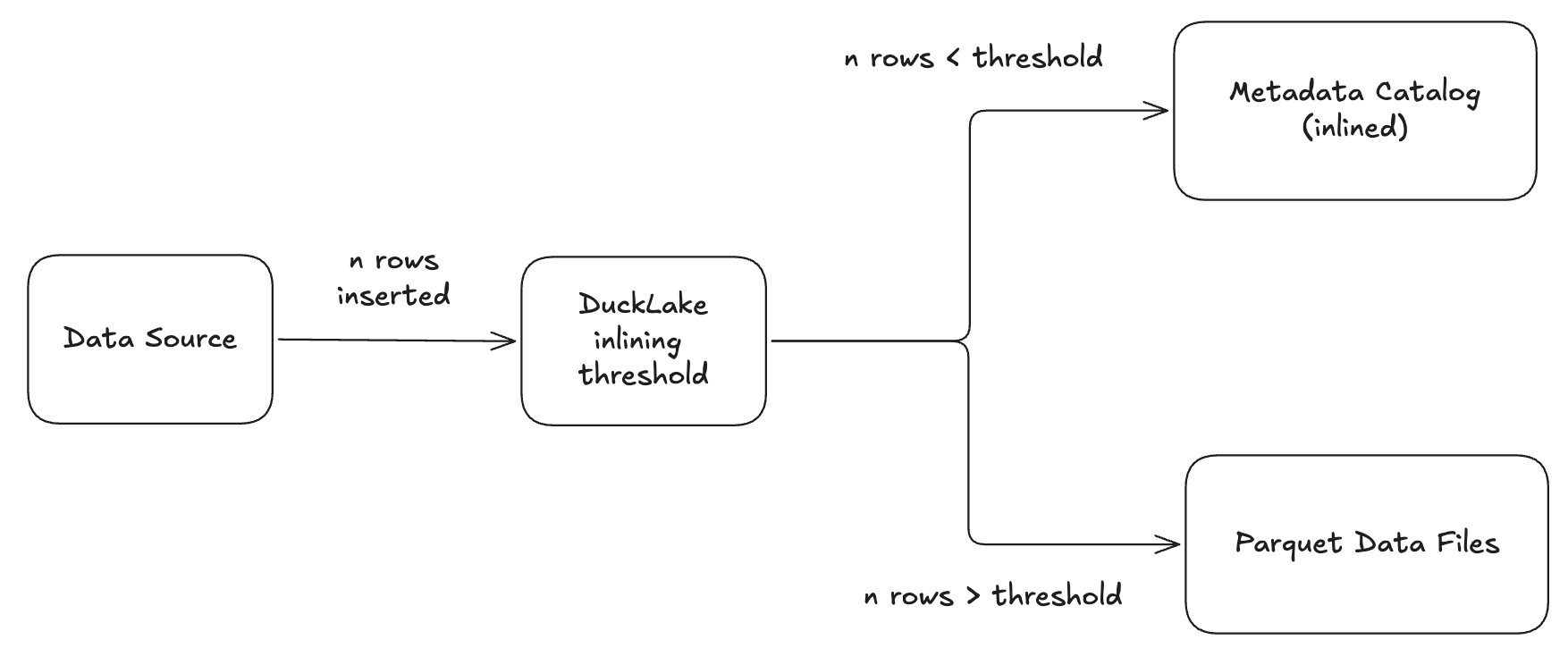
DuckLake approaches this small file problem with a novel solution. Because it uses a database as its catalog, it can store small updates directly in the catalog instead of immediately writing them to storage as Parquet files. This technique is called data inlining3. Instead of writing a file every time there is an insert or update, DuckLake saves the new data in the metadata storage you are using (in this case, DuckDB).
So when you perform an insert, for example, you won’t immediately see a new Parquet file created in the data folder of your DuckLake. But the really cool thing about inlining is that the data is still fully queryable and durable.
I was at first confused by this and saw some others in video/webinar comments say similar things. I would INSERT data and not see the Parquet files updating. This is because inlining is on by default for DuckLake with a “threshold” set to 10. If a new commit has >threshold rows inserted, it will bypass the inlining and be written as a new Parquet file.
Inserting New Data
Let’s take a look at this inlining behavior in the terminal. First, let’s INSTALL and LOAD DuckLake, then ATTACH and USE a new catalog. After that, we will CREATE a new table in that DuckLake instance and INSERT new row values into that table.
If you haven’t created a DuckLake locally before, it’s incredibly simple.
-- type in first to start duckdb session
duckdb

-- make sure it is installed and loaded
INSTALL DUCKLAKE;
LOAD DUCKLAKE;

-- create, attach and use a local ducklake
ATTACH 'ducklake:demo.ducklake' AS lake;
USE lake;
From there you CREATE a table and INSERT new data.
-- create a new table in the ducklake
CREATE TABLE lake.t (id INT, status VARCHAR);

-- insert a row of values into the ducklake
INSERT INTO lake.t VALUES (1, 'en route'), (2, 'shipped');
You can see in the images below that, while data appears in the DuckLake table, there are no files in the table’s data-files folder. You can also query the ‘ducklake_inlined_data’ metadata folder to see the inlined rows.
First, read all the data in DuckLake. The data appears as expected.
-- read all data in the table in ducklake
FROM lake.t;
Now look at the data files.
-- read all data files for the tables
FROM ducklake_list_files('lake', 't');
And read the metadata table created for the inlined data4
-- read all data from the inlined data table
FROM __ducklake_metadata_lake.ducklake_inlined_data_1_1;
The data in the table is stored in DuckDB (our default metadata storage) and is retrieved when we query it. If the next INSERT you do is also < threshold rows, it will simply store the data in the metadata storage catalog.
Now let’s do this again, but INSERT 11 rows of data:
-- insert 10 rows of values into the ducklake
INSERT INTO lake.t VALUES
    (3,  'en route'),
    (4,  'shipped'),
    (5,  'en route'),
    (6,  'shipped'),
    (7,  'en route'),
    (8,  'shipped'),
    (9,  'en route'),
    (10, 'shipped'),
    (11, 'en route'),
    (12, 'shipped'),
    (13, 'en route');
We’ll now see 11 new rows of data in our table, and a Parquet file has been created as well. That’s really cool.
-- read all data in the table in ducklake
FROM lake.t;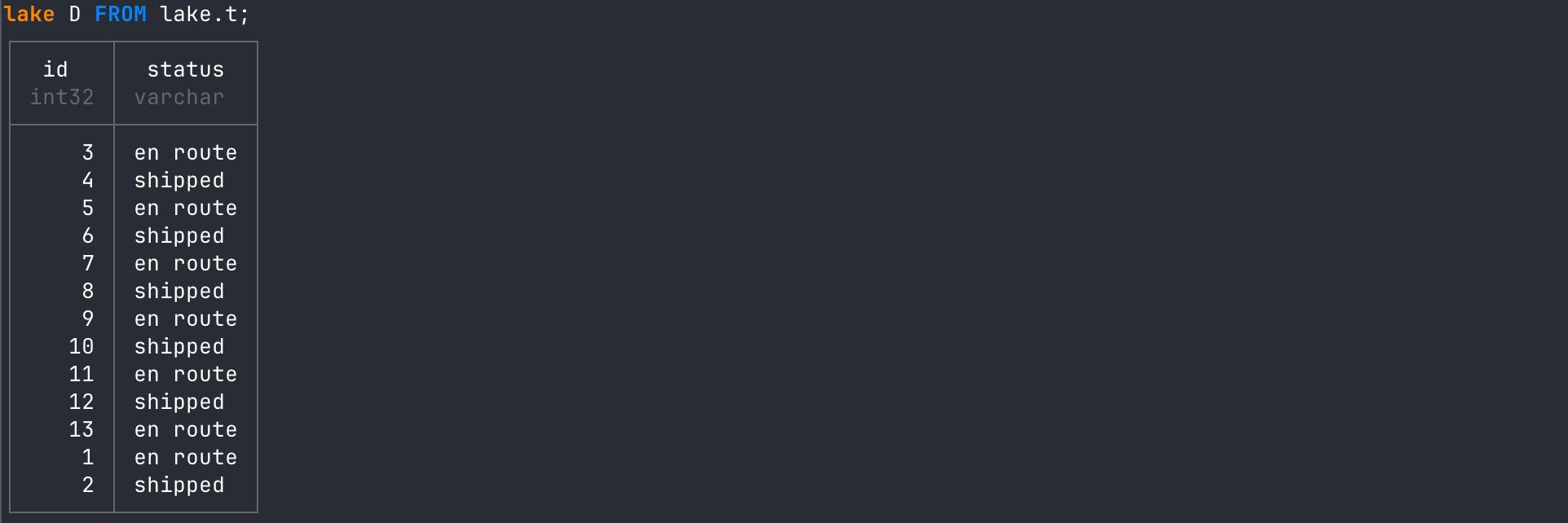
A data file is now showing up in our data files list.
-- read all data files for the tables
FROM ducklake_list_files('lake', 't');
The threshold is applied at the per-transaction level, which leads to a couple of different outcomes for how data is stored: either inlined or written to Parquet.
One interesting scenario is when you run an INSERT that is below the threshold, followed by another INSERT that exceeds it. The first insert will be inlined, while the second is written directly to Parquet.
The subtle design decision here is that only the rows from the second insert end up in Parquet files. The rows from the first insert remain inlined.
At query time, DuckLake reads from both the Parquet files and the inlined data and combines them into a single result. In other words, even though the data is physically split across storage layers, it behaves as one logical table.
In my opinion, that’s brilliant.
Deleting and Updating Data
It’s important to know that inlining is not just specific to INSERTs. It is also used when you DELETE or UPDATE rows as well, although it acts a little differently.
You can both DELETE inlined data as well as Parquet file data. But instead of rewriting the Parquet files or creating a separate deletion file, DuckLake records the deletion in a per-table inlined deletion table inside the catalog. This table tracks which inlined rows, or rows in which Parquet files have been deleted, along with the snapshot that caused the deletion.
For our data above, if we DELETE an inlined row, we will see the ‘ducklake_inlined_data’ table updated:
-- delete rows wher status column equals criteria
DELETE FROM lake.t WHERE status = 'en route';

-- read inlined data table
FROM __ducklake_metadata_lake.ducklake_inlined_data_1_1;
In the output below, you’ll see that I initially INSERT the first couple rows into DuckLake and view the ‘ducklake_inlined_data’ metadata table. I then DELETE rows based on criteria and view it again.
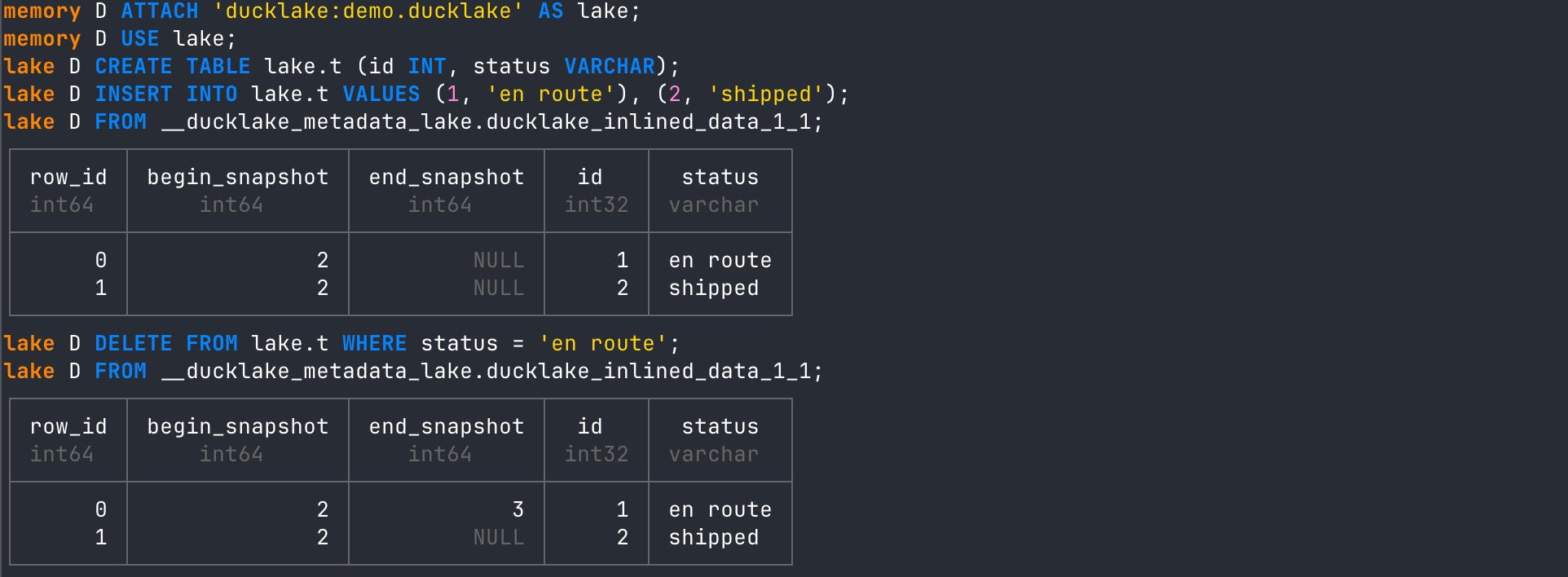
The new state of the ‘ducklake_inlined_data’ now has an end_snapshot ID for all inlined rows that met the deletion criteria. Honestly, I’m so smitten by how cool that is. I just love DuckLake’s design choices.
When deleting rows in data already written to Parquet, DuckLake does not rewrite the Parquet file. Instead, it creates an inlined deletion table in the catalog named ‘ducklake_inlined_delete’.
Let’s add some more rows that exceed the inlining threshold and will be written right to Parquet.
-- insert enough data larger than threshold to be written to Parquet
INSERT INTO lake.t VALUES
    (14, 'en route'), (15, 'shipped'),
    (16, 'en route'), (17, 'shipped'),
    (18, 'en route'), (19, 'shipped'),
    (20, 'en route'), (21, 'shipped'),
    (22, 'en route'), (23, 'shipped'),
    (24, 'en route'), (25, 'shipped');
You’ll see in the output screenshot below that deleting a row from a Parquet file will create new rows in the ‘ducklake_inlined_delete’ table. Subsequently, when you then read from Parquet again, it will exclude those rows! So it is not recreating the Parquet file or creating a new delete file. It is simply inlining row information in the metadata catalog and using that as filter criteria when you query the data.
-- delete rows wher status column equals criteria
DELETE FROM lake.t WHERE status = 'en route';

-- view inlined delete table
FROM __ducklake_metadata_lake.ducklake_inlined_delete_1;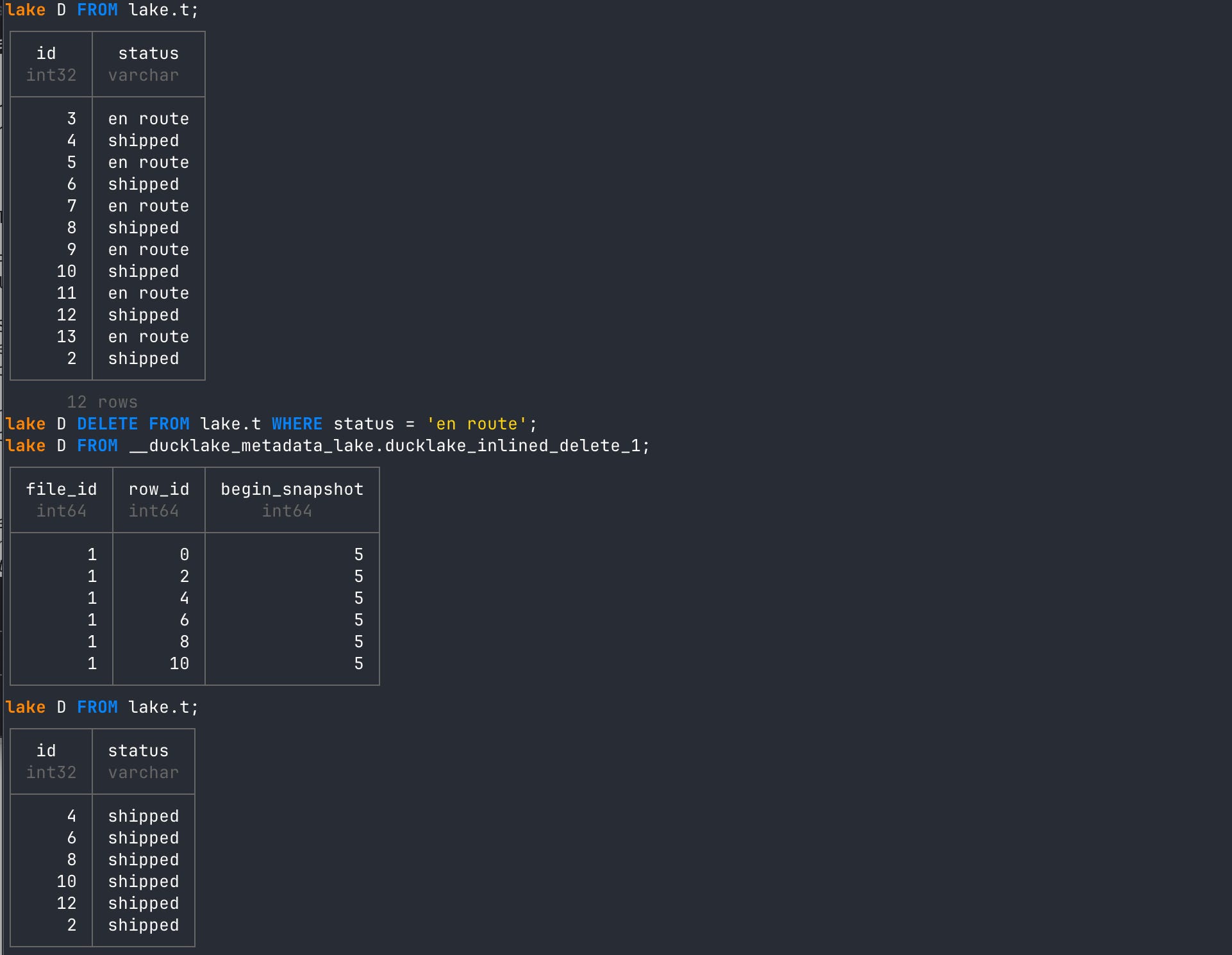
Again... I’m blown away by the elegance of the design choices.
An UPDATE will work as a combination of a DELETE and then an INSERT operation. So no need to rehash that now that we understand each of those already.
Now, what if you ran hundreds of inserts that are only one row? This is the scenario I was originally describing in the problem statement above regarding “small files”. In DuckLake, you will build up hundreds of inlined rows even though your threshold is set to 10.
Even with a threshold set up, if we are simply sending one row per transaction to DuckLake then it won’t ever be written to Parquet. However, DuckLake has offered a couple of ways to handle that.
Flushing Data to Parquet
In a production DuckLake servicing enterprise-level streaming data ingestion, you will be sending a lot of events at a high frequency. Each INSERT most likely represents one row. This means you will never break the inlining threshold, and all data will stay inlined.
This works great for quite a while, but eventually the amount of inlined data would be better suited in a Parquet file designed for reading that much data efficiently. Using something like Postgres for metadata storage eventually has some performance drawbacks from the volume of rows being read. Also, it kind of defeats the purpose of a lakehouse if you never have Parquet files.
That said, when you finally want to move the inlined data to Parquet, you will use a process called “flushing”. This is a different operation compared to the inlining threshold because it is manual, as opposed to the inlining threshold.
Real quick. The difference between flushing and the inline threshold:
Inline threshold: Represents a per-transaction row threshold in DuckLake. If a single INSERT, for example, exceeds the threshold, then the data will automatically be written to Parquet.
Flushing: The act of manually moving all current inlined rows of data to a single Parquet file.
As you can see above, flushing is different than the inline threshold. It is not automatically triggered by an INSERT, which is why we will have both inlined and Parquet data for different INSERTs depending on how many rows of data are in each.
If your inlined data starts to get to a point you’d like it moved to Parquet, you have a couple options:
Call the ducklake_flush_inlined_data function to either flush all inlined data in the entire catalog or just a specific table.
Call the CHECKPOINT statement, which will flush all inlined data as well.
Using the DuckLake Flush Function
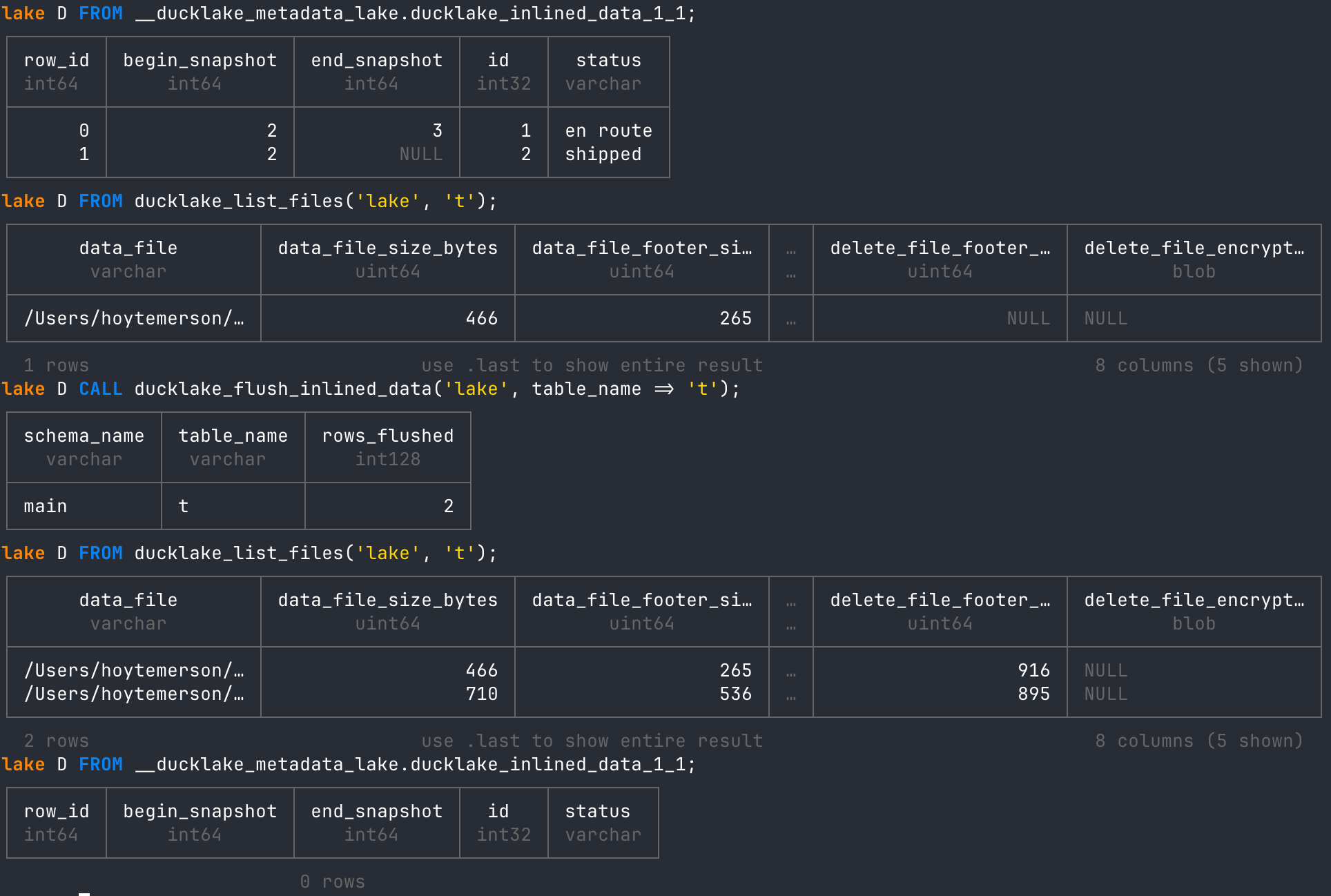
Let’s first use the ducklake_flush_inlined_data function to flush data from our current table.
View the current inlined data before flushing.
-- view current inlined data table
FROM __ducklake_metadata_lake.ducklake_inlined_data_1_1;
Then note the data files that have been written so far to Parquet.
-- view current data files
FROM ducklake_list_files('lake', 't');
Now call the ‘ducklake_flush_inlined_data’ function on the ‘lake.t’ table.
-- Flush a specific table only
CALL ducklake_flush_inlined_data('lake', table_name => 't');
After running the above and checking the inlined data and data files tables again, you’ll see a new data file created, and all rows in the inlined data table are gone.
Using the CHECKPOINT Statement
And finally, we have the CHECKPOINT statement. This statement is also run manually, but it is much more comprehensive than the ‘ducklake_flush_inlined_data’ function. In fact, it calls the ‘ducklake_flush_inlined_data’ function along with the following other functions to perform an entire maintenance routine.
ducklake_flush_inlined_data
ducklake_expire_snapshots
ducklake_merge_adjacent_files
ducklake_rewrite_data_files
ducklake_cleanup_old_files
ducklake_delete_orphaned_files
It’s very useful if you want a nice “clean room” each time you decide to flush data. Let’s start with a new DuckLake instance in a new folder. You can also delete all files in your current folder to start over.
-- Make a new directory and go to it
mkdir ducklake-checkpoint-demo
cd ducklake-checkpoint-demo

-- type in first to start duckdb session
duckdb

-- make sure it is installed and loaded
INSTALL DUCKLAKE;
LOAD DUCKLAKE;

-- create, attach and use a local ducklake
ATTACH 'ducklake:demo.ducklake' AS lake;
USE lake;
Now CREATE a new table again and INSERT new row values.
-- create a new table in the ducklake
CREATE TABLE lake.t (id INT, status VARCHAR);

-- insert a row of values into the ducklake
INSERT INTO lake.t VALUES (1, 'en route'), (2, 'shipped');
View all inlined data and written data files to see what is there before running CHECKPOINT.
-- read all data from the inlined data table
FROM __ducklake_metadata_lake.ducklake_inlined_data_1_1;
-- read all data files for the tables
FROM ducklake_list_files('lake', 't');
Now run the CHECKPOINT statement and then view the inlined data and written data files again.
-- flushes data
CHECKPOINT;

-- read all data from the inlined data table
FROM __ducklake_metadata_lake.ducklake_inlined_data_1_1;

-- read all data files for the tables
FROM ducklake_list_files('lake', 't');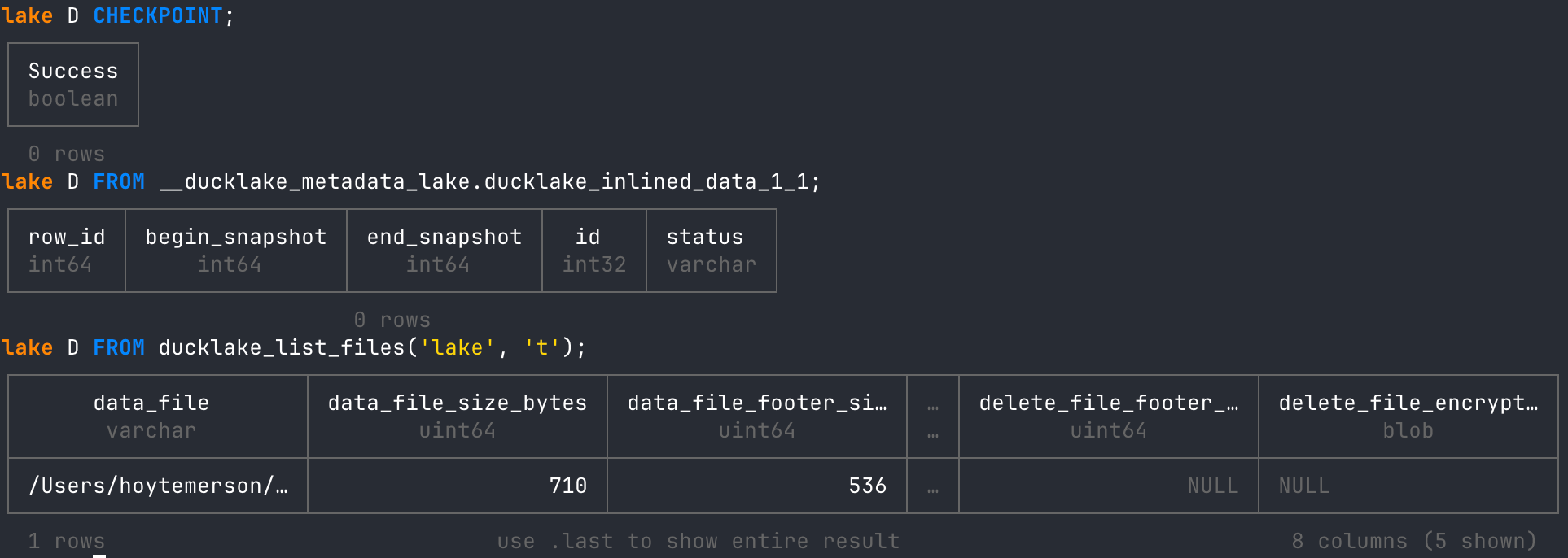
Just like the ducklake_flush_inlined_data function above, we end up with a new data file, and all inlined rows are removed from our inlined data metadata table. But along with this, we would potentially have a number of other tables and data cleaned up after the other functions were run. It’s a fantastic maintenance procedure, all set up for us to use. Wonderful!
Conclusion
DuckLake’s inlining and flushing features offer a clean, database-native answer to the “small file problem.” You get low-latency commits and full queryability without constantly producing tiny Parquet files. When it’s time to optimize for scan performance and long-term lakehouse hygiene, flushing (or CHECKPOINT) provides an explicit, controllable way to consolidate the inlined state into well-formed Parquet. The deeper you dive into DuckLake’s design choices, the more there is to love!
This was Really Cool, So What’s Next?
This article sets the stage for a whole series of DuckLake coverage, and there’s only more to come. We will explore why DuckLake is the simpler default for everyone who hasn't already committed to a lakehouse, plus practical examples that show why “catalog and metadata in a database” changes everything, including faster reads, fewer moving parts, and a smoother path from local to cloud. We’ll also dig deeper into the two big contrasts: versus Iceberg and Delta, and versus vanilla DuckDB, so readers walk away knowing exactly when DuckLake is the right default, when it’s not, and why the streaming and ingestion niche is one of the most exciting places it wins.

Hi, my name is Hoyt. I’ve spent different lives in Marketing, Data Science and Data Product Management. Other than this Substack, I am the founder of Early Signal. I help data tech startups build authentic connections with technical audiences through bespoke technical content and intentional distribution. Are you an early stage start up or solopreneur wanting to get creative with your technical content and distribution strategy? Let’s talk!
From the upcoming book “DuckLake the Definitive Guide”
https://www.cloudera.com/blog/technical/the-small-files-problem.html
https://ducklake.select/2026/04/02/data-inlining-in-ducklake/
The _1_1 naming convention is kinda cool. If you add a new column to your DuckLake table, for example, you will get another inlined table (with that new schema). So you could have many inlined tables, depending on how often you add/remove columns. They all just get stitched together on the fly like you would want.
great article.