
Training XGBoost with DuckLake and ADBC
Connecting the old and the new with Apache Arrow

If this is the first article of mine you’ve read about ADBC (Arrow Database Connectivity), I highly suggest you read my first article, ADBC: An Intro to NextGen Database Connections, to get a nice primer on how ADBC works and why it is such a game changer. As I dive deeper into ADBC, I’ve realized there are far more use cases for it than I first imagined. Today’s use case is a callback to my Data Science days while using my favorite new technologies. We’ll explore how to leverage DuckLake and ADBC to train an XGBoost model with minimal dependencies, showcasing the power of Apache Arrow for efficient data movement and interoperability.
TLDR;
You can see the entire project and run it yourself at the GitHub HERE.
You’ll be using your terminal and Python to run this project. Download Astral uv and necessary ADBC drivers (see dbc below), clone the repo, create a virtual environment, sync the necessary libraries and run the train_model.py file.
# Install uv
curl -LsSf https://astral.sh/uv/install.sh | sh

# Install dbc CLI
uv tool install dbc

# Install DuckDB ADBC driver (required)
dbc install duckdb

# Install project deps
uv sync

# Run project
uv run python train_model.py
This article about ADBC is made in partnership with Columnar, creator of the dbc cli tool that lets you easily manage your ADBC drivers as well as fantastic quick starts for ADBC.

Where is Data Technology Going?
Interoperability between data tools is the future. It allows new data technologies like DuckLake to work effortlessly with classic libraries like XGBoost, enabling open source projects and products to interact cohesively. At the center of that interoperability is Apache Arrow. As Matt Topol points out in his book “In-Memory Analytics with Apache Arrow,” Apache Arrow is less a library and more an ecosystem of tools. There are a number of ways you could move data from a source and send it to XGBoost to train on, but I think using ADBC is the shortest path to success.
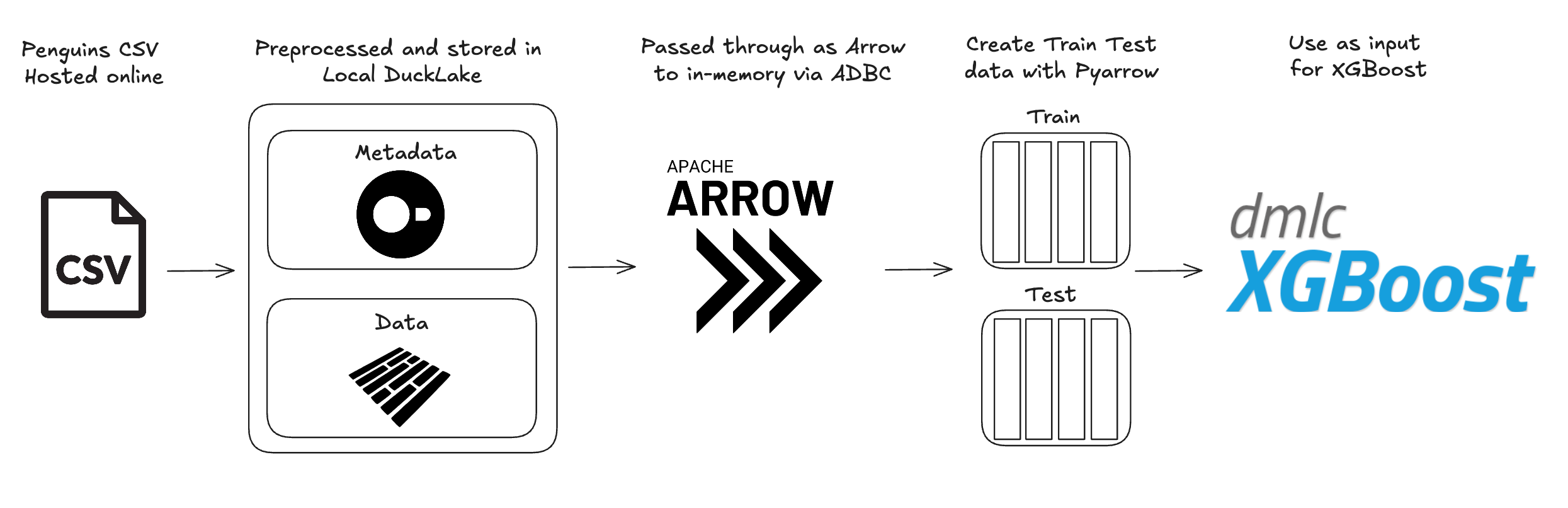
ADBC (Arrow Database Connectivity) enables efficient data transfer from one columnar data source to another with minimal copying. This means you are moving memory pointers from one place to another until you need to actually materialize the data for use. In our use case today, we're working with a local DuckLake instance (which could also be a production or managed DuckLake) that we create an ADBC connection with. ADBC allows us to read the DuckLake data as an Arrow table and store in-memory. We can then use the PyArrow library to split the Arrow table into two shuffled Arrow tables that are used as a data input for XGBoost to train and test on. We end up using the Apache Arrow ecosystem to handle what would need at least two other library dependencies. Let’s get into it!
Choosing the Right Data for the Job
I didn't want to spend a lot of time cleaning up a Kaggle dataset. This isn't an exercise in pre-processing, it's an exercise in training an XGBoost model with an Arrow table. Given that, I decided to work with the legendary penguins dataset. I know it well and I know what to expect from it. It also gives us a great opportunity to showcase how you can do basic pre-processing with just SQL. The penguins dataset is publicly available as a CSV online. So how do we pre-process with SQL and train an XGBoost classifier model with as little overhead as possible?
DuckLake as the Local Data Storage Option
Why use DuckLake instead of just DuckDB? It’s largely a matter of preference at this point. DuckDB handles the metadata storage, but I prefer DuckLake for its flexibility. Specifically, if I have data coming from a system that I use for training, I can have parquets sent to a storage bucket, and DuckLake lets me append those files directly. I find this approach has lower maintenance overhead than keeping a local DuckDB instance and performing APPENDs on it. Additionally, DuckLake can be deployed into production, which gives it an edge over using a standalone DuckDB database.
But obviously, DuckDB is still at the heart of DuckLake, and it lets us simply “read” the penguins CSV from a URL and then pre-process the data all within a single process. I don’t think this will ever get old to me.
Install and load the ducklake extension then attach the DuckLake instance:
# Install and load the ducklake extension
print("📦 Installing and loading ducklake extension...")
con.execute("INSTALL ducklake;")
con.execute("LOAD ducklake;")

# Attach to the DuckLake instance
attach_command = """ATTACH 'ducklake:my_ducklake.ducklake' AS my_ducklake;"""
con.execute(attach_command)
con.execute("USE my_ducklake;")
print("✅ DuckLake 'my_ducklake' attached")

# Drop table if it exists
con.execute("DROP TABLE IF EXISTS penguins_processed;")
Create a new table within the DuckLake using the pre-processed penguins data:
# Create table with penguins data from CSV
con.execute(f"""CREATE TABLE {table_name} AS SELECT
        CASE species WHEN 'Adelie' THEN 0 WHEN 'Chinstrap' THEN 1 WHEN 'Gentoo' THEN 2 ELSE NULL END AS species_numeric,
        CASE island WHEN 'Torgersen' THEN 1 ELSE 0 END AS island_Torgersen,
        CASE island WHEN 'Biscoe' THEN 1 ELSE 0 END AS island_Biscoe,
        CASE island WHEN 'Dream' THEN 1 ELSE 0 END AS island_Dream,
        CAST(bill_length_mm AS FLOAT) AS bill_length_mm,
        CAST(bill_depth_mm AS FLOAT) AS bill_depth_mm,
        CAST(flipper_length_mm AS FLOAT) AS flipper_length_mm,
        CAST(body_mass_g AS FLOAT) AS body_mass_g,
        CASE sex WHEN 'Male' THEN 1 ELSE 0 END AS sex_Male,
        CASE sex WHEN 'Female' THEN 1 ELSE 0 END AS sex_Female,
        CASE year WHEN 2007 THEN 1 ELSE 0 END AS year_2007,
        CASE year WHEN 2008 THEN 1 ELSE 0 END AS year_2008,
        CASE year WHEN 2009 THEN 1 ELSE 0 END AS year_2009
FROM read_csv('https://blobs.duckdb.org/data/penguins.csv', nullstr = 'NA')
WHERE sex IS NOT NULL;""")
Using SQL, we can create the necessary one-hot-encoding columns from our category variables and update datatypes on the numerical columns. XGBoost classifier models are not sensitive to scale, so we don't need to implement anything like StandardScaler from scikit-learn. So far, we've kept scikit-learn out of the picture. Will it last all the way through to training and testing?
Introducing ADBC/Arrow into the Equation
Now that we have our data locally stored in a scalable, column-oriented way, it's time for ADBC to do some work. The thing I love most about ADBC is how it has standardized database connections. It's important to remember that when you use ADBC, you need to download the drivers for the data source you are connecting to. You can build drivers yourself, or hunt for pre-built drivers from various sources, but I prefer using dbc, a CLI tool made specifically for ADBC driver installs. The page for the tool lets you choose all your prerequisites and then gives you the command you need to install the driver. It just makes it that much more convenient vs scrolling through the ADBC docs to figure out what the driver name and command is. For example, if I need to download the DuckDB driver for macOS and use it with Python:
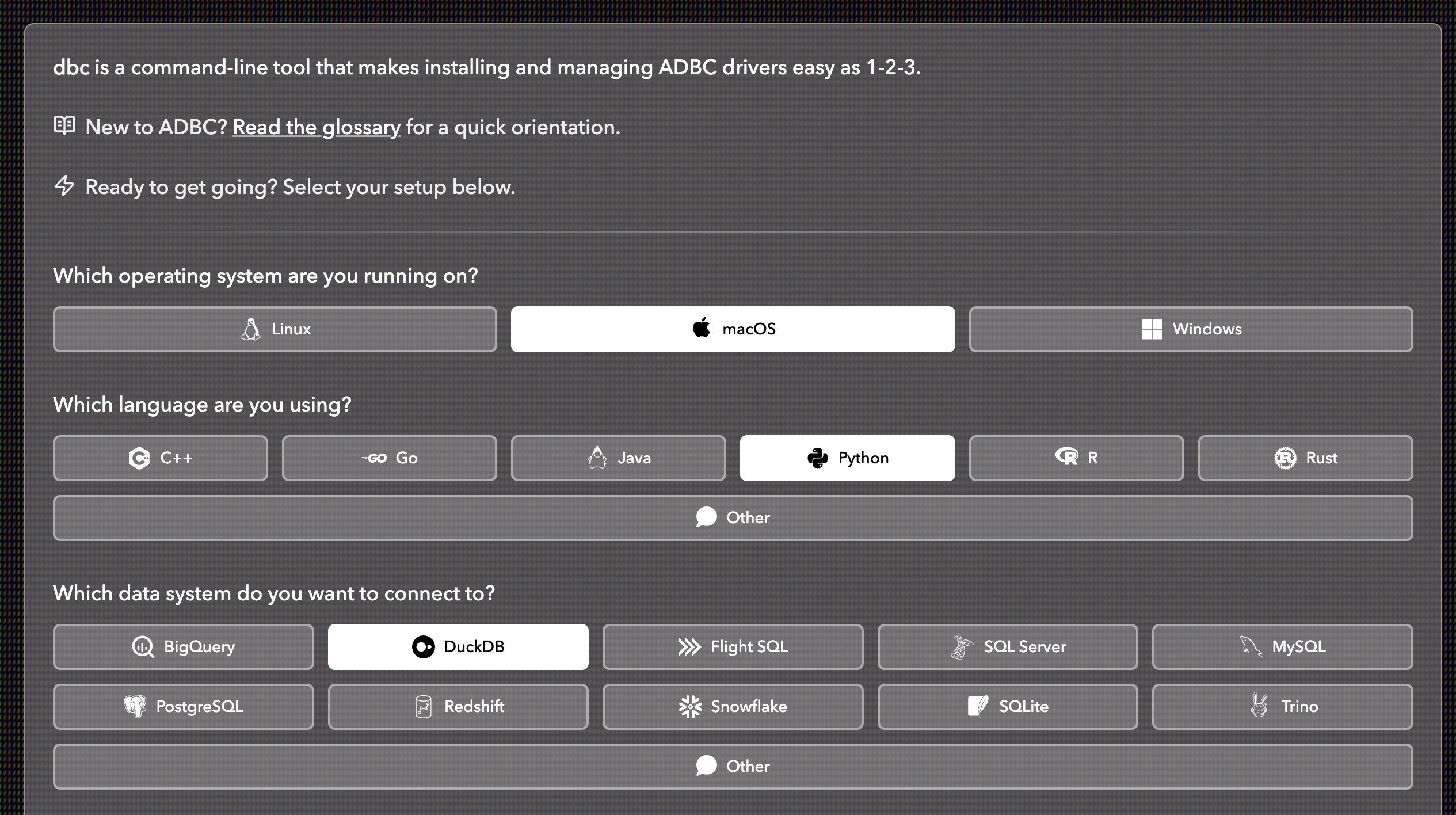
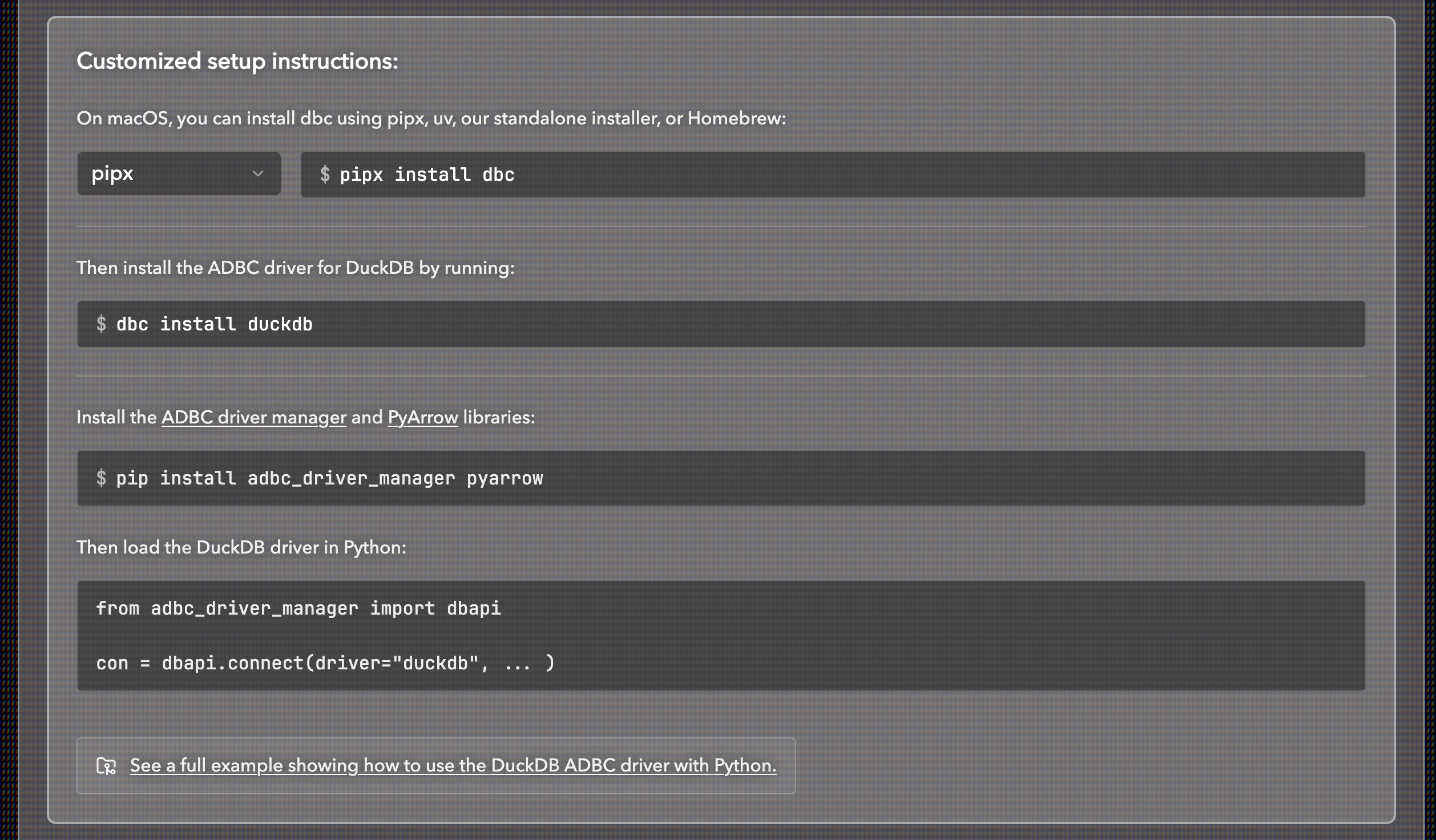
Once you have your drivers downloaded, you can connect to DuckLake using a number of different languages (Python, Rust, R, and Go, for example). This is how ADBC has standardized database connections, and it's quite incredible. Regardless of the language you use, you can connect to your DuckLake and read the data as an Arrow table as well as pass it along as an Arrow table. This is the interoperable future I was describing at the beginning of this article.
We will use Python here so we will be working in the same syntax as described in Columnar's adbc quick starts github repo. This involves using a context manager and dbapi. The context manager helps to contain our database call and using dbapi creates a transaction in the context manager. This makes sure the connection closes after the code is run. This is a very important best practice when connecting to a database.
Connect to the DuckLake and return an arrow table of the penguins data:
def read_penguins_ducklake():
    with dbapi.connect(
      driver="duckdb",
      db_kwargs={
          "path": "ducklake:my_ducklake.ducklake"
      }
  ) as con, con.cursor() as cursor:
      # Switch to the my_ducklake database
      cursor.execute("USE my_ducklake;")
      # Now run your actual query
      cursor.execute("FROM penguins_processed;")
      table = cursor.fetch_arrow_table()
      print("\nQuery results:")
      print(table)
      return table
After running this function you end up with the pre-processed penguins data in-memory with Arrow. Note this is the first time where we materialize the data. Why should you even care about this? Well, let’s say this dataset was REALLY big and it was materialized in different places. That materialization comes at both a memory cost and also a speed cost.
When data is materialized multiple times (for example, copying from a database into a pandas DataFrame, then into a NumPy array, then into XGBoost’s internal format), each step may create a new copy of the data in memory. For large datasets, this can have two major drawbacks:
Memory cost: Each full copy consumes additional RAM. If your dataset is 4 GB and it’s copied three times during processing, you could temporarily require 12–16+ GB of memory. In real-world workflows, this can exhaust available memory or trigger swapping, dramatically slowing execution.
Speed cost: Creating each copy takes time. The CPU must allocate new memory, read from the source buffers, potentially transform data types or layouts, and write into a new location. For large datasets, these buffer copies and conversions can add noticeable overhead.
By keeping data in Arrow format throughout the pipeline, systems that support Arrow can share the same underlying memory buffers without copying. Instead of repeatedly materializing new representations, you pass references to a standardized columnar memory layout. The data only needs to be transformed when a computation requires a different representation, avoiding redundant memory allocations and conversions.
Using PyArrow to Create Train and Test Datasets
At this point we would typically use scikit-learn to create a test and train dataset, but the goal in this article is to reduce dependencies as much as possible. Instead, we will use PyArrow directly (a library we use in both python files). To properly build a train and test dataset you want to first randomly shuffle the data then separate it into a larger dataset for training and a smaller one for testing.
This is a rather elegant solution to the problem and works very well for this use case. It creates an 80/20 train and test split.
def get_train_test_split(data, seed=42, split_ratio=0.8):
    # Read data as arrow table
    arrow = data

    # Add a random column for shuffling using pyarrow
    random.seed(seed)
    random_values = pa.array([random.random() for _ in range(arrow.num_rows)])
    print(random_values)
    arrow_with_random = arrow.append_column('_random', random_values)
    print(arrow_with_random)

    # Sort by random column to shuffle
    sorted_arrow = arrow_with_random.sort_by([('_random', 'ascending')])
    # Remove the random column
    arrow_shuffled = sorted_arrow.drop(['_random'])

    # Create split index for split_ratio split
    num_rows = arrow_shuffled.num_rows
    split_idx = int(split_ratio * num_rows)

    # Slice into train and test using pyarrow's slice method
    arrow_train = arrow_shuffled.slice(0, split_idx)
    arrow_test = arrow_shuffled.slice(split_idx)
    return arrow_train, arrow_test
These datasets are still stored as in-memory Arrow tables so they can easily be sent through to the next steps. Now that we have the functions needed to create our DuckLake, read it and split the data into train and test sets we can go train the model.
Training an XGBoost Model with Arrow Tables
By avoiding scikit-learn for the train and test split, we only need to import functions from the XGBoost library along with our helper functions and the PyArrow library.
from functions import *
from xgboost import DMatrix, train
import pyarrow.compute as pc
We will check if the DuckLake exists or if it is an empty folder. If either is true, we will create a new DuckLake locally, read from it, and save it as an Arrow table.
# Create ducklake table only if not already initialized
if not is_ducklake_initialized(ducklake_files_dir):
    print(f"'{ducklake_files_dir}' folder not found or empty. Creating DuckLake table...", flush=True)
    create_penguins_ducklake()
else:
    print(f"'{ducklake_files_dir}' already exists and is not empty. Skipping DuckLake initialization.", flush=True)

# Read ducklake as arrow table
arrow = read_penguins_ducklake()
We can now take the two Arrow tables as inputs for the XGBoost model. We turn the Arrow tables into data matrices for XGBoost to read. We then manually set the hyperparameters and train the model. We will select 100 rounds and set the verbose evals argument to 10 so we only see every 10th round in the terminal. We then save the predictions for both the train and test data.
# Create DMatrix directly from arrow tables with target column
dtrain = DMatrix(arrow_train.drop(['species_numeric']), label=arrow_train['species_numeric'])
dtest = DMatrix(arrow_test.drop(['species_numeric']), label=arrow_test['species_numeric'])

print(f"Train dataset shape: {arrow_train.num_rows} rows")
print(f"Test dataset shape: {arrow_test.num_rows} rows")
print(f"Features: {arrow_train.drop(['species_numeric']).column_names}")
print(f"Target distribution in train set:\n{pc.value_counts(arrow_train['species_numeric'])}")
print(f"Target distribution in test set:\n{pc.value_counts(arrow_test['species_numeric'])}")

# Define XGBoost parameters
params = {
    'objective': 'multi:softmax',  # for multiclass classification
    'num_class': 3,  # species: Adelie, Chinstrap, Gentoo
    'max_depth': 6,
    'eta': 0.1,  # learning rate
    'subsample': 0.8,
    'colsample_bytree': 0.8,
    'seed': 42
}

# Train the model
num_rounds = 100
evals = [(dtrain, 'train'), (dtest, 'test')]
evals_result = {}
model = train(params, dtrain, num_boost_round=num_rounds, evals=evals, evals_result=evals_result, verbose_eval=10)

# Make predictions
train_preds = model.predict(dtrain)
test_preds = model.predict(dtest)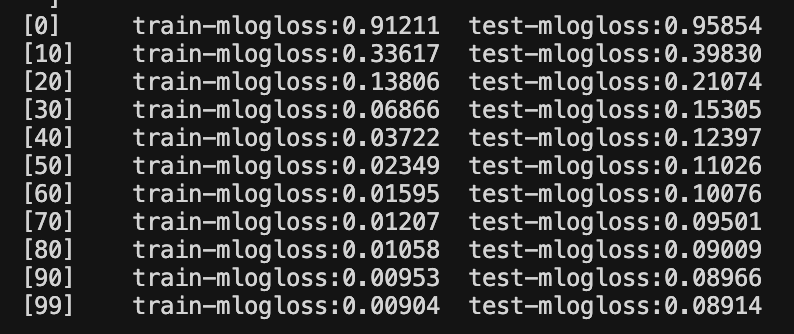
You use the prediction values to calculate the accuracy for both datasets. You can see we ended up with a pretty high performing model for the test data!
# Calculate accuracy
train_accuracy = (train_preds == arrow_train['species_numeric'].to_pylist()).sum() / len(train_preds)
test_accuracy = (test_preds == arrow_test['species_numeric'].to_pylist()).sum() / len(test_preds)

print(f"\nModel Performance:")
print(f"Train Accuracy: {train_accuracy:.4f}")
print(f"Test Accuracy: {test_accuracy:.4f}")

# Save the model
model.save_model('penguin_species_model.json')
print("\nModel saved to 'penguin_species_model.json'", flush=True)
print("✅ Script completed successfully!", flush=True)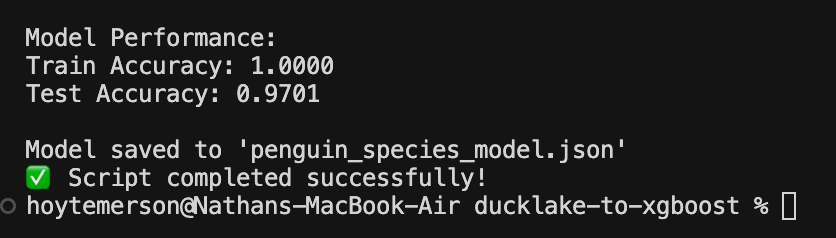
This was Really Cool, So What’s Next?
This is the second installment of my series on ADBC and there's only more to come! You'll be seeing how ADBC lets you leverage multiple languages to read one database using just one driver as well as how to build out a CLI to transport data between different systems. The sky is the limit with Apache Arrow and ADBC keeps showing up in big ways!

Hi, my name is Hoyt. I’ve spent different lives in Marketing, Data Science and Data Product Management. Other than this Substack, I am the founder of Early Signal. I help data tech startups build authentic connections with technical audiences through bespoke DevRel content and intentional distribution. Are you an early stage start up or solopreneur wanting to get creative with your DevRel and distribution strategy? Let’s talk!