
ADBC: An Intro to NextGen Database Connections
Another example of how Apache Arrow is eating the data world

Let me start out by saying I’m a total sucker for Apache Arrow. It’s the first technology I was obsessed about learning the deep internals for. I’m a self described “Apache Arrow Hipster”. I wrote about it before it was cool. That said, when your favorite band goes mainstream it can feel like watching something awesome get dissolved. But in the case of Arrow, it has only gotten stronger. When I write about Arrow, I pull a lot from Matt Topol’s book “In-Memory Analytics with Apache Arrow” which should be considered the Apache Arrow Bible. The second edition of the book has a chapter on a new addition to the Apache Arrow ecosystem, ADBC. This might possibly be the most unsexy technology you’ve ever heard of, which is why I have the overwhelming urge to show you just how cool it is.
This article about ADBC is made in partnership with Columnar, creator of the dbc cli tool that lets you easily manage your ADBC drivers as well as fantastic quick starts for ADBC.

What problem does ADBC solve?
Believe it or not, the tools used to connect to databases have remained fundamentally the same over the last 30 years. Historically, when you wanted to connect directly to a database via an API you would install either JDBC or ODBC. These APIs require you to install specific drivers to your computer so you can create a connection to the database of your choice. They allow users to connect remotely to a database either from their IDE or via an application they are building. The key limitation is that these APIs have been around for a long time and are primarily designed for row-oriented databases like SQL Server, Postgres and MySQL.
The problem with this is that many modern data systems are using column-oriented data warehouses like BigQuery and Snowflake or in-memory databases like DuckDB. These are primarily meant for analytical workloads. When you try to use JDBC to move data between columnar systems you’re getting a very inefficient process. It actually seems absurd when you think through it. At a very high level, ELI5 mental model it would look like this:
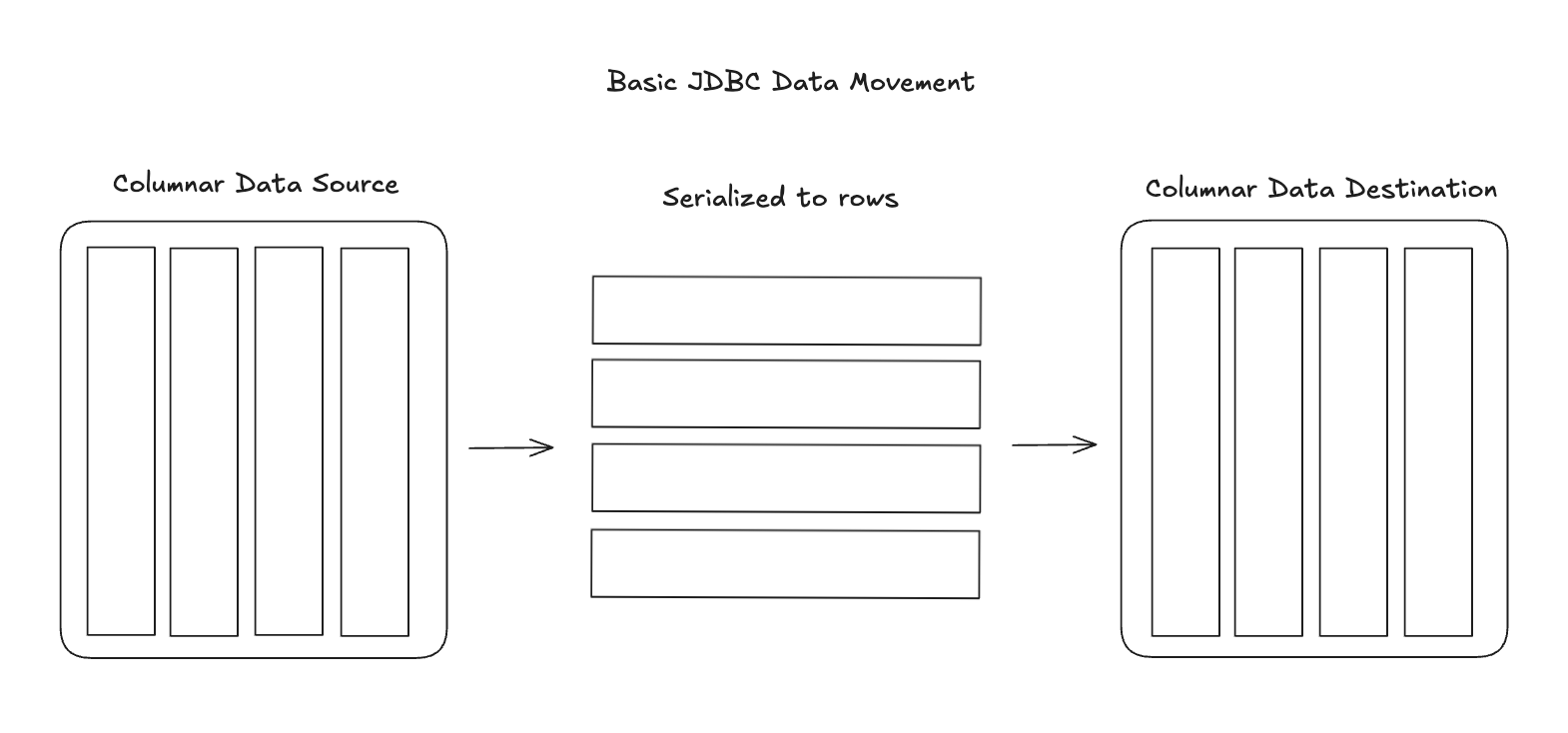
So JDBC is serializing column-oriented data into rows and then transferring the data row by row. When inserting data back into a column-oriented database via JDBC, the database must reconstruct columnar storage from the incoming row stream. It is a fundamental problem that at scale can have a major performance hit. Imagine trying to move 1 billion rows of columnar data from one source to another this way. I think you get the picture.
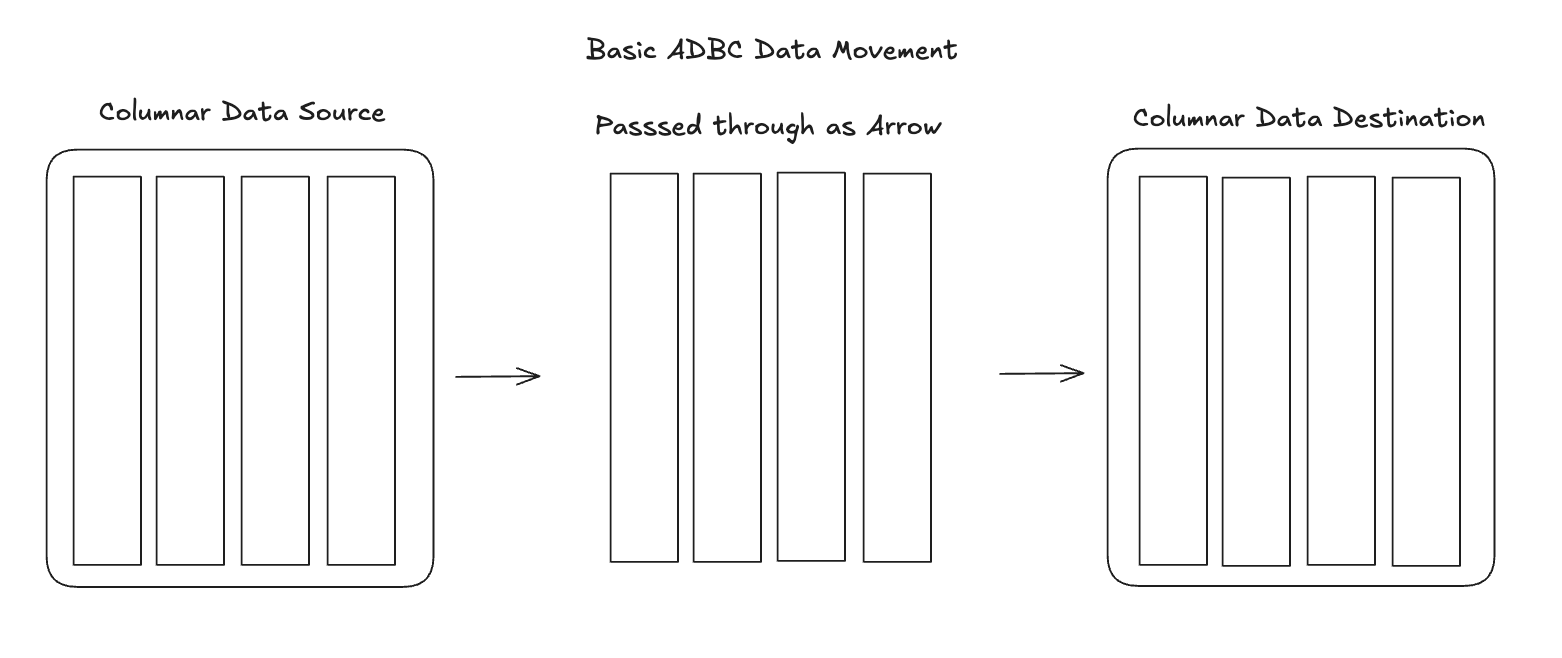
ADBC’s fundamental design principle is that data should remain in columnar format throughout the entire pipeline. And when you’re talking about in-memory columnar formats, the only one that’s truly standardized and widely adopted is Apache Arrow.
With ADBC, the data flow is:
Columnar (Arrow) → Columnar (Arrow) → Columnar (Arrow)
The other part of the equation is the data format that is returned from the SQL query. When I first tried using BigQuery’s API to download data to a pandas dataframe, for example, I found it took an enormous amount of time to download even medium sized datasets. I eventually found out that this was primarily because the data was returned in JSON format. In addition to being a row-oriented structure, JSON is also a text-based format, so the data must be serialized to text, transmitted over the network, then deserialized and parsed on the client side. JSON format takes up way more space than binary formats, and deserializing that JSON can be time consuming. If you were trying to bring a million row dataset into your local computer it could take several minutes to download and parse. Meanwhile, Arrow can be streamed in contiguous record batches over the network which allows you to much more efficiently transfer and load a dataset to your local machine. So keeping the data in Arrow format as default between analytical systems creates efficiency at the transfer layer but also at the deserialization step that affects the end user.
Some important points about ADBC:
Driver Management
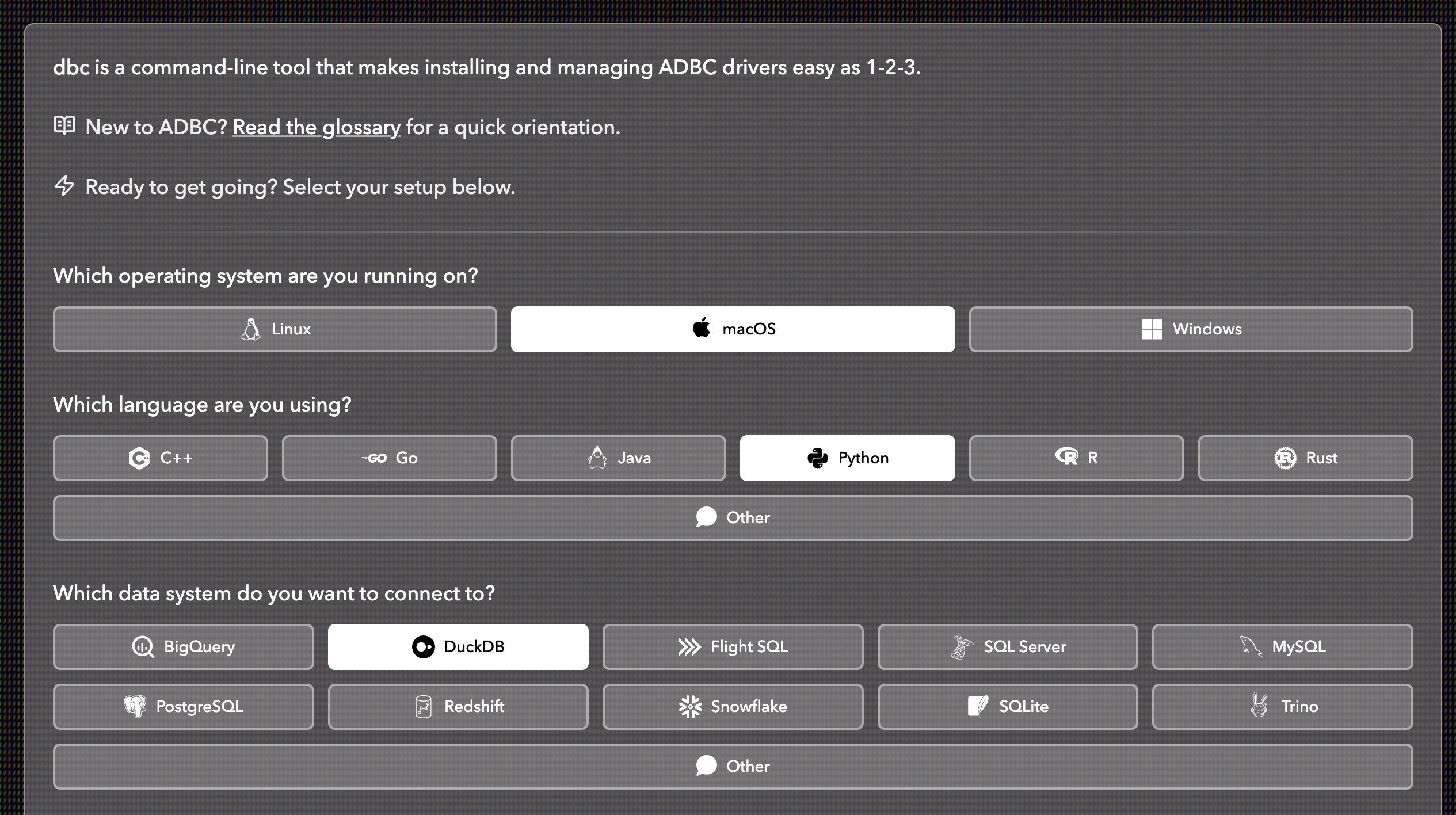
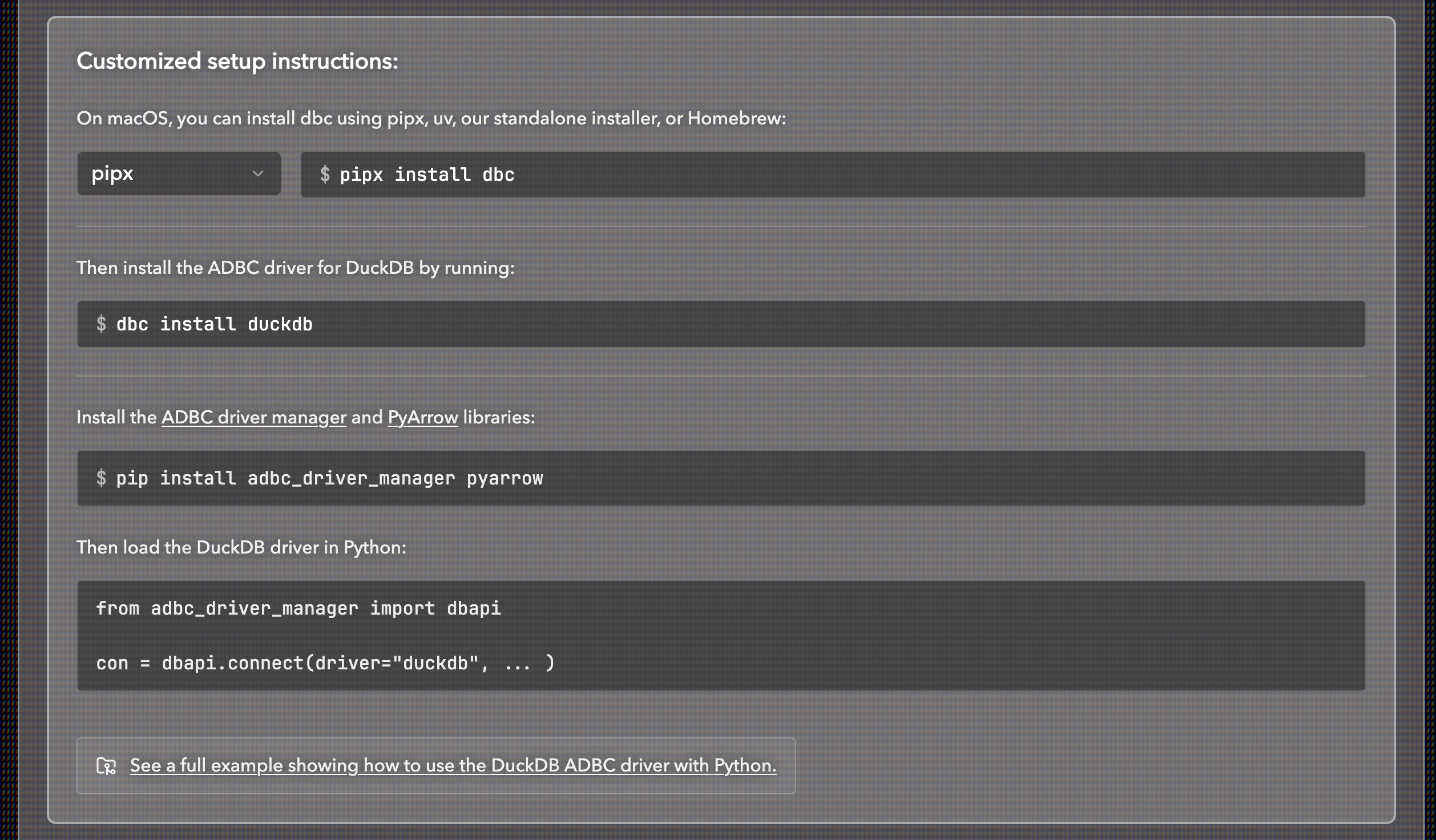
When you use ADBC you need to download the driver related to your OS and system you want to connect to. You can build drivers yourself, or hunt for pre-built drivers from various sources, but I prefer using dbc, a CLI tool made specifically for ADBC driver installs. The page for the tool lets you choose all your prerequisites and then gives you the command you need to install the driver. It just makes it that much more convenient vs scrolling through the ADBC docs to figure out what the driver name and command is. For example, if I need to download the DuckDB driver for macOS and use it with Python:
Connections vs Cursors (Python Driver Manager Only)
An ADBC driver manager is a library that acts as an intermediary between a client application and ADBC drivers. Instead of linking directly to one or more drivers, the application links to the driver manager, which locates and dynamically loads drivers.
I program in Python, and for that driver manager there are two important distinctions to be made with how ADBC works. You have the actual connection that is opened to a database source and then you have the cursor that is created. The cursor is what executes the SQL query or retrieves data.
Analogy:
Connection = Phone line to the database
Cursor = The conversation you have over that phone line
Context Managers
Using context managers for your connections is a good idea. You can end up with memory leaks if you don’t make sure you close your connections. With the Python API, you can use a “with” statement that will encapsulate the database connection and close it after the full statement code runs. A basic template for how it should look goes as follows:
# Template showing what the with statement does:
with (
    dbapi.connect(...) as postgres_conn,
    postgres_conn.cursor() as pg_cursor
):
    # Your code here
    pass
    # Commit the code result
    postgres_conn.commit()
Note that according to the dbapi 2.0 specification: "Closing a connection without committing the changes first will cause an implicit rollback to be performed." Which means you need to explicitly commit the process or the result will be rolled back and not show up in your data destination. You can either use the commit( ) method on the connection at the end of the code or you can assign the autocommit argument in the dbapi.connect( ) method to True. If the connection doesn't support autocommit = False you'll see a warning: cannot disable autocommit; conn will not be DB-API 2.0 compliant.
What exactly can I do with ADBC?
Connect to Different Types of Databases
ADBC is specifically focused on connecting to a database and returning data in the Arrow format. While it is most suited to work with columnar databases, it can also connect to traditional row-oriented databases like Postgres. The response from querying Postgres will still be in Arrow format which makes it easy to join to another Arrow table or turn into a dataframe of your choice (Polars or pandas for example). Being able to have Arrow returned with ADBC also lets you easily render data in a data application UI like Streamlit.
Pulling from a row-oriented database and transferring that to Arrow format does not give the same performance gains as going from columnar → columnar, however if your destination is columnar it is much more convenient. It also allows you to stick with one driver type as opposed to trying to use both JDBC for row-oriented and ADBC for column-oriented and going through the painful process of reconciling them back together.
It also makes connections with DuckDB instances by just attaching DuckDB to the connection. This means you can connect to an actual DuckDB database or you can connect to a local DuckLake since it is using DuckDB in a similar way.
Example code of connecting to a DuckLake:
from adbc_driver_manager import dbapi

# Connect to local ducklake instance
with dbapi.connect(
    driver="duckdb",
    db_kwargs={
        "path": "ducklake:my_ducklake.ducklake"
    }
) as con, con.cursor() as cursor:
    # Now run your actual query
    cursor.execute("SELECT * FROM my_ducklake.data;")
    table = cursor.fetch_arrow_table()
    print("\nQuery results:")
    print(table)
ADBC also supports multiple programming languages. Today we will be using the Python API but you can see all the different language options on Columnar’s ADBC quick starts Github.
Getting Info about a Database Connection
One of the first things to understand about ADBC is that it isn’t just about reading data. It’s also about understanding connections. You are creating an open connection with a database source. As such, you can get information about the source such as vendor name, driver name, table names and schemas. The ADBC Python API has a few functions that return different kinds of info about the connection:
# Template showing what the connection info functions do:
with (
    dbapi.connect(...) as postgres_conn,
    postgres_conn.cursor() as pg_cursor
):
    info = postgres_conn.adbc_get_info()
    vendor_name = info['vendor_name']
    driver_name = info['driver_name']
    schema = postgres_conn.adbc_get_table_schema('streaming_data')
    objects = postgres_conn.adbc_get_objects().read_all().to_pylist()
The above will read the Postgres table metadata and return the vendor and driver name for the connection as well as the table schema. Very useful if you don’t need to actually pull any data. Below is an example of the response on a managed Postgres instance I am hosting my synthetic dataset on:
Vendor name: PostgreSQL
Driver name: ADBC PostgreSQL Driver
Table: streaming_data
---------------------------
Schema:
created_at: timestamp[us, tz=UTC]
created_date: string
show_description: string
show_duration_seconds: int64
show_genre: string
show_id: int64
show_name: string
show_rating: string
show_type: string
state: string
timezone: string
user_id: int64
user_watch_duration_seconds: int64
Move Data Between Databases
Bulk Ingestion
You can bulk ingest data using ADBC which is perfect for append-only scheduled data transfers or if you have Parquet files you’d like to bulk ingest into a table. The adbc_ingest method in the Python API supports four different modes for inserting data into database tables:
create - Creates a new table. If the table already exists, an error is raised.
append - Appends data to an existing table. If the table doesn’t exist, an error is raised.
replace - Drops the existing table if it exists and creates a new table with the data.
create_append - Creates a new table if it doesn’t exist, or appends to it if it does exist.
These modes provide flexibility for different data loading scenarios, from initial table creation to incremental data updates. For example, let’s say you have data in your Postgres tables that you would like to use for analytics. You’d prefer to run one bulk job early in the morning to get yesterday’s data and append it to a table in your columnar Data Warehouse (BigQuery, MotherDuck). Or you may have Parquet files that are being exported by a service that you’d like to read in bulk and append to a Data Warehouse table. There’s a lot of great use cases for bulk ingestion.
A very basic append bulk ingest would look like this:
from adbc_driver_manager import dbapi
import pyarrow.parquet as pq
import polars as pl

# 1. Create a dummy Parquet file for the example, using Polars
import polars as pl
df = pl.DataFrame({'id': [1, 2, 3], 'value': ['A', 'B', 'C']})
df.write_parquet('test.parquet')

# Read the test Parquet as arrow table
tbl = pq.read_table('test.parquet')

# Create connection to local DuckDB and do bulk ingest
with dbapi.connect(
    driver="duckdb",
    db_kwargs={
        "path": "test.duckdb"
    }
) as con, con.cursor() as cursor:
    # The table will be written to the DuckDB database at the given path.
    cursor.adbc_ingest("test", tbl)

    # Test that data was added to the DuckDB table
    cursor.execute("SELECT * FROM test;")
    table = cursor.fetch_arrow_table()

    con.commit()

print(table)
Streaming Between Databases
Bulk ingestion is convenient when you’re moving reasonably sized workloads between systems. However, bulk ingest workflows encourage materializing large result sets as in-memory tables before writing them out. If the dataset exceeds available memory, this can lead to out-of-memory errors or force you into awkward batching logic.
ADBC addresses this issue by letting you exchange data as Apache Arrow RecordBatch streams. Instead of loading an entire result set into memory at once, you can incrementally fetch and write batches in sequence. This makes it practical to move datasets that are larger than memory.
Because ADBC drivers can expose Arrow data from both row-oriented and columnar databases, you can stream data directly between systems. For example, you can read data from a Postgres table as a stream of Arrow record batches and write it into a local DuckDB instance, which will spill to disk once it exceeds available memory.
For example, say I want to stream a synthetic dataset from a managed Postgres instance into a local DuckDB database. The code would look like this (leveraging TOML for secrets).
from adbc_driver_manager import dbapi
import tomllib

# Load connection string from secrets.toml
with open("secrets.toml", "rb") as f:
    secrets = tomllib.load(f)

with (
    dbapi.connect(
        driver="postgresql",
        db_kwargs={"uri": secrets["postgres_connection_string"]},
    ) as postgres_conn,
    postgres_conn.cursor() as pg_cursor,
    dbapi.connect(
        driver="duckdb",
        db_kwargs={"path": "streaming_data.duckdb"},
    ) as duck_conn,
    duck_conn.cursor() as duck_cursor,
):
    # Both connections are open here
    pg_cursor.execute("SELECT * FROM streaming_data")
    reader = pg_cursor.fetch_record_batch() # returns a RecordBatchReader
    # Still both open - now write to DuckDB
    # The table will be written to the DuckDB database at the given path.
    duck_cursor.adbc_ingest("streaming_data", reader)
    # Test that data was added to the DuckDB table
    duck_cursor.execute("SELECT COUNT(*) FROM streaming_data")
    count = duck_cursor.fetchall()
    print(count)

    # Commit the transaction to persist the data
    duck_conn.commit()
This is Really Cool, So What’s Next?
This intro is meant to set the foundation for a series of use cases I’ll be coding and documenting in the future weeks and months. I’ll be bringing you more interesting use cases from using ADBC to transfer data to ML models as well as reading data into analytical applications like Streamlit. I’m looking forward to sharing more as I continue my learning journey with it!

Hi, my name is Hoyt. I’ve spent different lives in Marketing, Data Science and Data Product Management. Other than this Substack, I am the founder of Early Signal. I help data tech startups build authentic connections with technical audiences through bespoke DevRel content and intentional distribution. Are you an early stage start up or solopreneur wanting to get creative with your DevRel and distribution strategy? Let's talk!
Great article. I like how you clearly defined the fundamental problem ADBC was built to address - efficient read and transfer of columnar data. I also really liked the example at the end showing how to take a row base data store and stream records over to columnar when you approach situations where the data is too large for RAM