
Running DuckDB on an iPhone
GizmoData just broke my brain with this one


It’s hard to overstate just how flexible DuckDB is.
It allows you to push the limits of what you can do with analytics and data tools. It works beautifully for single node data in-memory or stored locally. It becomes the de facto query engine for open source transfer layers like Arrow Flight SQL. It can be the core tech for a data warehouse or lakehouse architecture.
In this world of constant curiosity and infinite building we can really go out into the wilderness to meditate and think about some novel use cases. For example, what if you could run DuckDB on a phone? Maybe the better question was WHY would you do that?
Well…say hello to GizmoSQL.
This article is made in partnership with GizmoData, creator of Enterprise-grade data solutions built for performance, scale, and cost efficiency.

First, what is GizmoSQL?
GizmoSQL is an engine built by GizmoData and powered by DuckDB and Apache Arrow Flight SQL. It can process billions of rows in seconds at 90% lower cost than traditional platforms. When you think about using something like this on a cell phone it seems a bit overkill. But the high end scale that GizmoSQL allows doesn’t mean it’s “heavy”. In fact, the application itself is incredibly smooth and lightweight.
Since it leverages Apache Arrow Flight, you use GizmoSQL by first starting up a server then querying it with a client in another terminal or with a script. In production, the server you create would be hosted on provisioned infrastructure in your data center (on-prem), or in the cloud on AWS, Azure, or GCP. But locally you simply run a server on your computer.
There’s also a companion video to go along with the code below:
Let’s Try it Out Locally
GizmoSQL has extensive documentation as well as nice quick start. Because I have a Mac, I installed GizmoSQL via Homebrew. This will allow me to spin up a local GizmoSQL server without using Docker:
brew tap gizmodata/tap
brew install gizmosql
However, for our initial local server we will use Docker:
# Pull and run the Docker image
# Username defaults to "gizmosql_user" when GIZMOSQL_USERNAME is not set
docker run --name gizmosql \
           --detach \
           --rm \
           --tty \
           --init \
           --publish 31337:31337 \
           --env TLS_ENABLED="1" \
           --env GIZMOSQL_PASSWORD="gizmosql_password" \
           --env PRINT_QUERIES="1" \
           --pull always \
           gizmodata/gizmosql:latest
Once it downloads and is running we can query from a GizmoSQL client:
GIZMOSQL_PASSWORD="gizmosql_password" gizmosql_client \
  --host "localhost" \
  --port 31337 \
  --username "gizmosql_user" \
  --tls \
  --tls-skip-verify
This puts us into an in-memory instance of GizmoSQL. If we look at the tables in this instance we won’t see any yet:
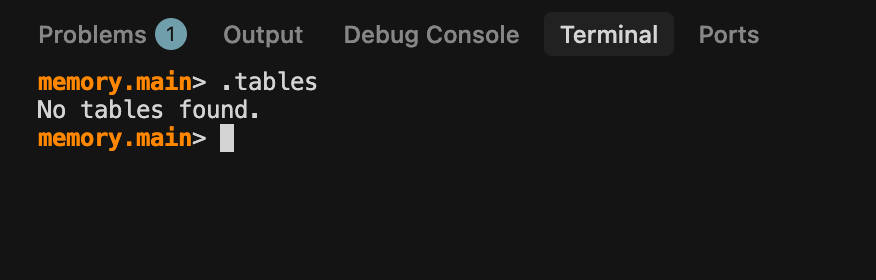
We can generate a TPC-H dataset with a nifty “call dbgen(sf=1);” query and when we look at the tables now we get all kinds of good stuff:
call dbgen(sf=1);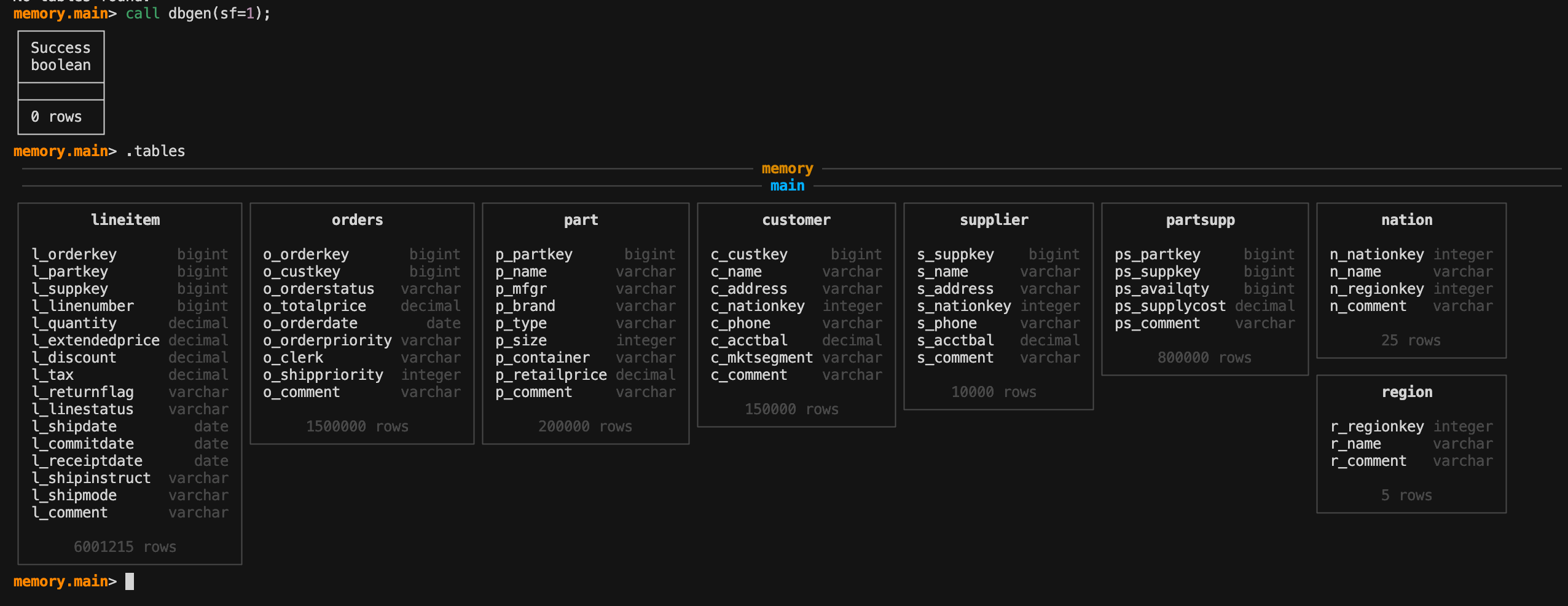
We can look at the data in a single table as well. Since we are leveraging the latest DuckDB version (1.5) we also have the nifty pager feature that lets us see all the data and scroll through it.
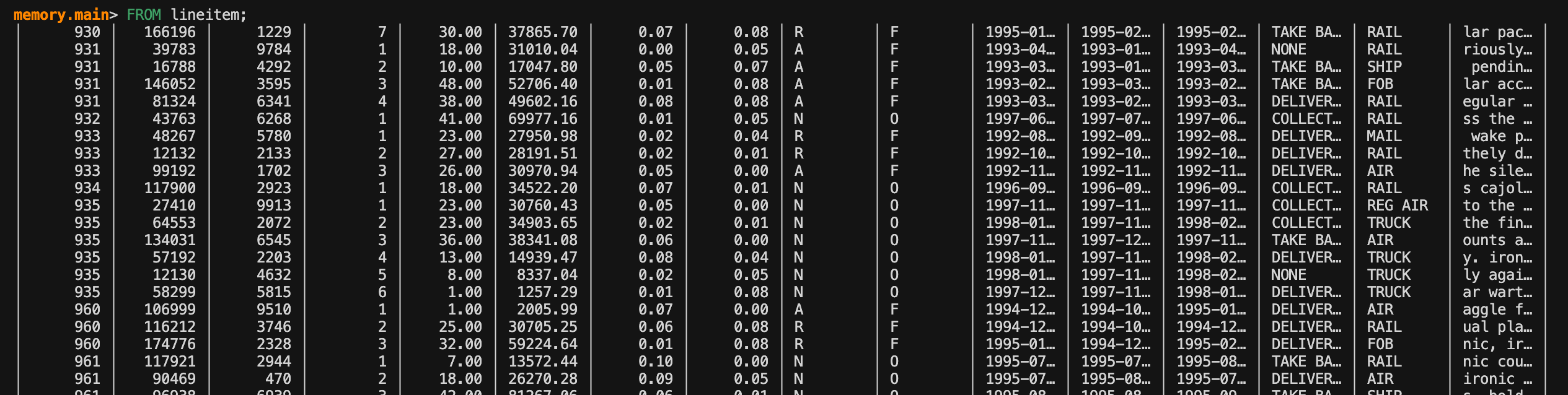
Here’s how it looks in action:
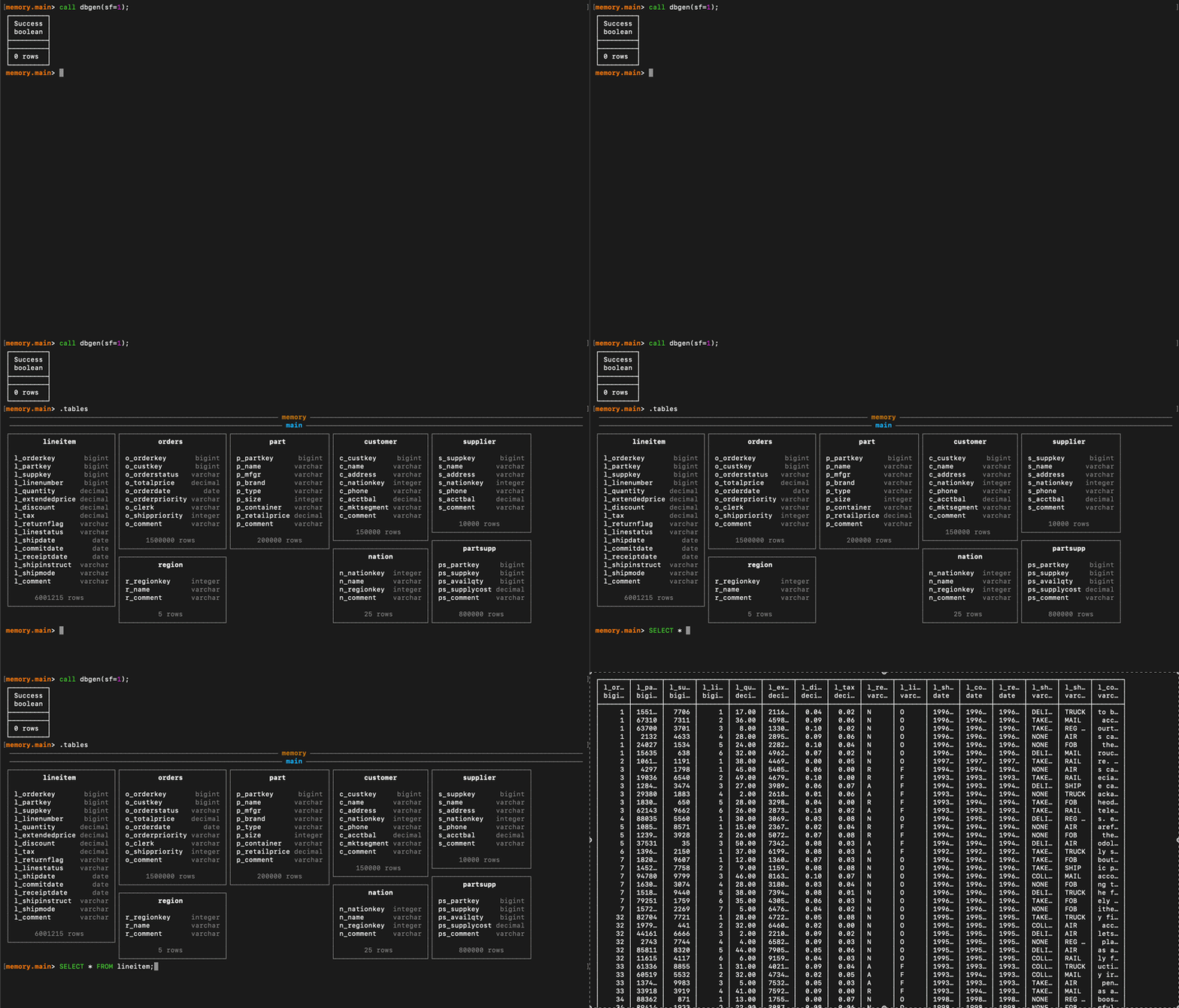
What is nice about this is that it gives us a very useful lightweight sandbox to build tools around, practice SQL or to analyze data with. If you terminate this server and then use the same script to spin it back up all the tables you added will still be there. So it’s a persistent local storage without the need to organize it all in your own local folders. You don’t need to open up VSCode or cursor and you can get a better idea of how this server client pattern works in data tools.
Could We Run It on an iPhone?
Phil Moore, solo founder of GizmoData, had the idea of pushing that lightweight concept of GizmoSQL to the limit. Phil built an iOS app version of GizmoSQL that can run a server directly on your iPhone. In approximately four hours over a weekend using Claude (Opus 4.6 with deep thought mode), which he described as “work that would have taken him a month to complete manually, he built the app. He used Claude extensively by providing clean code principles in the Claude md file and iterating on the design.
I am constantly blown away by what I am seeing people achieve with agentic programming. But what I really like about what Phil has done here is how he is using it to extend his own product into places he himself isn’t an expert in.
What has been built here is, essentially, DuckDB running on a server on your iPhone. Granted, it is GizmoSQL specifically, but what GizmoSQL is doing is handling all the infrastructure logic. These are all things that you’d need to put together on your own if you tried doing this in a production state.
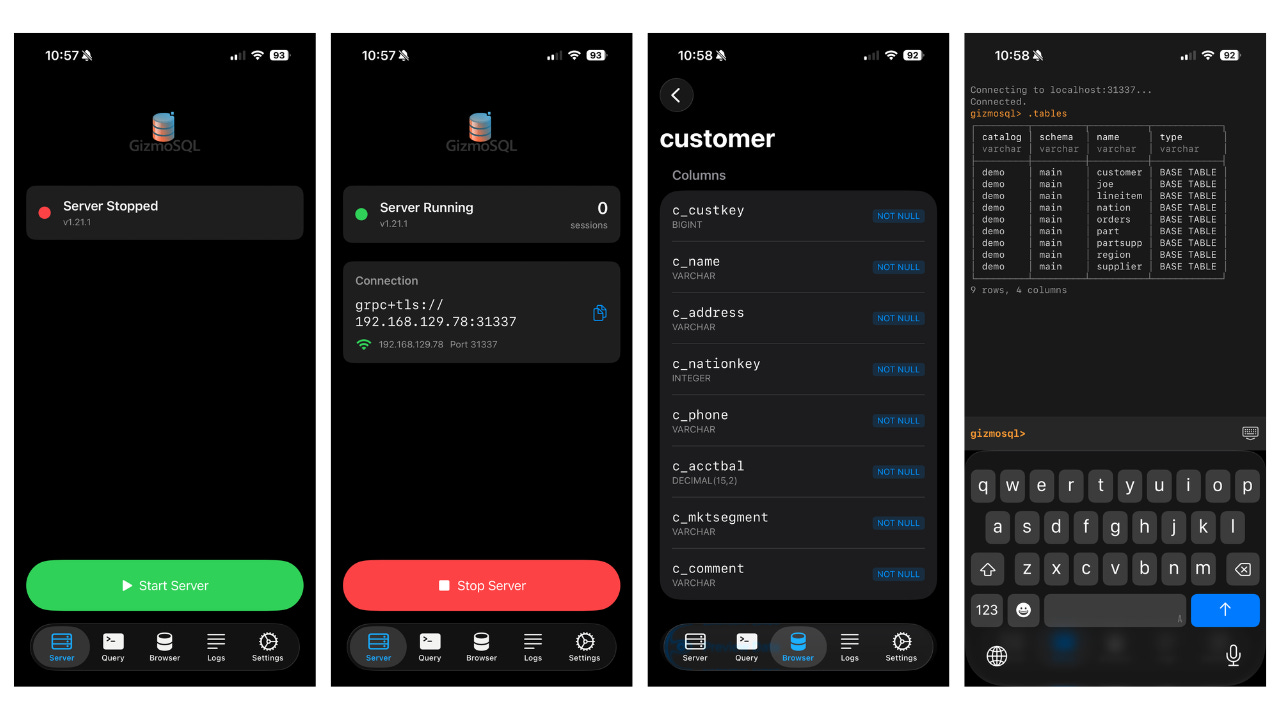
The app, on its own, is incredibly fun to have handy. It allows you to start and stop a server locally, multi level table metadata browsing and you can even run SQL literally in the app 🤯. I honestly didn’t realize how fun it was to type “.tables” on my phone.
Why would I possibly need this?
OK, so you can use your phone to query a table on your phone.
Like many good ideas, the use cases aren’t always obvious. But let me put together a picture for you so you can see the use case.
The initial server you created above is all happening locally on your computer. Which is fine and nice for testing out the tool and getting some starter demos going. But if you want to take something like GizmoSQL into production then you will need to move that server to a provisioned ecosystem like AWS or GCP. Having the server running on your phone allows you to build for an external server. This means your production application can be tested locally and then plugged into your production infrastructure.
That’s honestly, incredibly powerful.
However the app isn’t just convenient as a production server proxy. Looking at the screenshot above you can use the app to easily look through table metadata and run some basic sanity checks in a SQL execution terminal.
Creating a Server in GizmoSQL iOS
Obviously, downloading the app onto your phone is the first step. But from there it’s incredibly simple to create a server and connect from your computer.
You first want to go to the Settings screen and set up all the things you need for the server:
Port number
Backend type (you can also select sqlite other than DuckDB)
Database name (leave blank for in-memory db instance)
making it Read only or not
Username and password for authentication
Printing logs and log level (debug, info, warning, error)
Log format (JSON, text)
That is an amazing amount of detail about a server that you can set up within a UI! Once you have your settings chosen just hit “Start Server” on the Server page and you’re ready to connect.
Before we go on to connecting to the server, I want to call out a couple important details. If you leave the database name blank, DuckDB will create an in-memory instance for you to connect to. However, if you provide a name, a database file will be created and stored on your phone. I’ll show you a cool trick you can do with that stored database file later.
Connect to the iOS Server
Connecting to the app is a bit different in your terminal. You’ll be replacing “localhost” with the IP address for the server in the Server screen. This is found within the connection screen on that page. So for example, the connection string may look like “grpc+tls://123.456.7.890:31337” but you will just use the IP address:
gizmosql_client \
  --host "123.456.7.890" \ ### add the host address in the application
  --port 31337 \ ## the port you set in the settings screen
  --username "gizmosql_user" \
  --tls \
  --tls-skip-verify
After running this you’ll be asked for the password and from there you are connected to the server running on your phone via your computer terminal. It’s time to try it out!
We can add the TPC-H just like we did above. Simply add it with the same command either in your phone app or computer terminal. This saves the dataset in memory on your phone.
Note: TPC-H tables are large (~1GB footprint) and older iPhones might struggle to store in memory. If you have an older iPhone definitely put a name in for the database so it saves the data locally instead.
call dbgen(sf=1);We can CREATE a new table from the lineitem TPC-H table and add it on the same server on your phone. So it’s not just reading what you add to it, you can create other tables from the tables you insert.
CREATE OR REPLACE TABLE quantity_group
AS
SELECT
l_orderkey AS order_key,
l_quantity AS quantity
FROM lineitem;

SELECT * FROM quantity_group;
Now go ahead and run a computation, like an Average, on the new table you created:
SELECT
AVG(quantity)
FROM quantity_group
GROUP BY order_key;
The Application Also Stores Logs
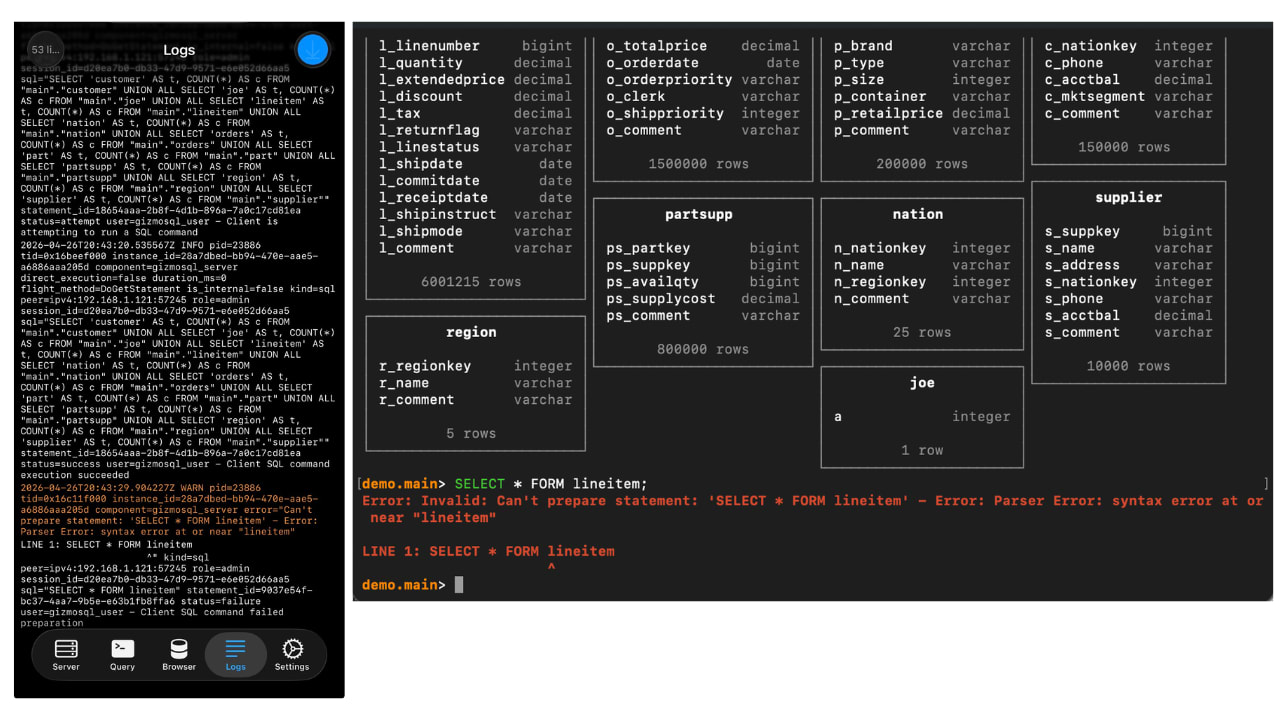
The phone app provides logs for the query outcomes you run on your local terminal. It’s really nice to have a physical device next to your computer you can use to look at log output. As you can see below, when we create an invalid SQL query in the computer terminal the logs in the phone show an error as well. Sorry folks, that’s just plain cool.
Moving Your Data off of Your Phone
Remember when I said that if you give your GizmoSQL server a name that it will be stored as a file on your phone? A REALLY cool feature is that given the file is stored in your iPhone’s file folder it can also be shared to your laptop or other device easily.
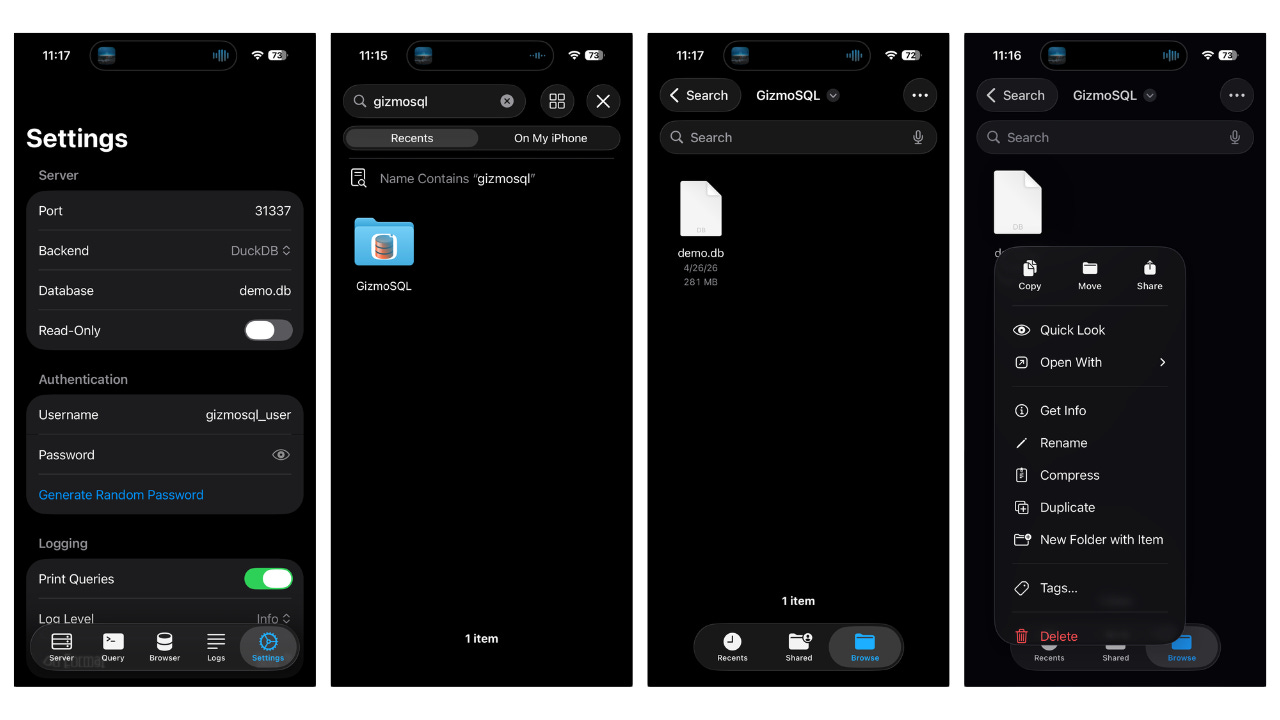
So let’s say you like the manual control the app allows you to have (I personally do and it’s how I use GizmoSQL now) and you want to move the work you did somewhere else. This gives you that option and it’s a novel way to leverage the iPhone’s internal UX as your own data transfer system.
The Big Takeaway and Future Questions
GizmoData’s implementation here is just scratching the surface, but it has a ton of interesting use cases. The big takeaway is that DuckDB is a technology that can run analytics on a phone with ease. And while it’s not currently designed for it, Claude Code can get access to compatible third-party apps. Does that allow you to have an agentic analyst working directly in your phone as needed? Do we start sharding analytical workloads over phones at your company? Is edge computing about to blow up? The future is going to be so wild!
The GizmoSQL iOS is available on the iPhone app store for $0.99. You can see more about GizmoData and their products/services at https://gizmodata.com/
Hi, my name is Hoyt. I’ve spent different lives in Marketing, Data Science and Data Product Management. Other than this Substack, I am the founder of Early Signal. I help data tech startups build authentic connections with technical audiences through bespoke technical content and intentional distribution. Are you an early stage start up or solopreneur wanting to get creative with your technical content and distribution strategy? Let’s talk!
 | A guest post by
|