
Building My First Data Tool With ADBC
Using Go, dbc and ADBC drivers to solve an annoying problem

If you’ve been following me on my deep dive into ADBC (Arrow Database Connectivity) then you’ve probably seen my initial two articles about it. The first was an intro to ADBC and what makes it stand out compared to the old guard ODBC/JDBC API’s. The second article was an interesting use case where I read from a DuckLake using ADBC and trained an XGBoost machine learning model with the Arrow table output.
TLDR;
I built a data transfer CLI tool I call Fletch. This is built using Go and ADBC drivers and is designed for agents to use. It has an interactive mode for humans too 🙂
You can see the entire project and run it yourself at GitHub HERE. You’ll be using your terminal and Go to run this project from scratch.
You can download and install the binary for this CLI tool with a curl command and use a series of useful flags and commands:
# Install Fletch
curl -fsSL https://raw.githubusercontent.com/early-signal-tech/fletch/main/install.sh | bash

# Fletch Help Section
fletch --help

# Fletch List Drivers
fletch list-drivers

# Fletch Test Connection
fletch test-connection
The Context
One of the things I really love about ADBC (and Apache Arrow et al) is how it has API’s for multiple programming languages. For ADBC, I was very interested in using the Go API to connect to different data systems. Go is a language I’d been wanting to try out for the last year. I started looking at Rust (ADBC also has an API for that) but Rust was a merciless language for beginners who didn’t understand memory management and pointers.
Go felt more approachable, but the issue was that the data use case really wasn’t apparent. Rust was being used in data libraries, like Polars, and the documentation showing how it worked was solid. However, I didn’t see Go being used in the same way. I needed to figure out a way to get my foot in the door.
That all changed with Columnar’s ADBC quick starts, which shows using Go with multiple data systems. Given I’d been using ADBC with Python to read and move data I realized this was my moment to try talking to a database with Go.
This article about ADBC is made in partnership with Columnar, creator of the dbc cli tool that lets you easily manage your ADBC drivers as well as fantastic skills and quick starts for ADBC.

What Problem Was I Trying to Solve?
As a content creator in the data tech space, I test a lot of different tools. Sometimes I want to see how something interacts with MotherDuck. Other times I need to show how BigQuery integrates with a tool. More recently, through using ADBC, I have discovered how easy it is to simply pull from a Postgres database for analytics.
My problem though was that I keep different datasets on different systems. For example, I had a dltHub pipeline running on GitHub actions. This pipeline was running SQL to create and append synthetic data daily onto a MotherDuck table. I like to use this synthetic dataset for tool demos because I know it very well and I control the landmines and have control over synthesizing data issues.
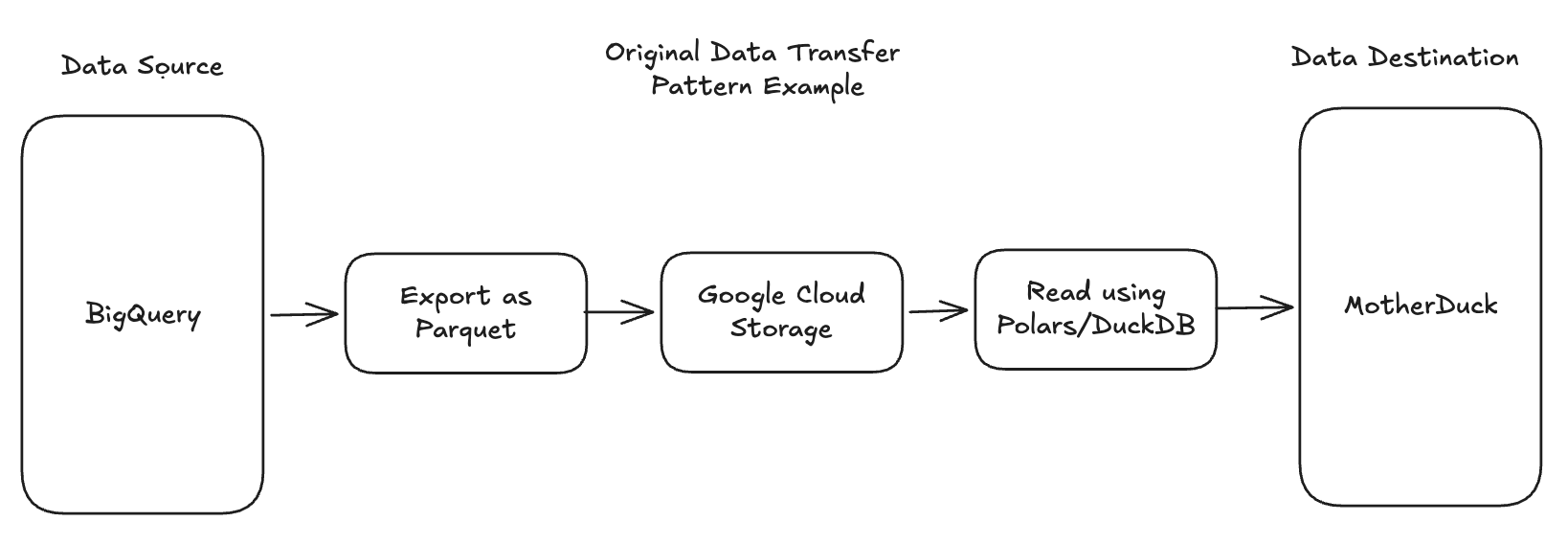
However, sometimes I want that same dataset somewhere else like a Supabase Postgres instance or to test a new lakehouse tool like Bauplan. In the past, I would do something like export a BigQuery table as a parquet file then export to Google Cloud Storage to then read that using DuckDB or Polars and create a new table in a destination data source (seems like an insane process in retrospect). Or I would use dlt to read the MotherDuck table and save as a DuckDB local instance. Both were intermediate steps that I thought was my only option.
You may ask “Hoyt, why don’t you just use TPC-H data or synthesize a new dataset each time? The main reason is because I like having already created synthetic datasets that are centered around real world business use cases. It’s also much faster to move and reuse one I’ve already built vs trying to do it from the ground up each time. Reusing synthetic datasets that I already know can be used in certain situations saves me a lot of time.
But I still had the nagging problem with the roundabout way I was moving these datasets between systems. This was where ADBC really shined. It allowed me to run Python scripts that quickly moved data between the systems I wanted. But always running a unique script depending on what and where I needed to transfer data gave me a "cold start" problem. I was constantly needing to write new scripts each time I wanted to make a data transfer because there'd be some type of query I needed to run or it was a source → destination combo I hadn't written a script for yet.
always running a unique script depending on what and where I needed to transfer data gave me a “cold start” problem
Apache Arrow as a Modern Data Primitive
Before I get into the solution to my problem above, I want to discuss this concept of a “primitive” in data. Historically, a primitive would reference a data type that can be represented at the lowest level (specifically, in binary). This includes integers, characters and booleans.
However, you might argue that we now have primitives operating at a higher abstraction level. Apache Arrow has become a primitive for data interchange. A fundamental building block that modern data systems assume as their foundational format. Just as traditional primitives define how individual values are represented in memory, Arrow defines how columnar data structures are represented across systems. It's not a data type in the classical sense, but it functions as a primitive in the data ecosystem. Ubiquitous, foundational, and increasingly assumed rather than chosen.
ADBC (Arrow Database Connectivity) is a protocol using Apache Arrow that standardizes the way data is transferred between applications and database systems. Unlike ODBC (Open Database Connectivity) or JDBC (Java Database Connectivity), which primarily uses row-based data transfer, ADBC leverages Arrow's columnar format for more efficient data interchange. Especially between two data systems that are both columnar formatted and leverage Arrow as an input and output.
ADBC breaks down a number of barriers we would normally run into with our data work.
Some examples of those barriers include:
Needing multiple API’s and driver solutions (O/JDBC) to connect to different data systems in our business or organization.
Having to stick to a certain programming language to connect to certain data systems.
Having to leverage both code and UI’s to connect data systems.
Relying on intermediate steps to materialize data when transferring data.
Designing a Solution for Humans and Agents
While there are libraries that handle data transfers very easily (ADBC, DuckDB and dlt specifically) that doesn’t help my cold start problem. Looking over the barriers above, I started mapping out what the features I needed for this solution should look like.
The ability to select any data source and any destination quickly and easily without writing new scripts each time.
Removing the need to use a specific programming language to enact data transfers. Except to pass SQL queries.
A UI that is human friendly or can be ran easily by an agent.
Focusing on direct data transfer between systems without any materialization.
There are a few ways this could be built:
Create a library on a library (python functions using ADBC)
A Streamlit app that let’s me do this via a GUI
A CLI tool to run locally in the terminal
Wanting the ability to select any data source and destination quickly meant I needed something dynamic. However, I wanted to remove the need for using a specific programming language to actually run the data transfers. On top of that, I wanted a UI that would be both human and agent friendly. That last need pushed me to the CLI tool option. I’ve been working extensively with agents and skill files and I realized the best option here is to have a local CLI tool that can be called using context from a local skill file. In the end, I wanted this tool to be agent-centric by design.
In the end, I wanted this tool to be agent-centric by design.
Discover and Test the Solution’s Building Blocks
I wanted to keep this CLI tool simple with as few libraries as possible. I looked at a couple of options for how to build a CLI but was specifically inspired by Wes McKinney to try out Go for programming. CLI tools are fantastic for agents to use. When you break down what an MCP server is, it essentially breaks down to a list of tool calls and skills files next to them for context. Installing a CLI tool with skill files locally creates a local MCP server. It all started to make so much sense.
I took my features and mapped them to a technology:
I would use Go to build the CLI and ADBC code
I would use a TUI library for the human interface
Data transfers would be handled by ADBC
Drivers would be installed and managed via Columnar’s dbc tool
Connecting your desired feature list goes a long way to getting your agent to build a solid product. This is the reason I think agents are specifically well designed to create these types of small tools. They are fantastic at being given a confined problem space and building within that.
Demoing Go and ADBC
I had never built a CLI tool before and I guess technically I still have not, given the tool was all coded by Claude. But I first needed to do a manual proof of concept that would help me to understand how the ADBC library in Go worked. I turned to the ADBC quick start from Columnar to try it out with DuckDB.
You can view the quick start here.
You first need to actually install Go itself, along with dbc if you haven’t yet. Once you do that, you need to download the ADBC driver of the systems you want to connect to:
curl -LsSf https://dbc.columnar.tech/install.sh | sh
dbc install duckdb
The application for the quick start involves two files:
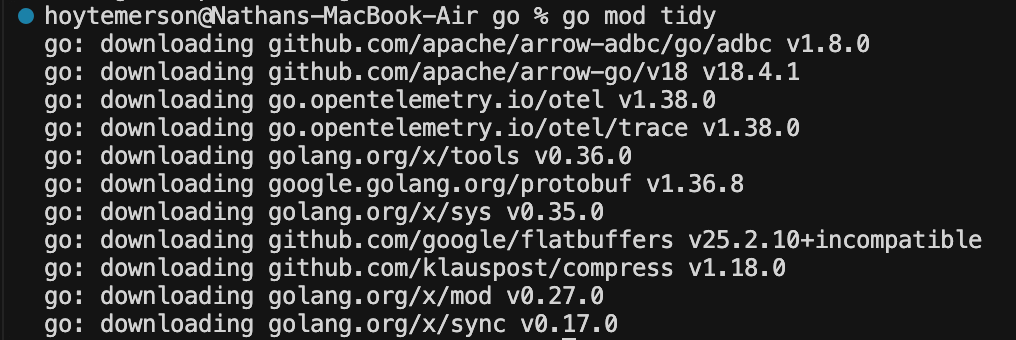
go mod tidy
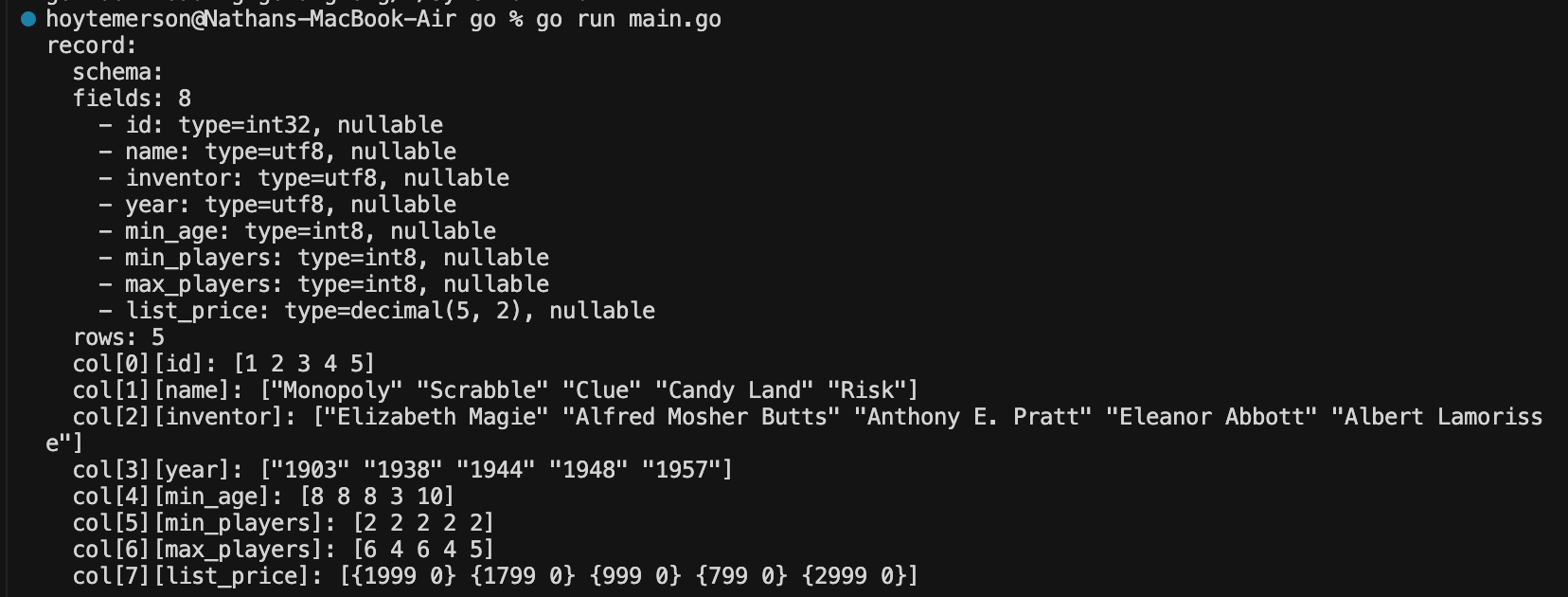
go run main.go
Go, like most programming languages, uses imports in source files. The go.mod file defines the module and tracks its dependencies.
module github.com/columnar/adbc-quickstarts/duckdb/go

go 1.24.0

require github.com/apache/arrow-adbc/go/adbc v1.8.0
The main.go file imports and uses those dependencies.
Something interesting is that every Go file must declare its package as the first non-comment line. Files in the same directory should share the same package name. So that entails simply putting:
package mainAfter that you import certain commands (similar to how Rust does it) as well as the ADBC driver manager.
import (
	"context"
	"fmt"
	"log"

	"github.com/apache/arrow-adbc/go/adbc/drivermgr"
)
The code after that will accomplish six things:
Initialize the driver: Create an ADBC driver manager instance to load database drivers
Open the database: Load the DuckDB driver and connect it to the games.duckdb file
Open a connection: Establish an active connection to the database
Create a statement and set the query: Build a statement object and assign SELECT * FROM games; to it
Execute the query: Run the SQL and get back an Arrow record batch stream
Read and print the results: Loop over the stream, printing each batch of rows to stdout
func main() {
	var drv drivermgr.Driver

	db, err := drv.NewDatabase(map[string]string{
		"driver": "duckdb",
		"path":   "games.duckdb",
	})
	if err != nil {
		log.Fatal(err)
	}
	defer db.Close()

	conn, err := db.Open(context.Background())
	if err != nil {
		log.Fatal(err)
	}
	defer conn.Close()

	stmt, err := conn.NewStatement()
	if err != nil {
		log.Fatal(err)
	}
	defer stmt.Close()

	err = stmt.SetSqlQuery("SELECT * FROM games;")
	if err != nil {
		log.Fatal(err)
	}

	stream, _, err := stmt.ExecuteQuery(context.Background())
	if err != nil {
		log.Fatal(err)
	}
	defer stream.Release()

	// Read all record batches from the stream
	for stream.Next() {
		batch := stream.RecordBatch()
		fmt.Println(batch)
	}

	if err := stream.Err(); err != nil {
		log.Fatal(err)
	}
}
To run the Go program we need to run a couple commands:
go mod tidy
go run main.go
Running ‘go mod tidy’ does some incredibly nifty stuff:
Resolves the full dependency tree: go.mod declares one direct dependency (github.com/apache/arrow-adbc/go/adbc v1.8.0), but that package itself depends on other packages. go mod tidy walks through all of those dependencies and figures out every module needed to build the project.
Downloads missing packages: It fetches the arrow-adbc module (and anything it depends on) from the Go module proxy and stores them in your local module cache (~/go/pkg/mod/).
Generates / updates go.sum: It creates a go.sum file containing cryptographic checksums for every downloaded module. This ensures future builds use the exact same code (integrity verification). You don’t have a go.sum file yet in this project, so go mod tidy will create one. Essentially it acts as a lockfile.
Prunes unused dependencies: If go.mod listed any dependencies that main.go doesn’t actually import, go mod tidy would remove them. Conversely, if main.go imported something not yet in go.mod, it would add it. In this case, the single require line already matches the single external import, so nothing changes in go.mod itself.
In short, for this demo it mostly means: “download the ADBC package and its dependencies, and generate the go.sum lockfile so the project is ready to build.”
Running ‘go run main.go’ is self explanatory. It runs the main Go file and we get the output in our terminal. How awesome is that???
Designing the CLI Tool for Human Interaction
I don’t have the original thread of prompts I used to get Claude to build my v0.1.0 but I don’t think that is the important part. What I usually do is build a design doc or a design prompt that I give to the agent to build with. This is a standard operating procedure for anyone that takes prompt engineering seriously.
Note: Columnar offers downloadable agent skills you can use when building new data projects, including support for multiple languages like Go.
npx skills add columnar-tech/skillsKey Design Requirements:
The tool should only use ADBC drivers to make data transfers.
Leverage Columnar’s ADBC Go quick start and ADBC docs for code creation.
The tool automatically checks for drivers when someone tries to initiate a data transfer. If no driver is found, install dbc and download the driver that way only.
The tool should have a nice step-based TUI that a human can easily use. This includes letting them select which source and destination they want, input auth credentials, as well as the SQL query they want to run.
The tool should have a number of flags and commands that can run commands passively by an agent.
The readme should be VERY agent-friendly and explain the tool usage context.
I want a binary in GitHub that can be easily downloaded and moved to a local bin file so the user can just call the tool anywhere in a terminal.
I had Claude first start out creating a tool I could use. This let me do UAT and iterate more effectively. I didn’t have a perspective on exactly how the TUI (terminal user interface) should look. I just wanted it to handle the above feature set. Claude settled on using Promptui, a popular Go library for creating interactive command-line prompts. It also chose something I hadn’t heard of before called Cobra. Cobra is a Go CLI library used to build and manage its command structure, flags, and command execution flow. This would specifically come in handy for letting agents use this tool.
I chose an initial group of data systems that represented the source and destinations (with more coming) that I thought gave a user a great first start. Once Claude got to an initial stage of development we went into UAT testing where I attempted to use the tool with a specific use case in mind. For instance, trying to copy a dataset I was keeping in my managed Postgres database over to MotherDuck. It’s pretty wild how a company might pay a SaaS solution to do this exact same thing.
I was able to get this human interactive tool set up rather quickly with Claude and honestly could have left it at that. But I had recently started to really get my agentic tool workflows figured out and I knew I should make sure this tool was agent friendly.
Designing the CLI Tool for Agent Interaction
Leading up to creating this tool I had been spending time with both Claude and ChatGPT to ask how agents prefer to read and use tools. I plucked a number of useful nuggets out of those sessions.
Binary files have a smaller footprint than uncompressed string files. Agents do not read binary though. They read text.
The text footprint for directions on how to use a tool should be relatively short. You’re not building an entire SaaS platform. An agent can easily read this when needed for context.
Using flags and commands may feel cumbersome to humans but become a beautiful shorthand for agents. It also reduces token burn when they aren’t writing long scripts and are instead writing terminal commands.
Make sure you have a verbose ‘--help’ flag that the agent will always look for if it doesn’t know what to do.
LLM’s and agents are deterministic, but a CLI has a deterministic set of steps and outcomes. This is the best way to keep an agent in check.
Having an agent build the code for a CLI tool, then letting the agent use that tool is like turning a bunch of random scripts you have lying around into a library. There is a more consistent outcome, is easier to maintain and others (including agents) can help contribute.
Coming up With a Great Name and Using It in the Wild
In the spirit of Apache Arrow, I felt like my tool needed a name related to archery or bow and arrow. I landed on the term Fletch which refers to attaching feathers to the back end of an arrow shaft. These act as a stabilizer and steering mechanism. They create drag that keeps the arrow flying straight and corrects flight errors in the same way tires help a car steer.
Given I was trying to stabilize an agent to almost deterministically initiate data transfers, this felt just right.
Here's how it's used:
You can download and install the binary for this CLI tool with a curl command:
curl -fsSL https://raw.githubusercontent.com/early-signal-tech/fletch/main/install.sh | bashRunning the above command will check what your computer OS is and download the necessary binary from the GitHub project. It will then use a sudo command to move the file to your local bin. From there you can call ‘fletch [command]’ anywhere you are in the terminal. This is similar to how uv, dbc or Claude Code works.
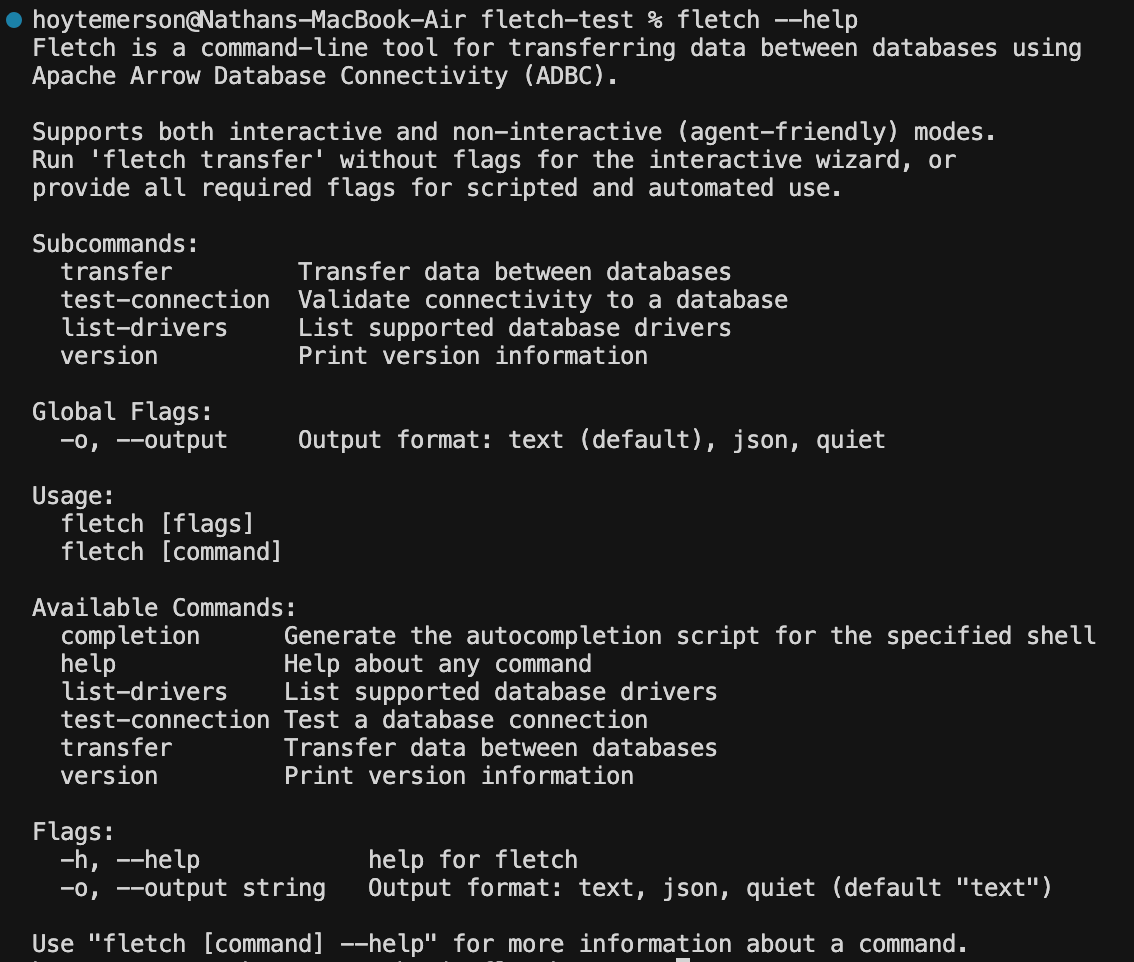
Fletch Help
Run ‘fletch --help’ to see exactly what you or your agent can do with Fletch”
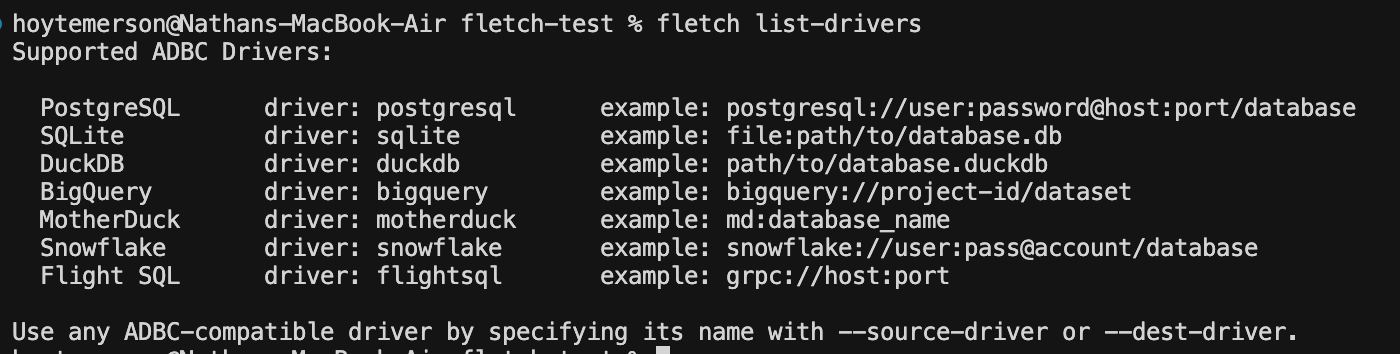
Fletch List Drivers
This is shows you the list of data systems Fletch currently has drivers for as well as examples of how you pass the source/destination URI’s in Fletch’s TUI.
Fletch Test Connection
Pretty self explanatory here. You can test a connection you have to make sure Fletch can connect to it. Great to use when getting your authentication credentials set up before you start initiating transfers.

Fletch Transfer
Let’s run ‘fletch transfer’ in the interactive mode (human mode) and see what the steps to enact a data transfer actually look like.
The first step asks to select your source database.
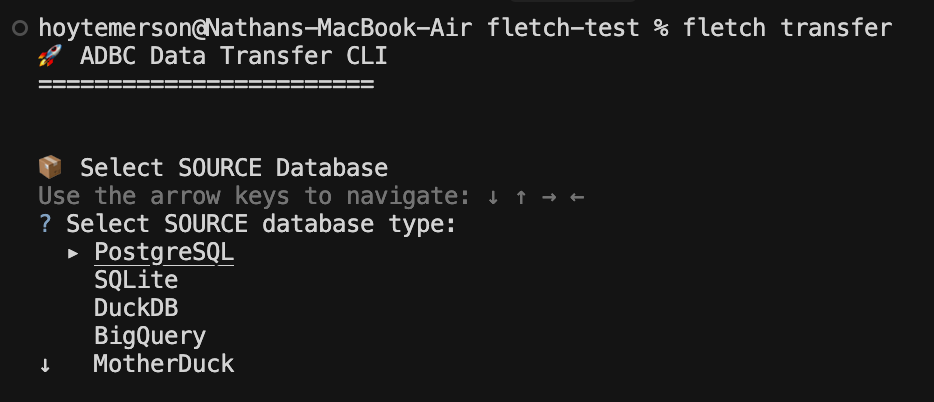
As you can see, right now there are only certain options for sources. This will change, especially since I don’t have files themselves as a source (ADBC let’s you read a file as a data source). But these are a good start and show you the different varieties of sources you can read from.
I have a local DuckDB instance already set up so I will go with that.
The next step is to input the DuckDB connection URI:
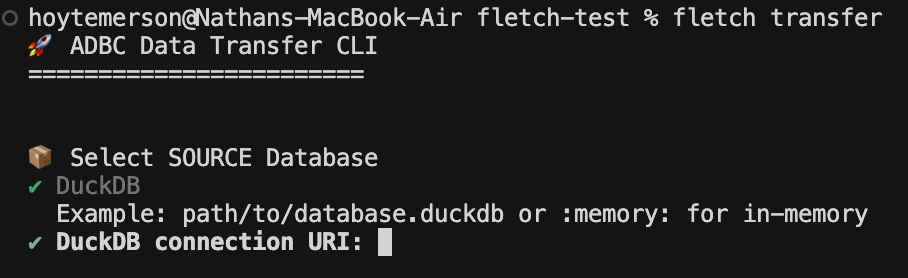
NOTE: This second step will be specific to the source data system you chose. For example, if you choose MotherDuck it will ask for the table name.
From here you are asked for the destination data database:
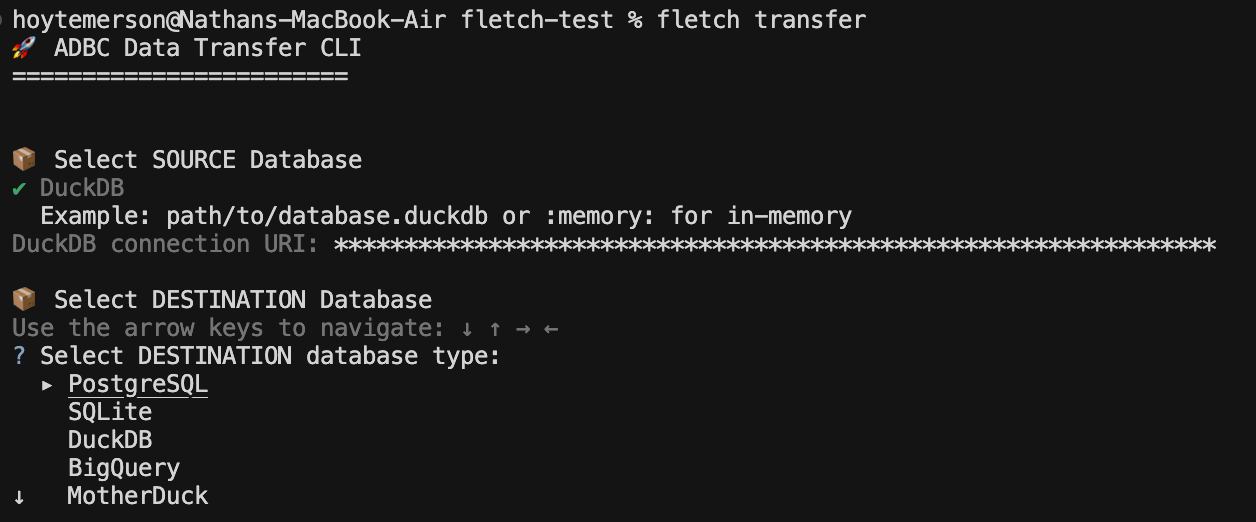
I will select DuckDB again simply because it is local and fast and I don’t need to set anything else up. We then input the connection URI for the destination DuckDB instance. You can just give a name for your DuckDB instance if it doesn’t already exist.
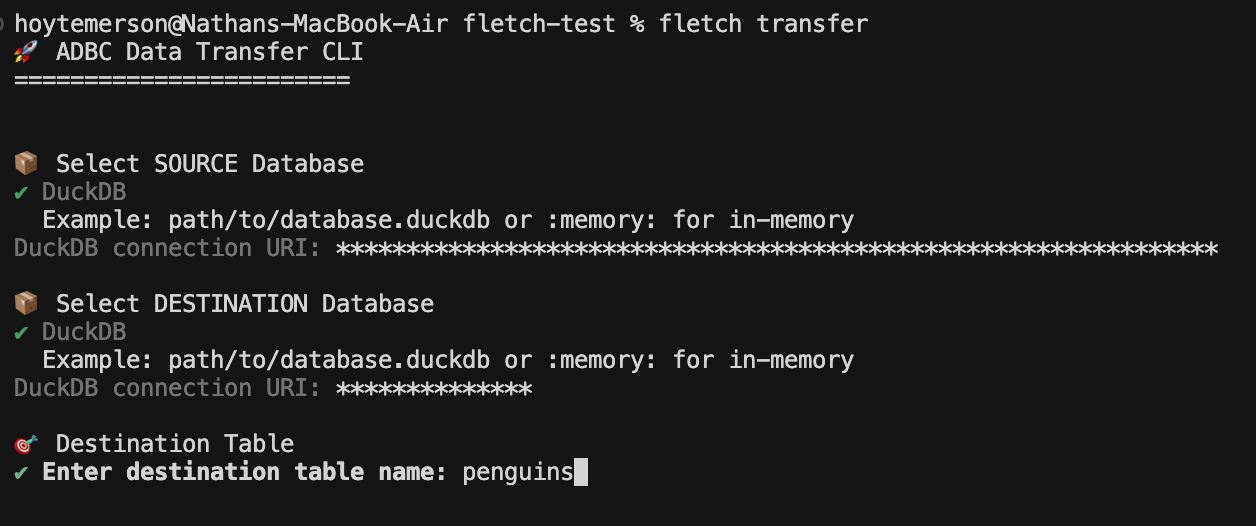
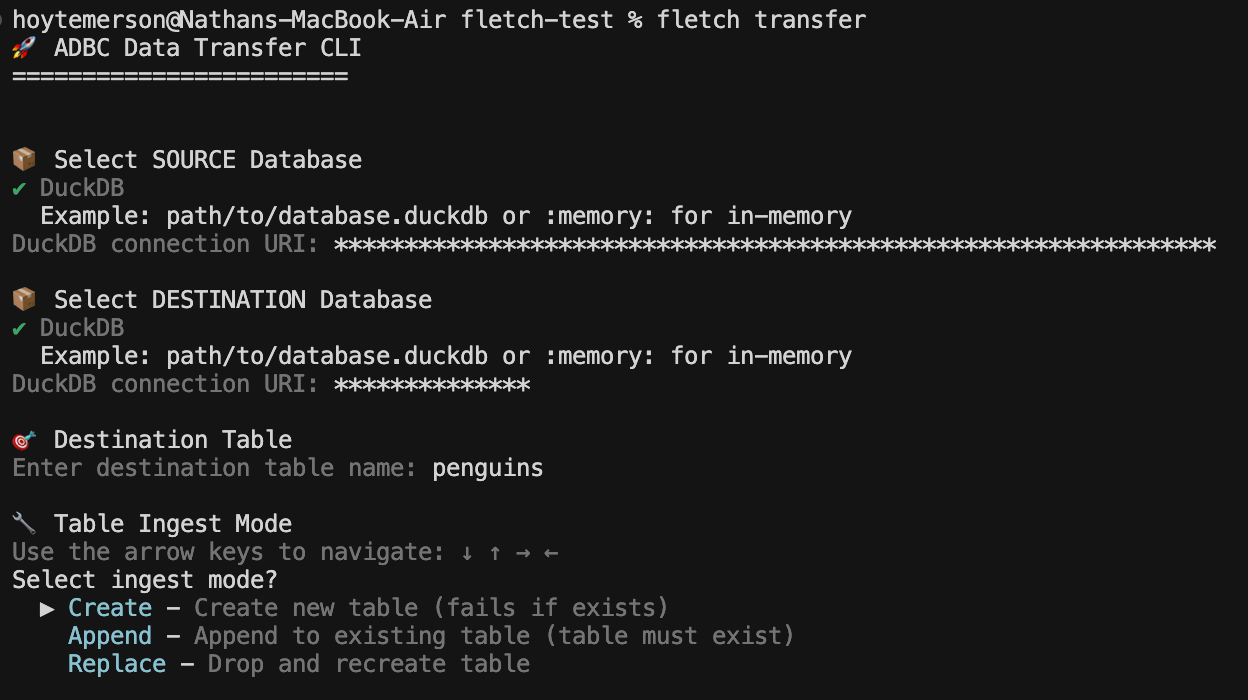
After we add the name of the destination table we are asked what type of ingest mode do we want. I am going to choose Create because I’ll be making the table for the first time.
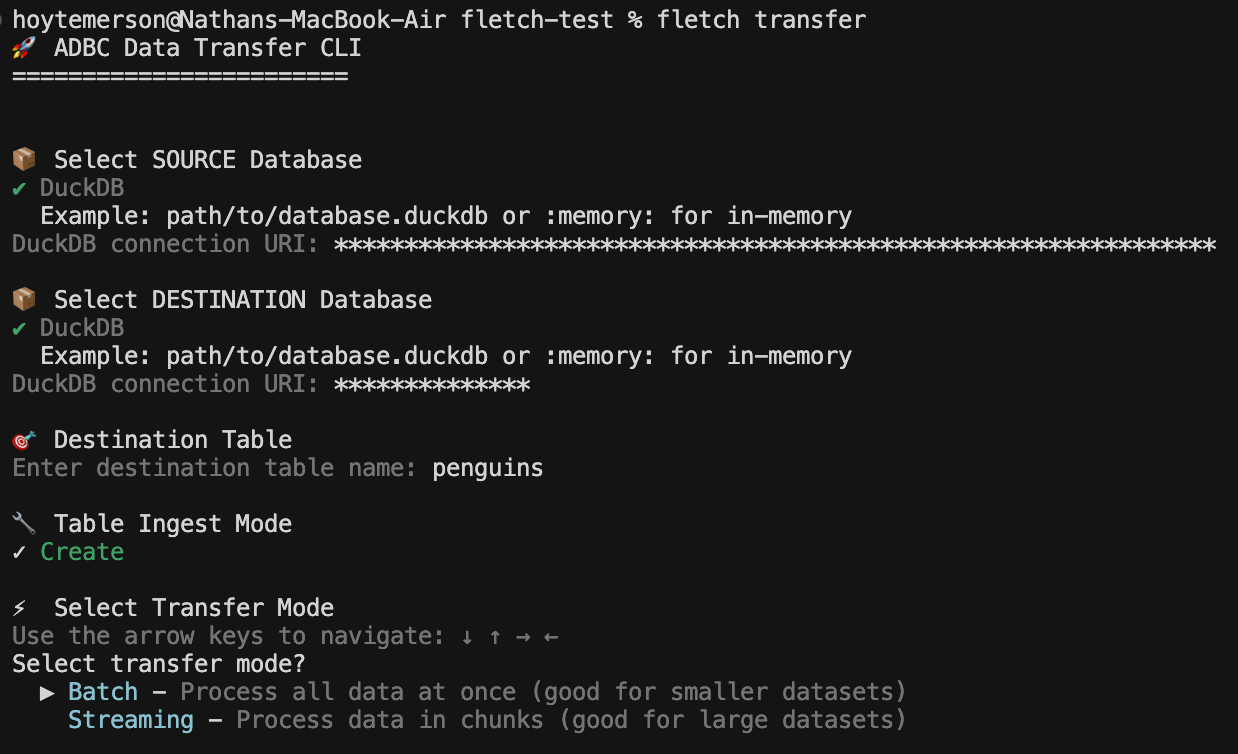
From here we are asked about the transfer mode. Not all data systems support each mode, however the tool will help you work through that (agents can easily fall back and correct as well). Since the data I’m moving is both small and using DuckDB I will go with Batch ingest.
You then enter the SQL query you want to run on the source database. The cool part here is that you can control what you transfer via SQL. More than likely this is going to be a SELECT * query with a filter statement.
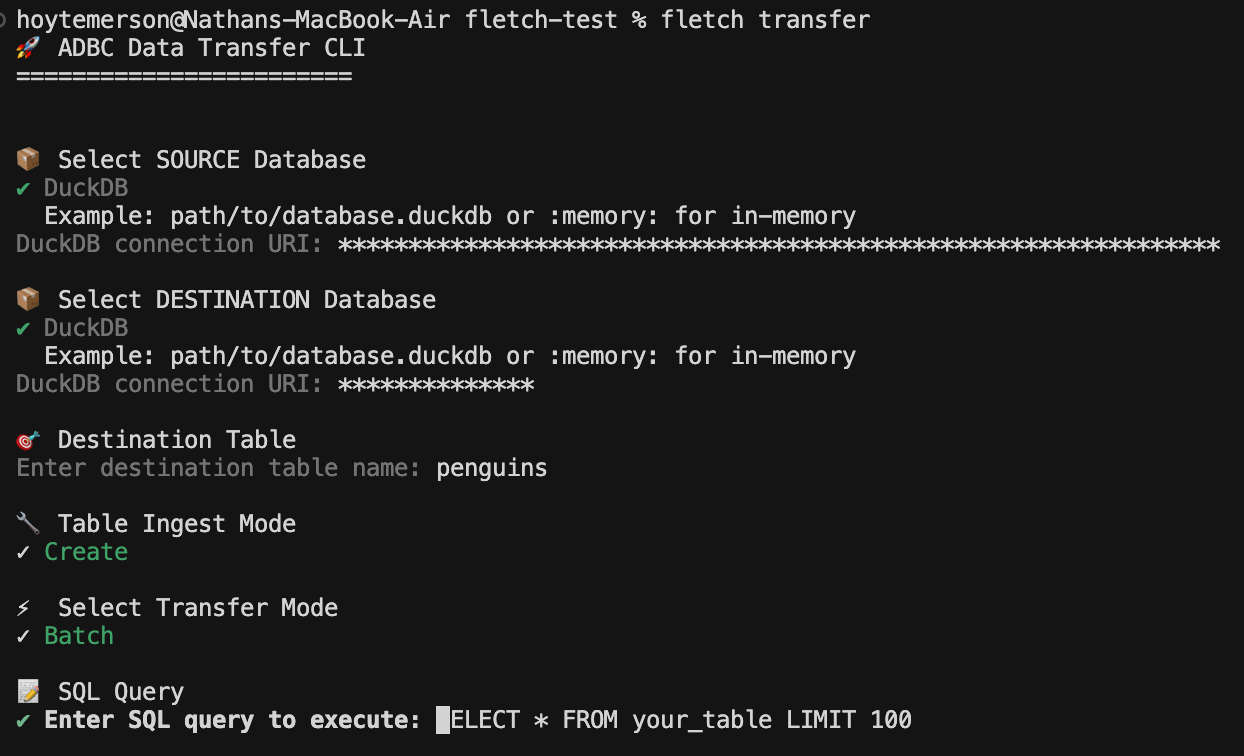
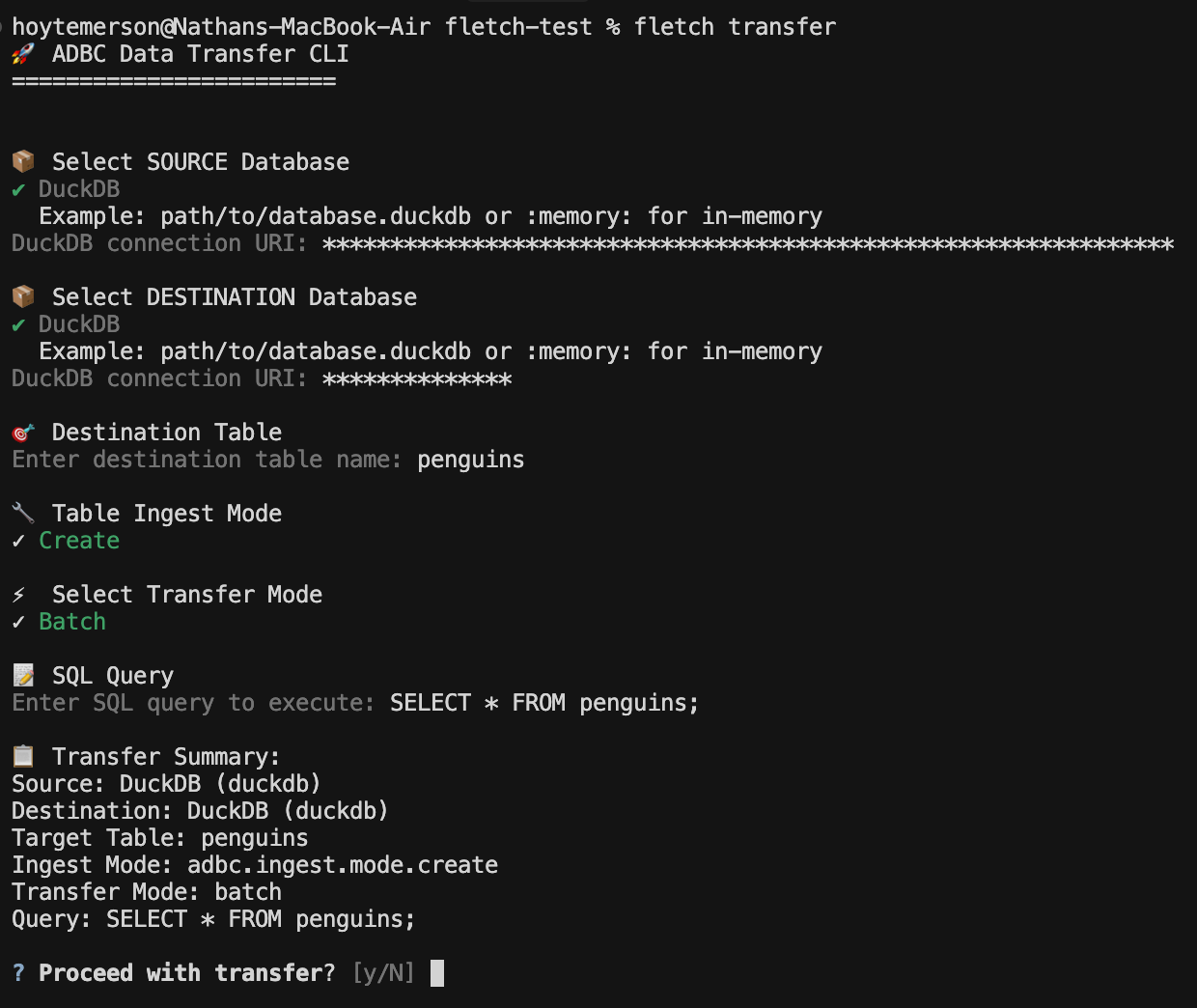
You then get to see a nice summary of what will be executed so you can sign off and initiate the data transfer.
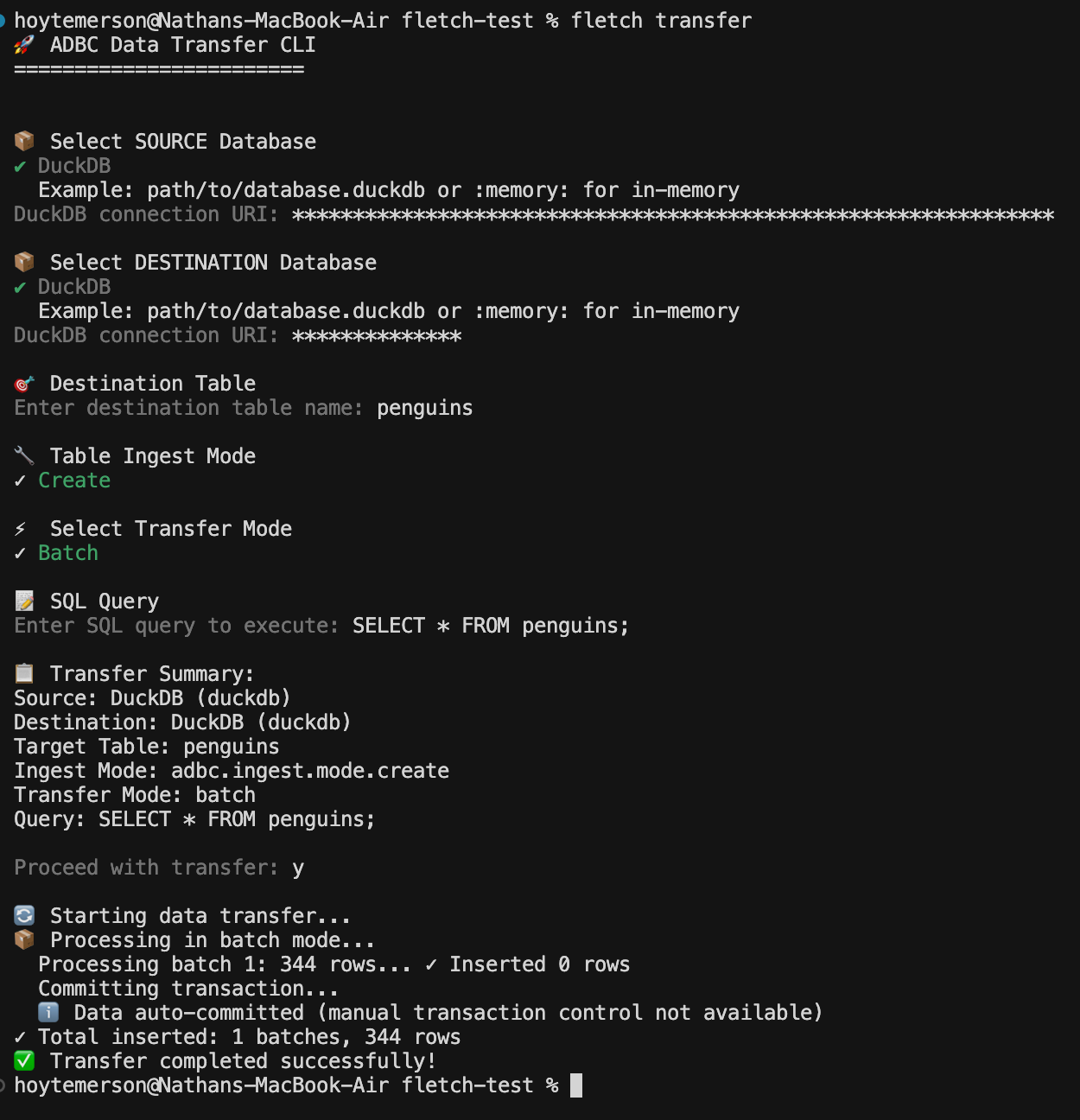
If all goes well you will see data was successfully transferred! If not you will get a useful error message that can be passed to your agent chat.
Letting an Agent Work With It
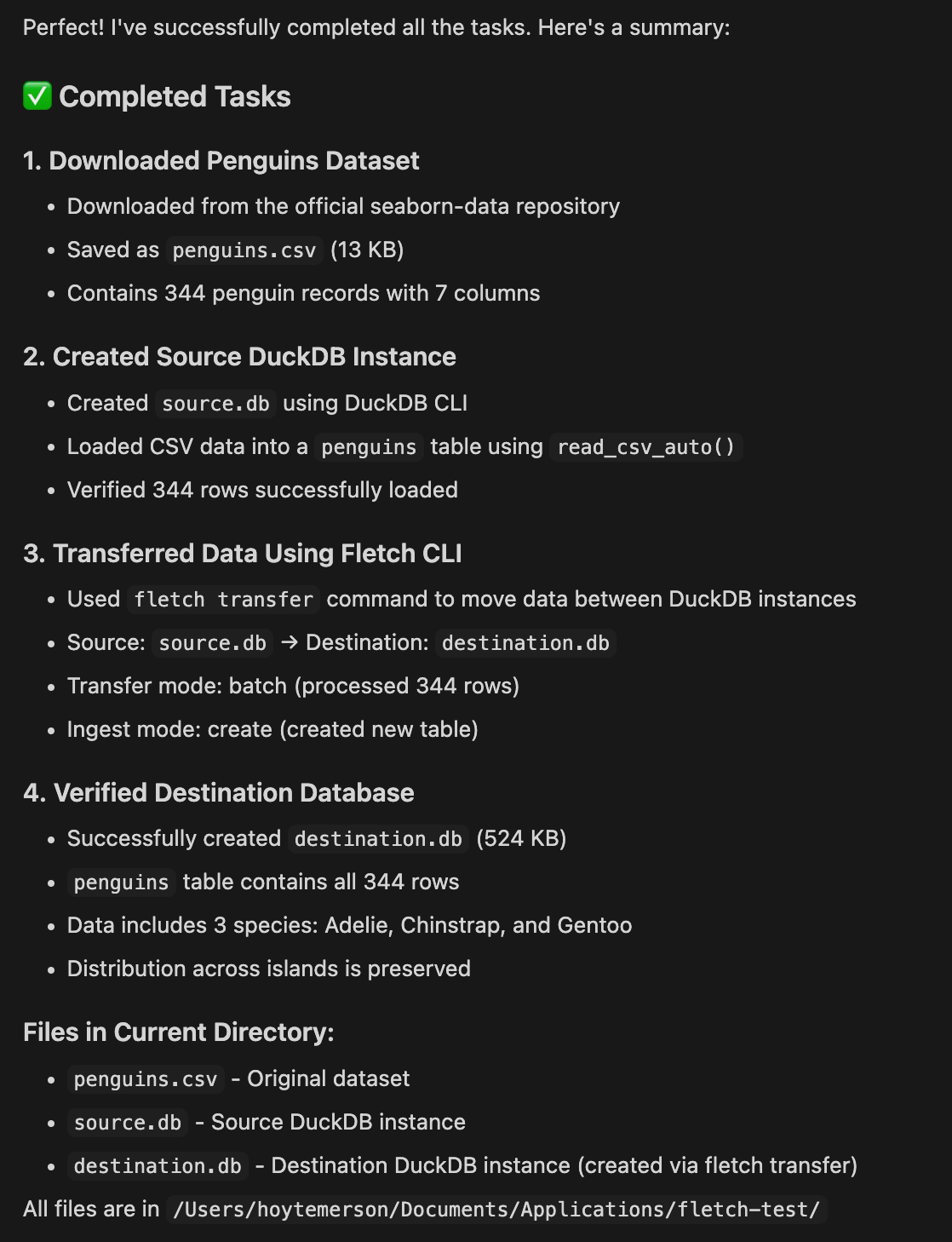
Now that you have a sense of what the tool does step by step, let’s try putting a prompt together that will download the penguins dataset we used in our last ADBC article, save that to a local DuckDB instance then transfer it to another DuckDB instance.
Download the penguins dataset and put it into a local DuckDB instance
in current folder using DuckDB CLI commands.

Use the fletch CLI tool to transfer that data to a new DuckDB instance
in the current folder.
I tried the above prompt a few times and got consistent results using Haiku 4.5. See the completed task output below:
This was Really Cool, So What’s Next?
This is the latest installment of my series on ADBC and there’s more to come! I’ll be showing more ways that ADBC connects to other technologies like Apache Iceberg (excited about that). The sky is the limit with Apache Arrow and ADBC keeps showing up in big ways!

Hi, my name is Hoyt. I’ve spent different lives in Marketing, Data Science and Data Product Management. Other than this Substack, I am the founder of Early Signal. I help data tech startups build authentic connections with technical audiences through bespoke DevRel content and intentional distribution. Are you an early stage start up or solopreneur wanting to get creative with your DevRel and distribution strategy? Let’s talk!
Man I would really like to see this in production, I am thinking a workflow orchestrator or agent running bash commands to move data without the migration script overhead 🤯